
Every team has conventions. How you structure a project. How you handle secrets. Your design system, your testing standards, your code style.
The problem: AI Agents don’t know your conventions. So you explain it again on every prompt, paste in your standards doc, or just hope someone remembered to add the context. It is one of those small frictions that compounds quietly until you are spending more time re-teaching the Agent than actually building.
Today we're launching Agent Customization: a way to give Replit Agent the context it needs to work the way you or your team actually works, across all projects. It has two parts: Custom Instructions and Skills.
Custom Instructions
Custom Instructions are always-on guidelines injected automatically into the agent's context on every project, every session, before anyone types a single word. Write them once, and the Agent applies them to every project in the workspace, automatically.
If you want the Agent to not commit secrets to version control, always use TypeScript strict mode, or follow your company's data handling policy — that goes in Custom Instructions. You don't ask each time. It just knows.
Custom Instructions live in Workspace Settings → Customization. They're available to Pro and Enterprise users.
Skills
Skills are different. Where Custom Instructions are always active, a skill only kicks in when a relevant task comes up. A design-system skill may fire when someone's building UI. A security-review skill may fire when someone's touching auth flows. Each one shapes how the Agent approaches that specific kind of work, and stays out of the way the rest of the time.
Skills are a relatively new concept, so let us explain what they are.
What a skill is
A skill is a reusable set of instructions you write once that the agent applies whenever it's relevant. Think of it like a one-page guide you'd hand a new engineer before they started a specific kind of task — the rules, the patterns, the things to avoid. The agent reads it before it works, and follows it.
Skills are a plain text file you can open in any editor, store in version control alongside your code, and share with your team, which means skills you write for Replit are portable. They're yours.
What's inside a skill
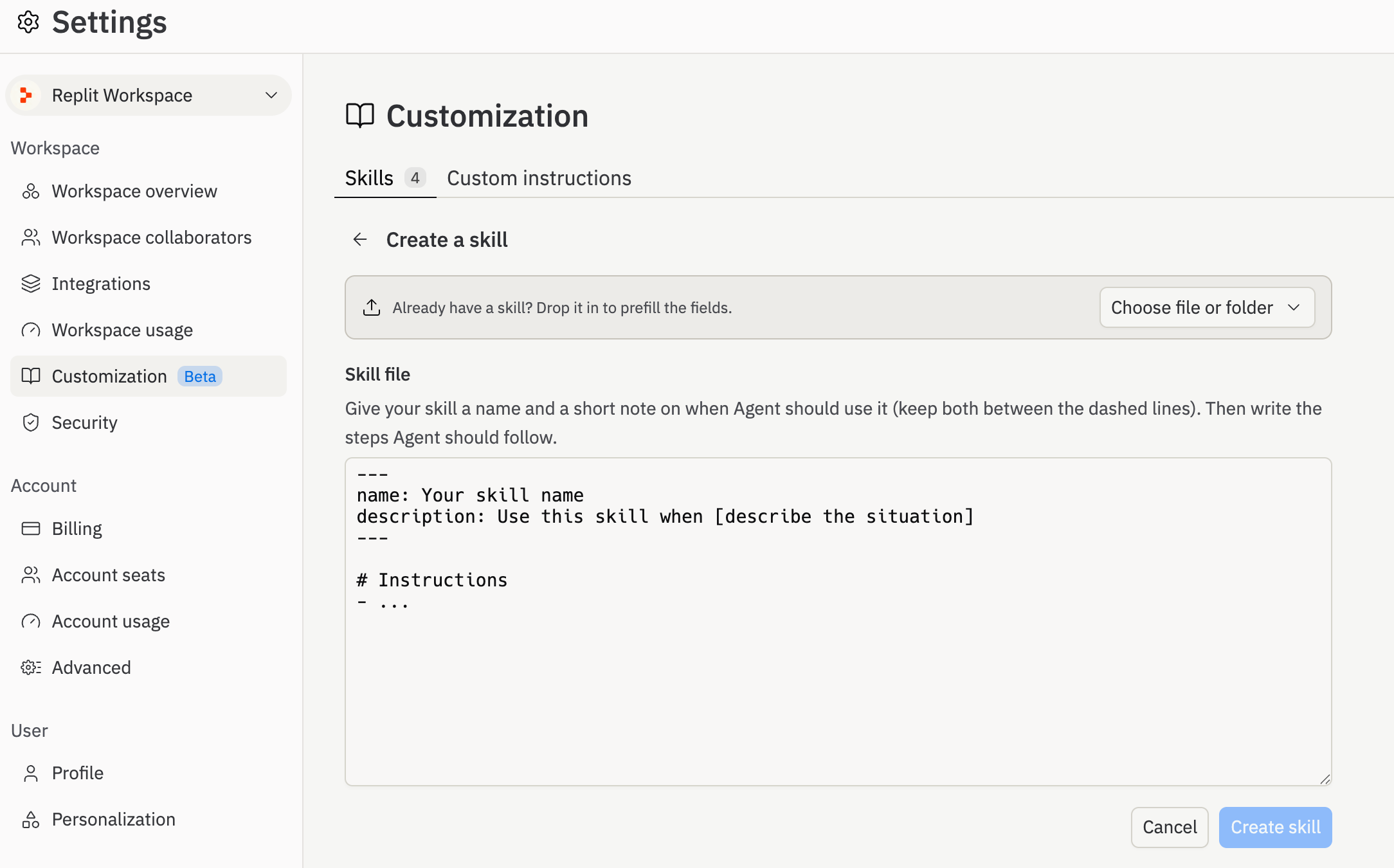
Every skill is a folder. Inside it lives a file called SKILL.md, plus any supporting files you want to reference. The main file has three things:
A name. This is what you type after / to invoke a skill manually. Keep it short and lowercase: api-design, not Our API Design Rules for Engineers.
A description. This is the most important part of the whole file. It's the only thing the agent reads when deciding whether to use a skill. A strong description says specifically when to use the skill and when not to. That last part matters: telling the agent not to fire a skill is often what separates a good description from a great one.
Instructions. Everything you'd tell someone picking up this kind of work. Rules, patterns, things to avoid. Any format works — bullets, prose, numbered steps. The point is clarity, not structure.
How to create a skill for Replit Agent
There are three ways by which you can setup a skill for Replit Agent
- Upload a pre-existing skill
- Write a new skill
- Chat with the Agent to build a new skill
How skills load
The agent doesn't use all your workspace skills upfront. It reads each description, decides which ones apply to the current task, and loads only those. This means you can have many skills without them stepping on each other — as long as each description is sharp enough to match the right tasks and not the wrong ones.
More than one skill can fire at once. If you're building a marketing page and your workspace has both a design-system skill and a landing-page-copy skill, both will load. They stack. This is why focused skills work better than giant catch-all ones: small, well-scoped skills combine cleanly. A skill that tries to cover everything tends to crowd out the skills that should have fired instead.
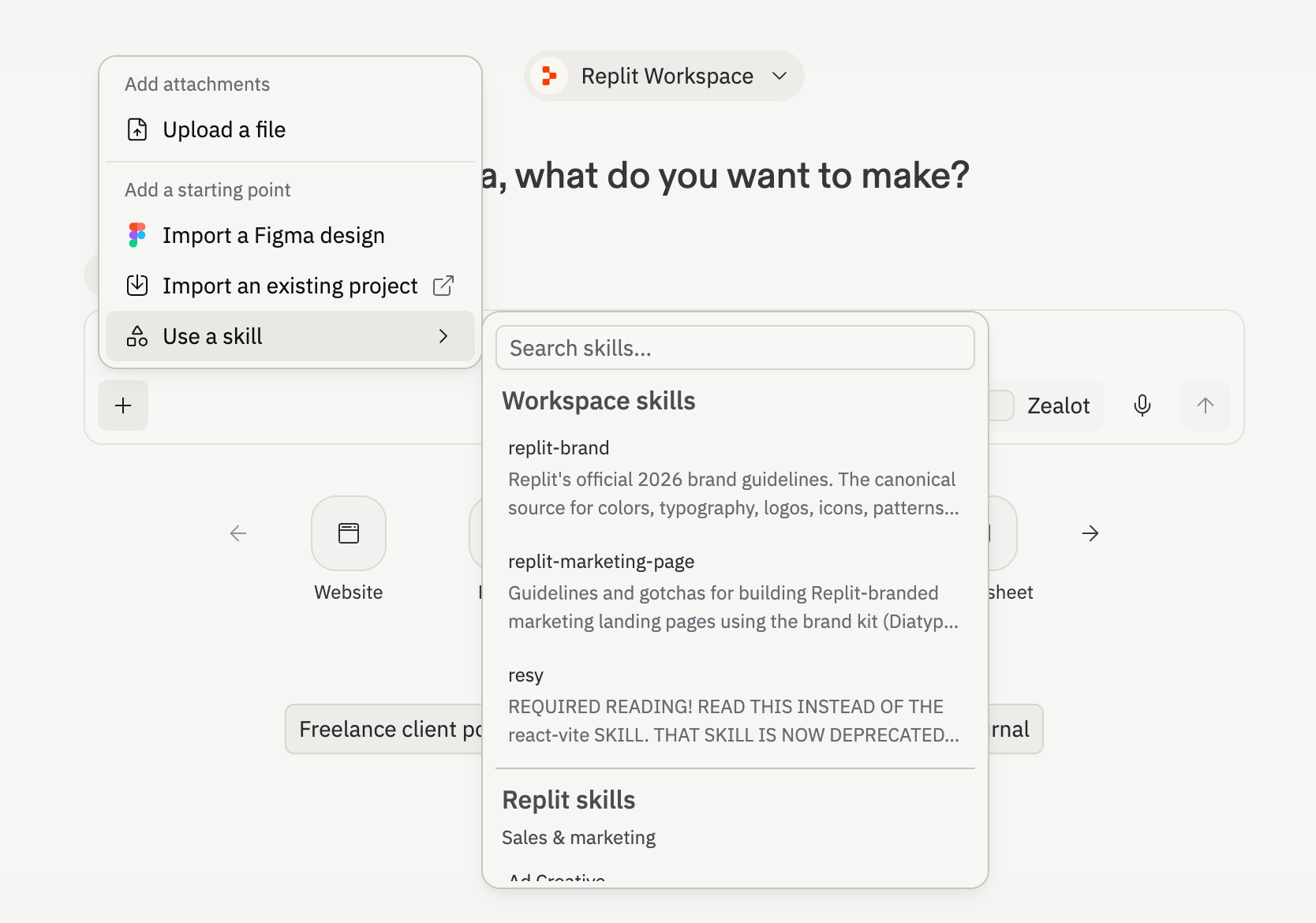
Skills can load by few different ways:
- Directly picked up based on your prompt
- You can also invoke a skill manually at any time by typing
/skill-namein the chat or picking a skill from the “+” button. Useful when you know exactly which skill you want to apply.
Finetuning your skills
A bad skill doesn't just sit there doing nothing — it makes the Agent worse, because now there are vague or wrong instructions in the mix. Most skills fail in diagnosable ways:
- If the skill fires when it shouldn't, the description is too broad. Narrow it — and include when not to use it. "Not for blog posts or help docs" is often more useful than any positive instruction.
- If the skill fires but the output is off, the instructions are too generic. Replace vague guidance ("make it professional") with specific rules: exact names, concrete requirements, explicit things to avoid. The test: could someone read this and know exactly what passes and what doesn't?
- If two skills conflict, fix the descriptions so both don't fire on the same task. Conflicts are almost always a scoping problem, not an instructions problem.
One more thing: skills go stale. Treat them like documentation — something you actually maintain. And note that changes only apply to future chats, not ones already in progress.
If you want to finetune your skill, ask Agent to tweak it and once you are satisfied, download and upload it to the Agent Customization pane.
Why this matters for teams
"Builders move fast on Replit, and legacy analytics struggle to keep up. Our skill changes that so Replit's Agent knows how to implement Mixpanel the right way from the first prompt. Now, the data is clean, well named, and useful the moment a product goes live. This is just the first of several Mixpanel skills we're bringing to Replit builders." - Dan Schmidt, AI Platform Staff Product Manager, Mixpanel
Custom Instructions and skills teach Agent your team’s conventions, so every app starts closer to your standards from the first prompt. That unlocks benefits like:
- Security and compliance, by default. Encode guardrails into Custom Instructions — secrets handling, approved libraries, data handling requirements — and know they'll apply to every project automatically.
- Design systems that stick. Your component library, your token names, your spacing rules. A
design-systemskill means the agent builds UI that fits your product, not a slightly different interpretation every time. - Engineering conventions without the overhead. Linting standards, testing requirements, project scaffolds — write them once as a skill, and new projects start correctly instead of needing cleanup.
- A library your whole team can use. Workspace skills appear at the top of the + menu in every project. On Enterprise, only admins can create or edit them. On Core and Pro plans, any workspace member can. Either way, everyone gets access to the same playbooks.
Getting started
Head to Workspace Settings → Customization.
From there, create Custom Instructions (Pro and Enterprise) and Skills (all plans). If you want a head start, we and our partners have prebuilt a set of skills you can install immediately- checkout our Skills directory here. Install one, try it, then edit it to fit how your team actually works.
You can also ask the agent to write a skill for you. Describe what you want it to know, and it'll generate the SKILL.md. Refine from there.