

Sports Website Builder
Build a sports website in minutes for free with AI. Write in plain English or tap buttons to create your website.







How to Use the Sports Website Builder
Sports Website Builder Example
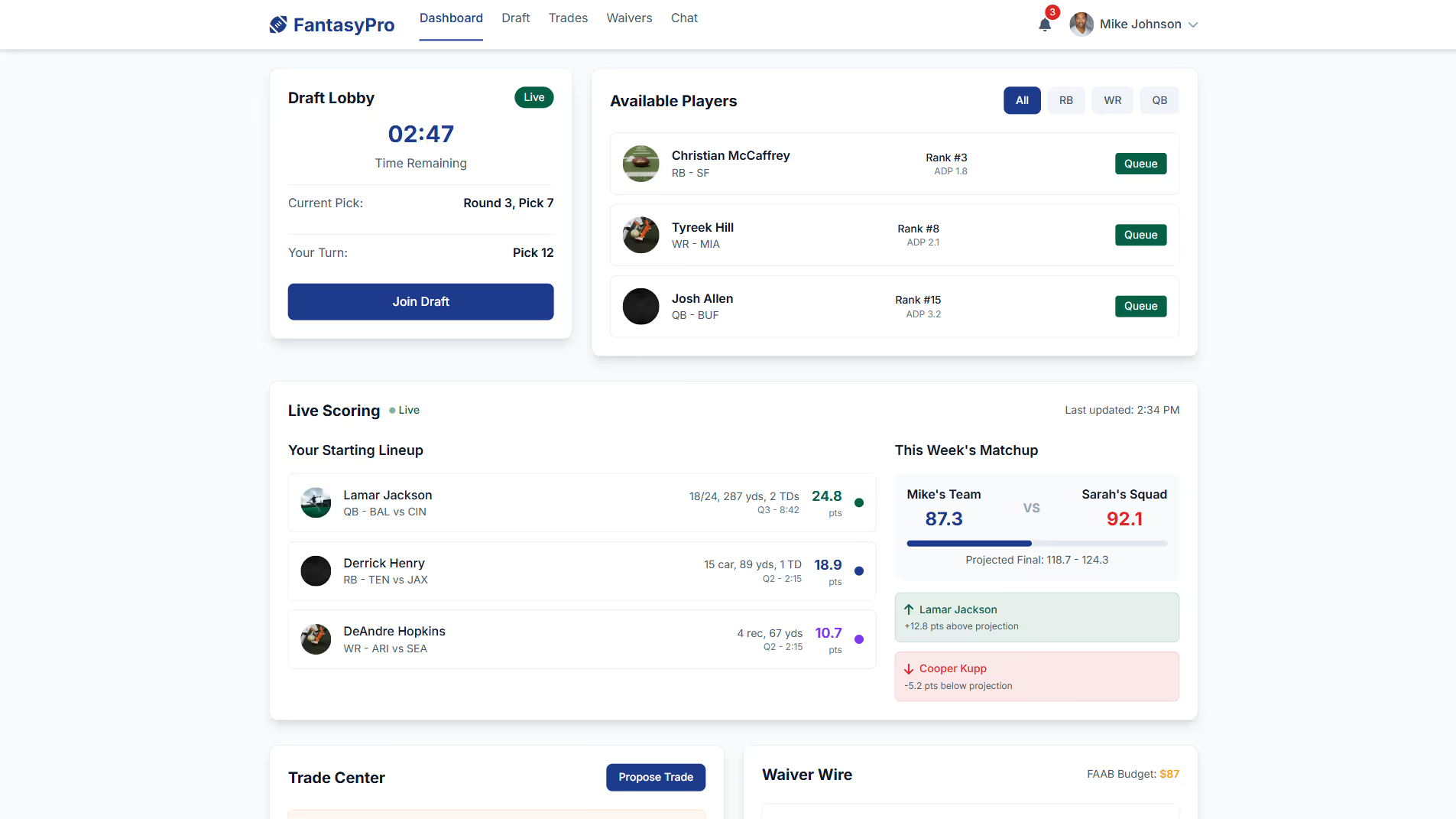
Built with Replit.
Build your vision in minutes for free without writing a single line of code.
Prompting the Sports Website Builder
Build a responsive fantasy sports website featuring a real-time Draft Lobby (timers, queues, mock drafts), cross-device Real-Time Scoring with live stat ingestion, a centralized Trade & Waiver Hub (FAAB bids, waivers, trades, veto workflows), and integrated League Chat & Polls with reactions to drive engagement and retention.
Build a live sports streaming website with a sub-5s latency HLS/DASH player for spoiler-free viewing and synced chat/betting, Multi-Angle Streams letting viewers switch between main, sideline, aerial, and player-cam feeds, togglable Interactive Stats Overlays (live box scores, win probability, shot charts), and DVR & Highlights with instant replay, pause, and auto-generated highlight reels.
Create a new, informational sports website featuring a machine-learned personalized news feed by teams/leagues/players, in-depth analytics with advanced metrics, visualizations and explainer articles, exclusive insider interviews (Q&As and podcasts) with coaches and players, and a real-time injury and transfer tracker with summaries and return timelines.
Build an event sports website featuring interactive ticketing and seating maps (pricing, sightlines, availability, secure checkout) for frictionless buying, dynamic schedules with add-to-calendar and push notifications to reduce no-shows, a venue guide covering parking, entry gates, concessions, and accessibility to lower stress, and fan engagement contests (quizzes, photo ops, scavenger hunts) to boost dwell time and sponsor value.
Top Sports Website Features by Type
Draft Lobby
A real-time drafting room lets managers pick players with timers, queues, and mock drafts. It drives engagement and differentiates the platform with a smooth, competitive onboarding experience.
Real-Time Scoring
Live stat ingestion updates team scores instantly across devices. Immediate feedback keeps users glued to the site during games and increases session length.
Trade & Waiver Hub
A centralized hub manages trades, waivers, FAAB bids, and veto workflows. It adds strategic depth while reducing friction and disputes among league members.
League Chat & Polls
Integrated chat with polls and reactions powers league banter and decision-making. Social features increase retention and keep users in-platform.
Multi-Angle Streams
Users can switch between main, sideline, aerial, and player-cam feeds. Control over perspective boosts engagement and justifies premium tiers.
Low-Latency Player
A sub-5s latency HLS/DASH player reduces delays between live action and stream. It improves chat sync, betting integrations, and spoiler-free viewing.
Interactive Stats Overlay
Toggable overlays show live box scores, win probability, and shot charts. It enhances understanding without leaving the stream, increasing watch time.
DVR & Highlights
Instant replay, pause, and auto-generated highlight reels let fans catch up fast. Convenience features broaden appeal across time zones and schedules.
Personalized News Feed
A machine-learned feed curates stories by teams, leagues, and player interests. Personal relevance boosts click-through and returning visits.
In-Depth Analytics
Advanced metrics, visualizations, and explainer articles unpack performance trends. High-quality analysis builds credibility and drives sharing.
Insider Interviews
Exclusive Q&As and podcasts with coaches and players add unique perspectives. Differentiated content attracts loyal readers and sponsors.
Injury & Transfer Tracker
A real-time tracker summarizes injuries, transfers, and return timelines. Always-fresh utility content keeps users checking back daily.
Ticketing & Seating Map
Interactive maps display pricing, sightlines, and availability with secure checkout. Frictionless buying converts traffic into revenue.
Schedule & Alerts
Dynamic schedules with add-to-calendar and push notifications keep fans on time. Timely reminders reduce no-shows and improve attendance.
Venue Guide
A guide covers parking, entry gates, concessions, and accessibility in one place. Clear logistics reduce stress and improve event satisfaction.
Fan Engagement Contests
On-site and in-app quizzes, photo ops, and scavenger hunts reward participation. Gamification boosts dwell time and sponsor value.
The Sports Website of Your Dreams
FAQ about the Sports Website Builder
How to make a sports website?
You can create a sports website by starting with a template and then customizing it with your team's information, schedules, and news. This approach gives you a foundation to build upon.
Generally, making a sports website involves creating a front end for the user interface and a back end to handle data like scores and stats. This requires coding the site's structure, style, and interactive features.
In Replit, you can begin with a website template. Edit the HTML, CSS, and JavaScript files in the workspace to add your content and customize the appearance. For complex features, like adding a photo gallery or a contact form, you can ask Agent3 to generate the necessary code. Agent3 can also help debug issues or modify the template's design. When your website is complete, you can deploy it directly from your workspace.
Can I build my own sports website for free?
Yes, you can build and host a basic sports website for free.
Building a free website typically involves using a free hosting plan and either a pre-made template or writing the code yourself. Free options are generally best for static sites that don't require complex backend features like user databases or payment processing.
On Replit, you can start with a website template to get a complete project with files you can edit. Basic hosting is included. To customize your site, you can ask Agent3 to write or modify code, fix errors, or add new sections. For example, you could prompt it to create a photo gallery or change the site’s color scheme to match your favorite team.
Do sports blogs make money?
Yes, sports blogs can make money. Monetization often comes from methods like advertising, affiliate marketing, or paid content. Building a dedicated audience with engaging content is key to generating revenue.
You can create and host a sports blog using a Replit template. To add monetization features, you will need to edit the project’s code. For example, you can insert advertising code snippets from services like Google AdSense into your HTML files.
If you need help with the code, you can ask Agent3 to modify files, explain code blocks, or fix errors. Once your site is built, you can deploy it as a live website from the workspace.
What features should a sports website include?
A sports website should include features like live scores, game schedules, team and player statistics, and news updates. These core elements provide the timely, relevant information that keeps fans engaged.
To build this on Replit, start with a website template. For dynamic features like live scores, you will need to integrate a third-party sports data API. You can write the code to connect to the API in the workspace. If you need help fetching or displaying the data, you can ask Agent3 to write or fix the code. For news articles, you can create static HTML pages. Once your site is ready, deploy it directly from the workspace.
How do I design a professional-looking sports website?
To design a professional-looking sports website, start with a suitable web template and customize it with your team's branding, high-quality visuals, and essential features.
A professional sports site needs a clean layout, intuitive navigation, and dynamic content like game schedules or player stats. Consistent branding and responsive design for mobile devices are also crucial for a good user experience.
On Replit, you can begin with a website template. Then, edit the HTML and CSS files to change the layout, colors, and fonts. You can ask Agent3 to help by providing prompts like, "update the CSS to use my team's colors" or "create a photo gallery for game highlights." Agent3 can also help debug code or add new sections. Once your design is ready, you can deploy the site directly from the workspace.