Wysiwyg Website Builder
Build a WYSIWYG website in minutes for free with AI. Write in plain English or tap buttons to create your website.
How to Use the WYSIWYG Website Builder
Step 1: Share your WYSIWYG website's features and requirements.
Step 2: Replit generates your website instantly.
Step 3: Customize features and user experience.
Step 4: Launch your new WYSIWYG website.
WYSIWYG Website Builder Example
Built with Replit.
Build your vision in minutes for free without writing a single line of code.
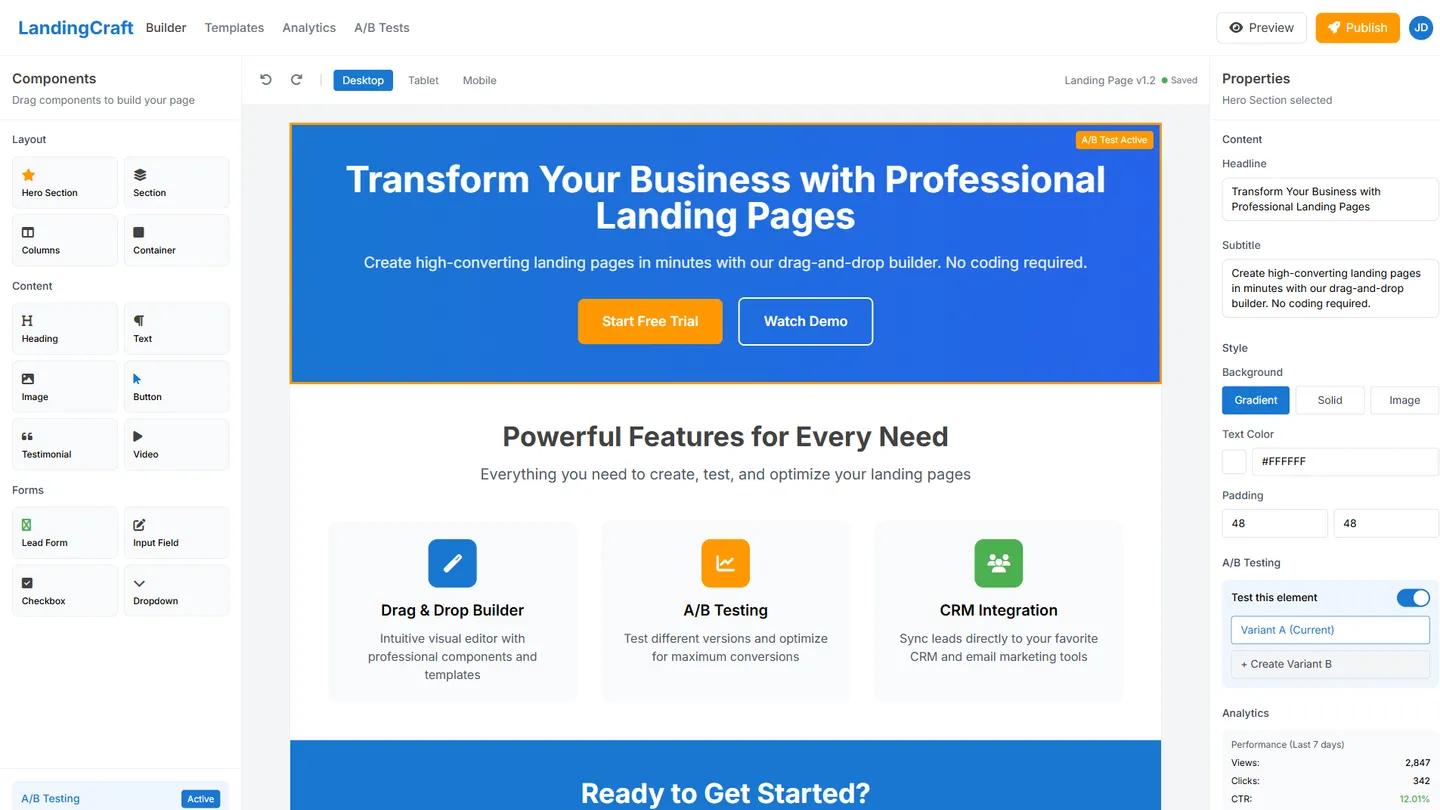
Example
Wysiwyg Website Builder
Prompting the WYSIWYG Website Builder
Marketing Wysiwyg Website Builder Prompt
Create a high-converting, on-brand landing page with the drag-and-drop builder, set up A/B tests for headlines/images/CTAs, embed CRM-synced lead capture forms with custom fields, and enable heatmap analytics to visualize clicks, scroll depth, and drop-offs.
Use promptBlog Wysiwyg Website Builder Prompt
Create a blog with an inline block editor for rich posts (images, embeds, quotes), a real-time SEO assistant for titles/meta/internal links, built-in subscribe forms and RSS feeds, and an editorial calendar to schedule drafts, approvals, and publish dates for multiple contributors.
Use promptEmail Marketing Wysiwyg Website Builder Prompt
Build an email campaign using the drag-and-drop responsive template builder with brand styles, set up smart segments by behavior/interests/lifecycle, create automation flows for welcomes/drips/cart recovery, and run deliverability checks with spam tests and inbox previews before sending.
Use promptSmall Business Wysiwyg Website Builder Prompt
Build a small business website that includes a booking widget for online appointments, custom quote/contact forms with instant alerts, embedded maps, hours, and directions, and a mini storefront with simple checkout for a small catalog, deposits, and gift cards.
Use promptTop WYSIWYG Website Features by Type
Landing Builder
A drag-and-drop landing page builder lets marketers compose pages visually without code. It speeds experimentation and ensures on-brand layouts that convert.
A/B Testing
Built-in split testing lets you compare headlines, images, and CTAs in a few clicks. It raises conversion rates by backing decisions with real user data.
CRM Forms
Lead capture forms sync contacts and custom fields directly to your CRM. This closes the gap between traffic and sales follow-up for faster pipelines.
Heatmap Analytics
Visual heatmaps show where visitors click, scroll, and drop off. It highlights friction and opportunities to optimize key sections of marketing pages.
Block Editor
An inline block-based editor lets writers compose rich posts with images, embeds, and quotes. It keeps formatting consistent and easy to manage for any author.
SEO Assistant
Real-time SEO tips guide titles, meta descriptions, and internal links. It helps posts rank better and attract organic readers without expert knowledge.
Subscribe & RSS
Built-in email subscribe forms and RSS feeds grow and retain your audience. Readers get updates automatically, boosting repeat visits and engagement.
Editorial Calendar
A scheduling calendar organizes drafts, approvals, and publish dates. It keeps a steady cadence and coordinates multiple contributors smoothly.
Template Builder
A drag-and-drop email builder provides responsive sections, fonts, and brand styles. It makes beautiful campaigns fast without HTML skills.
Smart Segments
Segmentation and tagging target subscribers by behavior, interests, and lifecycle. It raises open and click rates by sending relevant messages.
Automation Flows
Visual workflows trigger welcomes, drip series, and cart recovery based on actions. It scales personalized communication with minimal manual effort.
Deliverability Check
Spam tests and inbox previews catch issues before sending. It protects sender reputation and ensures more emails land in the inbox.
Booking Widget
A built-in scheduler lets customers book appointments or services online. It reduces back-and-forth and fills calendars automatically.
Quote Forms
Custom contact and quote forms route inquiries with instant alerts. It accelerates response times and wins more local business.
Maps & Hours
Embedded maps, hours, and directions make it easy to visit or call. It builds trust and removes friction for first-time customers.
Mini Storefront
Simple checkout supports a small catalog, deposits, or gift cards. It enables fast online sales without complex ecommerce overhead.
The WYSIWYG Website of Your Dreams
Get started freeFAQ about the Wysiwyg Website Builder
What is the best WYSIWYG website builder?
The best WYSIWYG (What You See Is What You Get) builder depends on your project’s specific needs for features, ease of use, and cost.
These platforms let you design a website visually, often with drag-and-drop tools, without writing code. This makes them accessible but can limit customization.
Replit is not a WYSIWYG builder. You build websites by editing code files like HTML and CSS, with a live preview to see your changes instantly. This gives you full control over the final result. If you need help, you can ask Agent3 to write code, modify your design, or fix errors. For example, you can prompt it to “change the button color to blue” or “add a three-column layout.”
What is WYSIWYG website builder?
A WYSIWYG (What You See Is What You Get) website builder is a tool that lets you design web pages visually, often by dragging and dropping elements, without writing code. The editor displays the content exactly as it will appear on the live website.
Replit is a code-based environment, not a visual WYSIWYG builder. You build websites by directly editing files like HTML and CSS, often starting from a template. For assistance with your code, you can ask Agent3 to generate new sections, modify your design, or debug errors in your project.
What features should a wysiwyg website include?
A WYSIWYG website builder should provide a visual editor, drag-and-drop components, and a selection of templates. These features allow you to design web pages and see the final result in real-time, often without writing code.
While Replit is a code-based environment, not a traditional drag-and-drop builder, you can achieve a similar outcome. Start with a website template, then use Agent3 to build your site. Describe the visual changes you want, and Agent3 will write the necessary HTML and CSS. For instance, you can ask it to “add a three-column grid with images” or “fix the navigation bar.” This workflow lets you direct the design while the AI handles the code.
How do I design a professional-looking wysiwyg website?
To design a professional-looking website, focus on a clean layout, consistent branding, and a responsive design that works on all devices.
Professional sites generally use a limited color palette, readable typography, and simple navigation. The goal is a cohesive experience that is easy for visitors to use, whether built with a WYSIWYG editor or by writing code directly.
Replit does not have a visual WYSIWYG editor, but it provides a live preview of your site as you code. You can start with a template and edit the HTML and CSS files. For design assistance, use Agent3 to automate changes. For example, you can ask it to “change the button styles to be more modern” or “fix layout issues on mobile.”
What is the best way to optimize a wysiwyg website for search engines?
The best way to optimize a WYSIWYG website is by focusing on core SEO principles: using relevant keywords, creating high-quality content, and ensuring your site's technical health. While visual editors simplify design, you must still manage the underlying elements that search engines read.
Search engine optimization involves making your site easy for search engines to understand. This means optimizing on-page elements like meta tags and headers, as well as technical factors like site speed and mobile-friendliness. Some WYSIWYG tools can create complex code that may slow down your site, which is a key factor for search rankings.
Replit gives you direct access to your site's code. You can open your HTML files in the workspace to manually edit meta titles, descriptions, and image alt text. For more complex tasks, you can use Agent3. Ask it to "add SEO-friendly meta tags to this page" or "minify this CSS file to improve load times." This allows you to combine visual editing with precise, code-level control for better optimization.
What are you waiting for?
Build an app without knowing how to code. Tell Replit what you have in mind, then make it your own.