Wysiwyg App Builder
Build a WYSIWYG app in minutes for free with AI. Write in plain English or tap buttons to create your app.
How to Use the WYSIWYG App Builder
Step 1: Share your WYSIWYG app's features and requirements.
Step 2: Replit generates your app instantly.
Step 3: Customize features and user experience.
Step 4: Launch your new WYSIWYG app.
WYSIWYG App Builder Example
Built with Replit.
Build your vision in minutes for free without writing a single line of code.
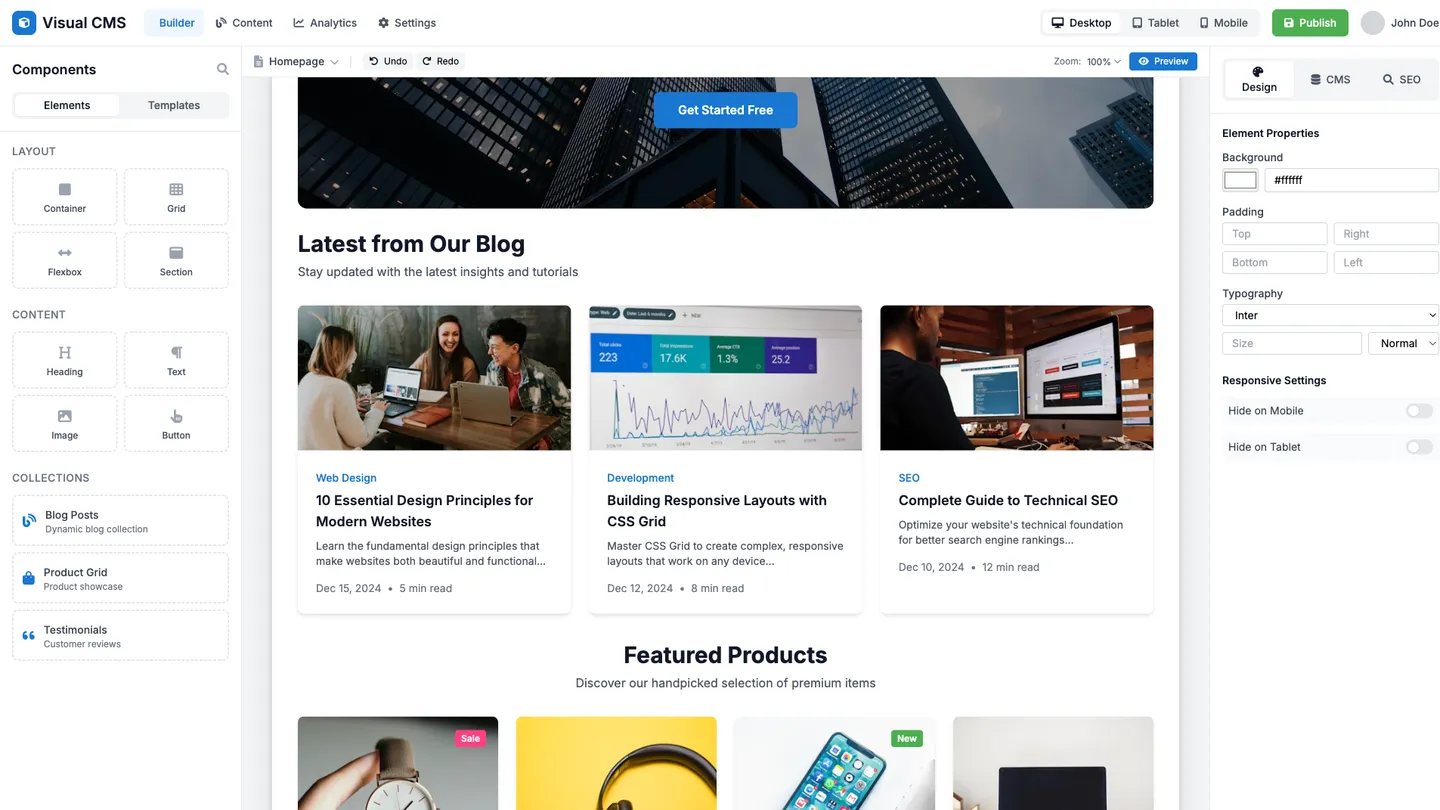
Example
Wysiwyg App Builder
Prompting the WYSIWYG App Builder
Website Builder Wysiwyg App Builder Prompt
Build a responsive website using drag-and-drop layout with editable desktop/tablet/mobile breakpoints, bind blogs and product lists via Visual CMS Collections, and optimize titles, meta descriptions, alt text, and structured data using the SEO Meta Assistant.
Use promptEmail Designer Wysiwyg App Builder Prompt
Create an email using modular content blocks (header, hero, product grid, footer), insert personalization tokens (first name, last purchase, location) in the subject and body, run the accessibility checker (contrast, alt text, font sizes), and show an inbox rendering preview for Gmail, Outlook, and Apple Mail before finalizing.
Use promptDocument Editor Wysiwyg App Builder Prompt
Create a WYSIWYG document editor with real-time coauthoring (live cursors and comments), global styles and themes for headings/colors/spacing, smart citations with auto-formatted bibliographies for major styles, and version history with named versions and one-click restore.
Use promptPresentation Software Wysiwyg App Builder Prompt
Create a WYSIWYG presentation app with slide master layouts for titles/content/section headers, animated transitions and object animations with timing controls, presenter notes with dual-screen presenter view and timers, and interactive elements like buttons, polls, and live data widgets embedded in slides.
Use promptTop WYSIWYG App Features by Type
Drag-and-drop Layout
Users can place text, images, and components exactly where they want by dragging elements on the canvas. This speeds up site creation and removes the need for code, making it ideal for quick iterations.
Responsive Breakpoints
Designs automatically adapt for desktop, tablet, and mobile with editable breakpoints. This ensures a consistent, high-quality experience across devices without duplicating work.
Visual CMS Collections
Create and bind dynamic content like blogs or product lists directly from a visual data panel. It empowers non-developers to manage structured content while keeping designs consistent.
SEO Meta Assistant
Edit titles, meta descriptions, alt text, and structured data from within the builder. This helps sites rank better and improves click-through without leaving the design workflow.
Modular Content Blocks
Drag prebuilt headers, hero sections, product grids, and footers onto an email canvas. It accelerates campaign creation and ensures brand consistency across messages.
Inbox Rendering Preview
Preview how emails look across major clients like Gmail, Outlook, and Apple Mail. This reduces rendering surprises and increases confidence before sending.
Personalization Tokens
Insert dynamic fields like first name, last purchase, or location into subject lines and content. Personalized messages boost engagement and conversions with minimal extra work.
Accessibility Checker
Automatically audits color contrast, alt text, and font sizes for email accessibility. More accessible emails reach broader audiences and improve deliverability outcomes.
Real-time Coauthoring
Multiple people can edit the same document simultaneously with live cursors and comments. It eliminates version ping-pong and speeds up team workflows.
Styles and Themes
Apply global headings, colors, and spacing with reusable styles. Consistent formatting keeps documents professional and easy to update at scale.
Smart Citations
Insert and manage citations with auto-formatted bibliographies supporting major styles. This saves time and prevents formatting errors in research and reports.
Version History
Track changes with named versions and one-click restores. It provides accountability and safety when collaborating or experimenting.
Slide Master Layouts
Define master templates for titles, content, and section headers. This enables fast slide creation with consistent branding throughout the deck.
Animated Transitions
Add smooth transitions and object animations with timing controls. Motion keeps audiences engaged and helps emphasize key points.
Presenter Notes
Attach speaker notes and run dual-screen presenter view with timers. It boosts delivery confidence and keeps talks on track.
Interactive Elements
Embed buttons, polls, and live data widgets directly into slides. Interactivity increases audience participation and turns static decks into dynamic experiences.
The WYSIWYG App of Your Dreams
Get started freeFAQ about the Wysiwyg App Builder
What is the best WYSIWYG WYSIWYG app builder website builder?
Replit is not a traditional WYSIWYG (What You See Is What You Get) builder. The best platform depends on your needs, with popular choices like Webflow or Wix focusing on visual-first design.
A WYSIWYG editor lets you build by dragging and dropping elements, showing you the final look as you create. This is user-friendly but can offer less control than direct coding.
Replit uses a code-first approach with a live preview. You start with a template and edit the code directly. For non-coders, Agent3 can translate plain English instructions into code. You can ask it to "change the button color to green" or "add a new section with a title and paragraph." This workflow combines the full power of code with the simplicity of giving instructions.
Is there a 100% free WYSIWYG app builder website builder?
No, a truly 100% free WYSIWYG builder without significant limitations is uncommon.
Most free builders come with trade-offs, such as mandatory ads, restricted features, or the inability to use a custom domain. They offer visual editing convenience but often limit your control and ownership over the final product.
Replit is a code-based environment, not a visual WYSIWYG editor. You can start with a website template and see a live preview as you edit the code. For tasks you can't do yourself, you can instruct Agent3 to generate a site from a description, modify the design, or fix errors. This approach combines the power of code with the simplicity of automated assistance.
What features should a wysiwyg app builder website include?
A WYSIWYG app builder should provide a visual editor, pre-built components, and one-click deployment.
These features allow you to design an interface visually, add standard functionality quickly, and publish your app without complex setup. The goal is to accelerate the process of turning an idea into a live application.
Replit is a code-first environment, not a drag-and-drop builder. You can start with a template and directly edit the HTML and CSS files to customize the appearance. To add features or fix problems, you can ask Agent3 to write, modify, or debug your code. Once finished, you can deploy your project with a single click from the workspace.
How do I design a professional-looking wysiwyg app builder website?
To design a professional-looking WYSIWYG app builder website, begin with a clean template, customize its visual elements for consistency, and ensure the layout is intuitive and responsive across all devices.
A professional appearance depends on a unified visual theme, including a consistent color palette, typography, and spacing. The user interface should be uncluttered, guiding users logically. A responsive design is crucial so the site functions correctly on desktops, tablets, and mobile phones.
You can start by selecting a website template in the Replit workspace. From there, directly edit the HTML and CSS files to customize the design. For instance, modify the style.css file to change colors and fonts. If you need to adjust the layout or fix a design error, you can ask Agent3 to write or correct the code. While Replit does not offer a visual drag-and-drop editor for site design, its code editor and AI tools allow for deep customization. You can deploy your finished site with a single click.
What is the best way to optimize a wysiwyg app builder website for search engines?
The best way to optimize your website is by creating high-quality content and managing technical SEO settings. This ensures search engines can find, understand, and rank your pages.
Search engine optimization (SEO) involves making your site visible and relevant in search results. For sites made with a WYSIWYG builder, this includes editing visible text like headings and also adjusting the underlying code, such as meta tags, that search engines read.
In Replit, you can edit content directly in the builder. For more technical changes, you can access the site’s HTML and CSS files in the workspace to add or modify meta tags, image alt text, and other SEO elements. If you need help, you can ask Agent3 to perform tasks like "add SEO-friendly meta tags to my index.html" or "find and fix broken links in my project."
What are you waiting for?
Build an app without knowing how to code. Tell Replit what you have in mind, then make it your own.