Wiki Website Builder
Build a wiki website in minutes for free with AI. Write in plain English or tap buttons to create your website.
How to Use the Wiki Website Builder
Step 1: Share your wiki website's features and requirements.
Step 2: Replit generates your website instantly.
Step 3: Customize features and user experience.
Step 4: Launch your new wiki website.
Wiki Website Builder Example
Built with Replit.
Build your vision in minutes for free without writing a single line of code.
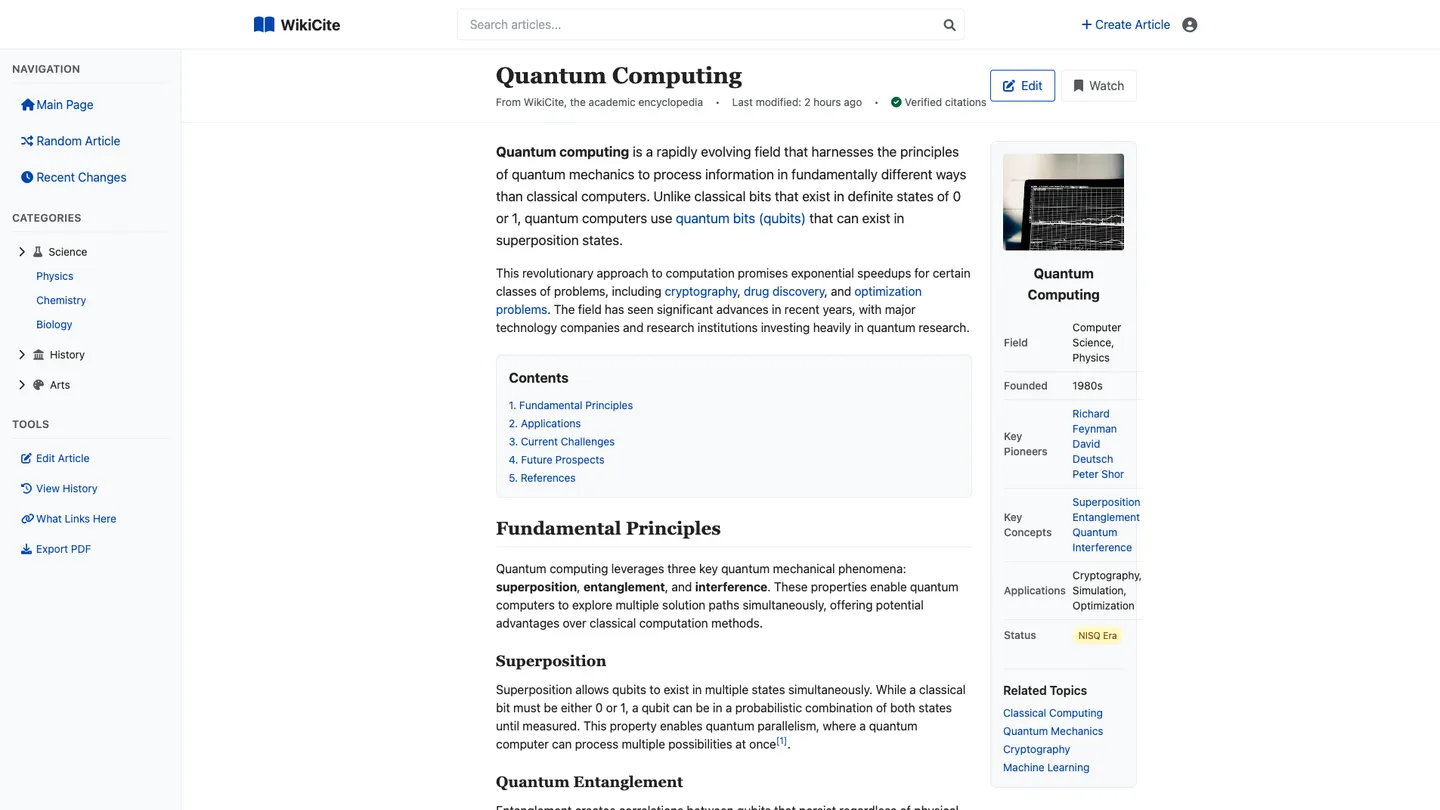
Example
Wiki Website Builder
Prompting the Wiki Website Builder
Encyclopedic Wiki Website Builder Prompt
Build an encyclopedic wiki that uses structured infoboxes on each article, runs a citation validator for formatting and link integrity, auto-generates semantic crosslinks between related topics, and enforces a version review workflow with flagged revisions and approvals before publishing.
Use promptFandom Wiki Website Builder Prompt
Build a fandom wiki with interactive Character Relationship Maps (affiliations and rivalries), Episode Guides featuring spoiler-toggle summaries/quotes/trivia, a tagged upvoted Fan Theory Hub, and moderated Media Galleries for screenshots, GIFs, and fanart.
Use promptHow-To Guides Wiki Website Builder Prompt
Build a how-to guides wiki with a step-by-step builder featuring numbered, collapsible steps with images and timers, auto-generated tools and materials checklists, skill level badges (beginner/intermediate/advanced) per guide, and an end-of-guide troubleshooting Q&A aggregating common pitfalls and fixes.
Use promptAcademic Research Wiki Website Builder Prompt
Build an academic research wiki that auto-resolves DOIs for accurate, persistent references; includes a peer review module with structured workflows for comments, rigor ratings, and revision requests; provides a dataset repository attached to articles with versioning, metadata, and licensing; and supports ORCID-linked author profiles for verified identity and cross-institution attribution.
Use promptTop Wiki Website Features by Type
Structured Infoboxes
Add standardized infoboxes to summarize key facts for each article. This improves scanability and consistency, making encyclopedic content easier to compare across entries.
Citation Validator
Provide automated checks for citation formatting and broken links. This maintains verifiability and trust, which are core to encyclopedic standards.
Semantic Crosslinks
Automatically suggest and insert semantic links between related topics. This deepens navigation and helps readers discover connected knowledge paths.
Version Review Workflow
Enable flagged revisions with reviewer approvals before publishing changes. This protects accuracy and prevents low-quality edits from reaching readers.
Character Relationship Maps
Interactive graphs show relationships, affiliations, and rivalries among characters. Fans can explore lore visually, making complex universes easier to understand.
Episode Guides with Spoilers
Episode pages include a spoiler-toggle section for summaries, quotes, and trivia. This respects users who want details without accidental spoilers.
Fan Theory Hub
A dedicated area for posting, tagging, and upvoting fan theories. Community voting surfaces the most compelling ideas and drives engagement.
Media Galleries & Fanart
Curated galleries support screenshots, GIFs, and fanart with moderation tools. Visual content enriches fandom pages while keeping quality and rights in check.
Step-by-Step Builder
Editors can create numbered, collapsible steps with images and timers. Clear sequencing reduces confusion and improves task completion rates.
Tools & Materials Checklists
Auto-generated checklists ensure users gather everything before starting. This prevents mid-task interruptions and failed attempts.
Skill Level Badges
Each guide displays beginner, intermediate, or advanced badges based on complexity. Readers quickly gauge suitability and choose the right tutorial.
Troubleshooting Q&A
Integrated Q&A at the end of guides aggregates common pitfalls and fixes. It reduces repeated support requests and improves success outcomes.
DOI-Integrated References
References auto-resolve DOIs to fetch metadata and persistent links. This ensures citation accuracy and long-term accessibility.
Peer Review Module
Structured review workflows allow invited reviewers to comment, rate rigor, and request revisions. It raises the scholarly quality and credibility of entries.
Dataset Repository
Attach datasets with versioning, metadata, and licensing to articles. Reproducibility increases when data and methods are accessible in one place.
ORCID-Based Profiles
Author profiles link to ORCID for verified identity and publications. This builds trust and helps attribute contributions across institutions.
The Wiki Website of Your Dreams
Get started freeFAQ about the Wiki Website Builder
How do I make my own wiki website?
You can create a wiki website by starting with a template or by building one using a web framework.
A wiki is a website that allows users to collaboratively create and edit pages. This typically involves a frontend to display content and a backend to manage and store the information, often in a database or flat files.
To start, you can search for a wiki template in the builder. If you prefer to build it yourself, you can create a new project with a framework like Python Flask or Node.js Express. Agent3 can generate the initial code for a basic wiki structure. You can then ask Agent3 to modify the code, add features like user authentication, or fix any errors that arise. Once your wiki is ready, you can deploy it as a web app directly from your workspace.
Is it free to create a wiki page?
Yes, creating and hosting a wiki page can be free. Many open-source wiki platforms are available at no cost, but they often require you to find and pay for a separate web hosting service.
You can build and host a wiki on Replit for free. The simplest way is to use a template for a static site generator like Jekyll or Hugo and deploy it directly from the workspace. Static site hosting is included at no charge. If you need to customize the template, add new pages, or fix bugs in the code, you can instruct Agent3 to make the changes for you.
What features should a wiki website include?
A wiki website should include features for page creation, inter-page linking, search, and version history.
These core functions enable users to build a collaborative knowledge base. Page creation and linking allow content to grow organically, search makes information discoverable, and version history protects against accidental data loss.
You can build a wiki on Replit by starting with a template or creating one from scratch. To add pages, edit files directly in the workspace. For more complex features like a search bar or versioning with Git, you can ask Agent3 to write or modify the code. For instance, you can ask it to "implement a search function for my wiki." Agent3 can also help fix errors or automate setup steps.
How do I design a professional-looking wiki website?
To design a professional-looking wiki, focus on a clean layout, consistent styling, and clear navigation. You can use a Replit template as a starting point and customize its design.
A professional design typically includes readable fonts, a simple color palette, and a logical structure that makes information easy to find. The site should also work well on mobile devices.
On Replit, start with a wiki template and edit the HTML and CSS files in the workspace to change the appearance. For specific design changes, you can ask Agent3 for help. For instance, prompt it to "change the font to sans-serif" or "create a two-column layout." Agent3 can also debug CSS issues or help make your design responsive.
What is the best way to optimize a wiki website for search engines?
The best way to optimize a wiki for search engines is by creating high-quality content, using a logical page structure, and adding descriptive metadata.
Search engine optimization (SEO) helps search engines understand and rank your site. This involves using relevant keywords, ensuring fast load times, and writing unique title tags and meta descriptions for each page.
In your project, you can directly edit the HTML files to add or update <title> and <meta name="description"> tags. You can also modify the site’s structure or code to improve performance. For assistance, ask Agent3 to generate meta tags, find and fix broken links, or suggest relevant keywords for your articles.
What are you waiting for?
Build an app without knowing how to code. Tell Replit what you have in mind, then make it your own.