Website Builder For Trucking Company
Build a website for trucking company in minutes for free with AI. Write in plain English or tap buttons to create your website.
How to Use the Website Builder For Trucking Company
Step 1: Share your website for trucking company's features and requirements.
Step 2: Replit generates your website instantly.
Step 3: Customize features and user experience.
Step 4: Launch your new website for trucking company.
Website Builder For Trucking Company Example
Built with Replit.
Build your vision in minutes for free without writing a single line of code.
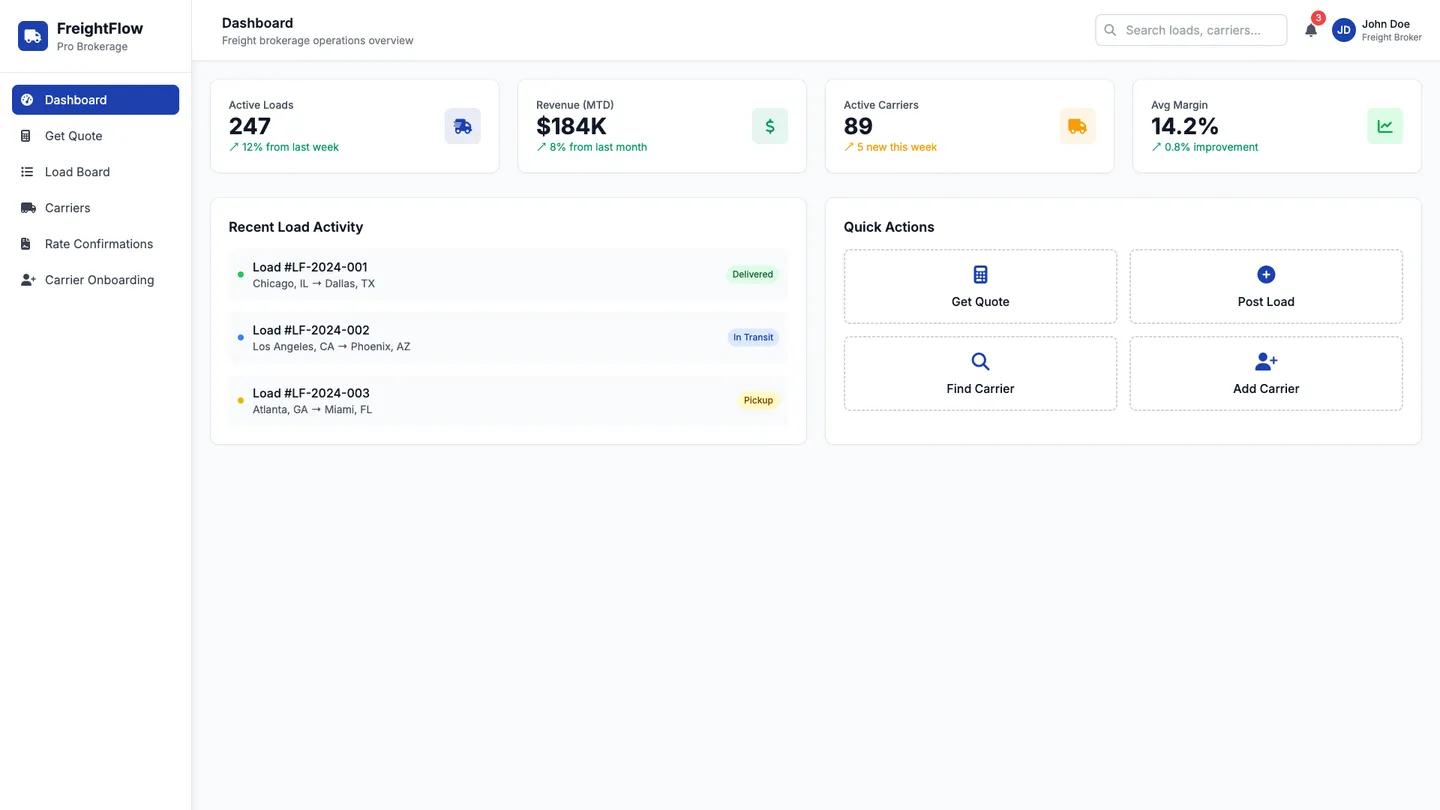
Example
Website Builder For Trucking Company
Prompting the Website Builder For Trucking Company
Freight Brokerage Website Builder For Trucking Company Prompt
Build a freight brokerage website with an instant quote engine calculating lane-specific spot and contract rates from historical data and market indexes, carrier matching that pairs loads to vetted carriers by equipment, location, and performance, digital e-sign rate confirmations with accessorials, detention terms, and pickup/delivery instructions, and automated compliance onboarding with COI verification, safety scores, and W-9 collection.
Use promptLogistics Management Website Builder For Trucking Company Prompt
Build a logistics management website for a trucking company that provides route optimization with multi-stop time windows, equipment constraints, and driver HOS to cut miles, fuel costs, and late deliveries; shipment visibility tracking from tender to POD with status updates and exception flags for proactive service; dock scheduling to coordinate appointment slots and live/unload priorities across facilities to reduce yard congestion and dwell time; and cost & KPI analytics aggregating costs by lane, customer, and carrier with OTIF, dwell, and tender acceptance dashboards to inform pricing, capacity planning, and process improvements.
Use promptFleet Tracking Website Builder For Trucking Company Prompt
Build a fleet tracking website for a trucking company with a live map showing real-time GPS truck locations, ETAs, and traffic overlays; geofence alerts for arrivals, departures, and dwell at customer sites and yards; driver behavior scoring from telematics (speeding, harsh events, idling); and a maintenance planner that schedules PMs by engine hours, mileage, and fault codes with shop work orders.
Use promptLoad Board Website Builder For Trucking Company Prompt
Build a trucking company load board with Smart Load Search (filters by lane, equipment, deadhead radius, pickup window, plus saved searches), Book Now to instantly accept pre-approved loads at posted rates, Bid & Chat for in-app bidding and messaging with brokers that documents rate agreements, and Lane Analytics showing market rates, volume trends, and preferred lanes by carrier history to guide pricing and profitable freight selection.
Use promptTop Website For Trucking Company Features by Type
Instant Quote Engine
Calculates lane-specific spot and contract rates in seconds using historical data and market indexes. This speeds up sales cycles and wins more tenders with transparent, competitive pricing.
Carrier Matching
Matches loads to vetted carriers based on equipment, location, and performance. This shrinks tender rejection rates and keeps freight moving with the best-fit capacity.
Digital Rate Confirmations
Generates e-signable rate cons with accessorials, detention terms, and pickup/delivery instructions. This reduces paperwork errors and accelerates carrier acceptance.
Compliance Onboarding
Automates carrier onboarding with COI verification, safety scores, and W-9 collection. This lowers risk exposure and speeds time-to-first-load for new carriers.
Route Optimization
Builds efficient multi-stop routes with time windows, equipment constraints, and driver HOS. This cuts miles, fuel costs, and late deliveries.
Shipment Visibility
Tracks every shipment from tender to POD with status updates and exception flags. This enables proactive service and faster issue resolution.
Dock Scheduling
Coordinates appointment slots and live/unload priorities across facilities. This reduces yard congestion and dwell time for drivers.
Cost & KPI Analytics
Aggregates costs by lane, customer, and carrier and surfaces OTIF, dwell, and tender acceptance. This informs pricing, capacity planning, and process improvements.
Real-Time GPS
Shows truck locations, ETAs, and traffic overlays on a live map. This improves dispatch decisions and customer ETA accuracy.
Geofence Alerts
Triggers arrival, departure, and dwell notifications at customer sites and yards. This reduces check calls and speeds issue response.
Driver Behavior
Scores speeding, harsh events, and idling from telematics data. This enhances safety, lowers fuel burn, and reduces insurance costs.
Maintenance Planner
Schedules PMs by engine hours, mileage, and fault codes with shop work orders. This prevents breakdowns and maximizes asset uptime.
Smart Load Search
Filters by lane, equipment, deadhead radius, and pickup window with saved searches. This helps carriers fill backhauls and optimize utilization.
Book Now
Lets carriers instantly accept pre-approved loads at a posted rate. This removes negotiation delays and locks capacity fast.
Bid & Chat
Enables in-app bidding and messaging with brokers on specific loads. This streamlines negotiations and documents rate agreements.
Lane Analytics
Shows market rates, volume trends, and preferred lanes by carrier history. This guides pricing and helps carriers pick profitable freight.
The Website For Trucking Company of Your Dreams
Get started freeFAQ about the Website Builder For Trucking Company
How to create a transport for trucking company website?
You can build a website for a trucking company by starting with a pre-built template and then modifying its code to fit your specific needs.
A typical trucking company website includes pages for services, company information, and contact details. Key features often involve forms for quote requests or contact, and information about the company's fleet and service area.
In Replit, you can begin with a portfolio or business website template. Since there is no visual editor, you will edit the HTML and CSS files directly to add your company’s logo, text, and images. If you need to add a new feature, like a service quote form, you can ask Agent3 to generate the necessary code. Agent3 can also help you modify the design or debug errors in your code. Once your site is ready, you can deploy it directly from the workspace.
What features should a for trucking company website include?
A trucking company website needs key features like a detailed services page, a contact form with your location, a careers section, and shipment tracking. These elements help clients understand your business, allow potential hires to find opportunities, and provide a valuable tool for existing customers, which builds credibility and improves service.
You can build this by starting with a website template. Add pages for services and careers by creating and editing HTML files in the workspace. For interactive features like a contact form or shipment tracking, you will need backend code. You can ask Agent3 to write the code, explain how to integrate it, or debug any issues. To display a map, you can embed one from an external service. When finished, deploy your website directly from your project.
How do I design a professional-looking for trucking company website?
To design a professional trucking company website, start with a clean template and customize it with your company’s branding, services, and contact information. A professional design should be easy to navigate and build trust with potential clients.
A good trucking site clearly displays what you do, the areas you serve, and how to get a quote. It should feature high-quality images of your fleet, be mobile-friendly, and have clear contact forms. This helps establish credibility and makes it easy for customers to do business with you.
You can start with a website template and edit the HTML and CSS files in the workspace. To customize the design, you can ask Agent3 to modify the code for you. For example, prompt Agent3 to “change the color scheme to blue and gray” or “add a section for customer testimonials.” If you encounter any layout issues, Agent3 can also help identify and fix errors in your code.
What is the best way to optimize a for trucking company website for search engines?
The best way to optimize a trucking company website is by using targeted keywords, creating useful content, and ensuring your site is technically correct. This includes focusing on local search terms and specific services you offer.
Search Engine Optimization (SEO) is the process of improving your site to increase its visibility in search engine results. It involves structuring your website and content so that search engines can easily find, understand, and rank it for relevant queries.
On Replit, you can directly edit your website’s HTML files to improve SEO. Add relevant keywords to your page’s <title> and <meta name="description"> tags. You can ask Agent3 to generate these tags for you; for example, “Write a meta description for a trucking company based in Houston.” Agent3 can also help you find and fix technical issues like broken links or suggest content improvements to include important keywords.
How can I customize the layout of my for trucking company website?
You can customize your website's layout by editing its HTML and CSS files directly in the workspace.
Every website uses HTML to structure its content and CSS to control visual styling, such as colors, fonts, and element positioning. Changing these files is how you alter the site's appearance and layout.
To customize your site, open the HTML and CSS files from the file tree. You can edit the code manually to make your desired changes. If you are unfamiliar with coding, ask Agent3 for assistance. For example, you can prompt it to "make the navigation bar sticky" or "create a two-column layout for the services section." Agent3 can also help identify and fix errors if your changes cause problems.
What are you waiting for?
Build an app without knowing how to code. Tell Replit what you have in mind, then make it your own.