Website Builder For Tradesmen
Build a website for tradesmen in minutes for free with AI. Write in plain English or tap buttons to create your website.
How to Use the Website Builder For Tradesmen
Step 1: Share your website for tradesmen's features and requirements.
Step 2: Replit generates your website instantly.
Step 3: Customize features and user experience.
Step 4: Launch your new website for tradesmen.
Website Builder For Tradesmen Example
Built with Replit.
Build your vision in minutes for free without writing a single line of code.
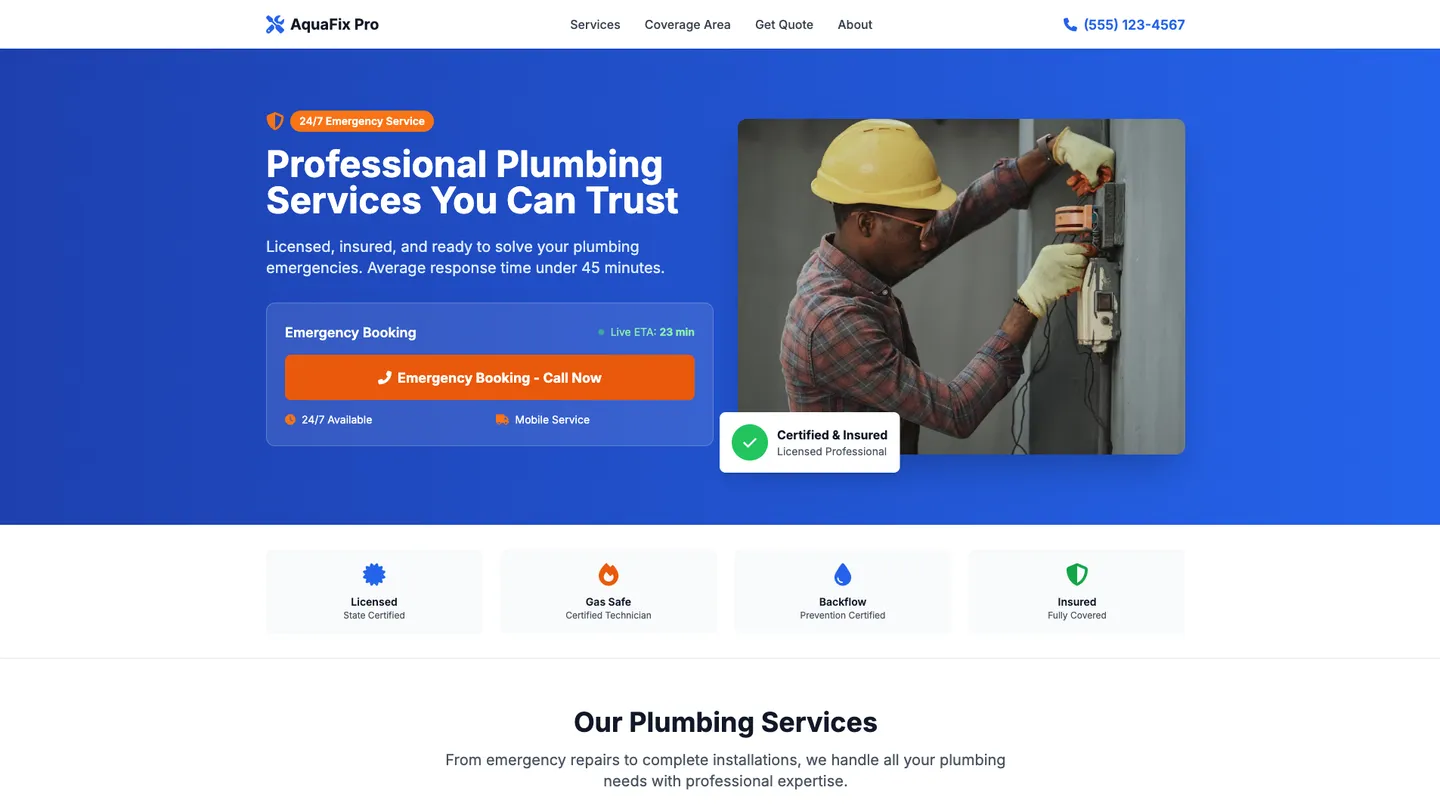
Example
Website Builder For Tradesmen
Prompting the Website Builder For Tradesmen
Plumbing Services Website Builder For Tradesmen Prompt
Build a plumbing services website for tradespeople featuring a prominent one-tap Emergency Booking button with live ETA, an interactive Service Area Map with live availability windows, an Instant Quote Calculator using inputs like fixture count and pipe material, and verified Compliance Badges for licensing, gas-safe, backflow certification, and insurance.
Use promptElectrical Contractors Website Builder For Tradesmen Prompt
Build an electrical contractor website for tradesmen featuring 24/7 emergency dispatch with priority triage for outages and hazards, an on-site residential/light commercial load calculator, a localized permit code library summarizing relevant codes and permits, and a self-serve project scheduler coordinating site visits, shutoffs, and inspection slots.
Use promptHome Renovation Website Builder For Tradesmen Prompt
Build a home renovation website for tradesmen featuring a filterable Before/After Gallery (by room and budget tier), an interactive Budget Builder allocating spend across trades/finishes/contingencies, a browser-based 3D Design Preview with basic AR room sizing, and a Material Selection Board for choosing finishes, fixtures, and SKUs with lead times.
Use promptLandscaping Design Website Builder For Tradesmen Prompt
Build a landscaping design website for tradesmen with a Plant Selector filtering by zone, sun, water needs, and maintenance level to guide sustainable choices and reduce post-install call-backs, a Maintenance Planner that auto-generates seasonal tasks and recommended service visits to create recurring revenue and keep installations looking their best, Drone Site Survey booking with topographic snapshots and measurements to accelerate design accuracy and minimize grading/drainage surprises, and an Interactive Site Map with clickable phases, irrigation zones, and lighting circuits to improve client understanding and simplify on-site crew instructions.
Use promptTop Website For Tradesmen Features by Type
Emergency Booking
A prominent one-tap emergency booking button with ETA display. It converts high-intent visitors fast and captures urgent jobs when response speed matters.
Service Area Map
An interactive map showing covered neighborhoods with live availability windows. It sets expectations, reduces unserviceable leads, and improves routing efficiency.
Instant Quote Calculator
A guided form that estimates costs for common jobs based on inputs like fixture count and pipe material. It builds trust with transparent pricing and prequalifies leads.
Compliance Badges
Verified badges for licensing, gas-safe, backflow certification, and insurance. They reassure customers and shorten the decision cycle for compliance-sensitive work.
Emergency Dispatch
24/7 emergency dispatch request with priority triage for outages and hazards. It captures critical jobs and demonstrates reliability when safety is at stake.
Load Calculator
An on-site electrical load calculator for residential and light commercial panels. It educates clients, reduces change orders, and helps scope upgrades accurately.
Permit Code Library
A localized library summarizing relevant electrical codes and permit requirements. It positions the contractor as compliant experts and saves back-and-forth in preconstruction.
Project Scheduler
A self-serve scheduler that coordinates site visits, shutoffs, and inspection slots. It cuts phone tag and keeps crews and clients aligned on timelines.
Before/After Gallery
A visual gallery with filterable before-and-after photos by room and budget tier. It inspires homeowners and proves capability across styles and price points.
Budget Builder
An interactive budget builder that allocates spend across trades, finishes, and contingencies. It aligns expectations early and reduces sticker shock and scope creep.
3D Design Preview
Browser-based 3D previews of layouts with basic AR room sizing. It helps clients visualize outcomes and speeds approvals without expensive site meetings.
Material Selection Board
A digital board to select finishes, fixtures, and SKUs with lead times. It centralizes choices, avoids rework, and keeps procurement on schedule.
Plant Selector
A plant selector that filters by zone, sun, water needs, and maintenance level. It guides clients to sustainable choices and reduces post-install call-backs.
Maintenance Planner
Automated seasonal maintenance plans with tasks and recommended service visits. It creates recurring revenue and keeps installations looking their best.
Drone Site Survey
Booking for drone site surveys with topographic snapshots and measurements. It accelerates design accuracy and minimizes surprises in grading and drainage.
Interactive Site Map
Clickable site maps showing phases, irrigation zones, and lighting circuits. It improves client understanding and simplifies crew instructions on-site.
The Website For Tradesmen of Your Dreams
Get started freeFAQ about the Website Builder For Tradesmen
How much does it cost to hire someone to build a for tradesmen website for you?
Hiring someone to build a tradesmen website can cost anywhere from a few hundred dollars for a basic site to several thousand for a complex one with custom features.
The price depends on the developer's rates and the site's complexity. Features like online booking, payment integration, or a large photo gallery increase the cost and development time.
You can build the website yourself on Replit to reduce these costs. Start with a portfolio or business website template and customize it in the workspace. If you need to change the design, add a contact form, or fix a bug, you can ask Agent3 to write or modify the code for you. This gives you control over the final product without the high cost of hiring a developer.
What is the best handyman for tradesmen website builder?
The best website builder for a tradesman depends on your technical skill and customization needs. While no-code builders offer simplicity, a code-based platform provides more control over your site's design and features.
General website builders use pre-made templates that can be restrictive. For a tradesman, custom features like a dynamic project gallery, a detailed service menu, or an integrated booking system are often essential for standing out. Building with code allows you to create these features exactly as you envision them.
On Replit, you can use a portfolio or business template as a starting point. You can then modify the HTML and CSS files to match your brand. If you need help, ask Agent3 to add specific sections like a "Request a Quote" form or to debug your code. When your site is complete, you can deploy it with a single click.
What is the best for tradesmen website builder for professionals?
The best website builder for a tradesman is one that allows you to easily showcase your work, list your services, and provide clear contact information. The ideal choice depends on your technical comfort and customization needs.
Most website builders provide templates tailored for trades. These simplify creating a professional-looking site with galleries and contact forms. While drag-and-drop builders are common, platforms that allow code editing offer greater control over design and functionality.
On Replit, you can build a fully custom website. Start with a web template and modify the HTML and CSS to fit your brand. You can create pages for your services, a gallery for past projects, and a contact form. If you need help with the code, you can ask Agent3 to write new sections, modify the design, or fix bugs. This gives you a unique, professional site that you can deploy directly from your workspace.
What is a fair price for for tradesmen website design?
The price for a tradesman's website can range from a few hundred dollars for a simple site to several thousand for a custom build with advanced features.
Costs are determined by factors like custom design versus templates, the number of pages, and features such as contact forms or online booking. Hiring a freelance designer or an agency is typically the largest expense.
On Replit, you can build and host a website for free or for the cost of a paid plan. You can start with a template or ask Agent3 to generate the initial code. For example, you can prompt it to "create a five-page website for a plumbing business with a gallery." Agent3 can also help modify the design, add features, or fix errors, allowing you to create a professional site with minimal expense.
Are there free for tradesmen website builders?
Yes, you can create a free website for a tradesman business. Many platforms offer free plans, which typically include the platform's branding and a branded domain name.
While Replit is not a drag-and-drop website builder, you can use it to build and host a custom website for free. You can start with a pre-built website template and then edit the HTML and CSS files to add your services, project photos, and contact details. For code changes, you can instruct Agent3 to modify the design, add new sections, or fix layout issues. When you are finished, you can deploy the site directly from the workspace.
What are you waiting for?
Build an app without knowing how to code. Tell Replit what you have in mind, then make it your own.