Vacation Rental Website Builder
Build a vacation rental website in minutes for free with AI. Write in plain English or tap buttons to create your website.
How to Use the Vacation Rental Website Builder
Step 1: Share your vacation rental website's features and requirements.
Step 2: Replit generates your website instantly.
Step 3: Customize features and user experience.
Step 4: Launch your new vacation rental website.
Vacation Rental Website Builder Example
Built with Replit.
Build your vision in minutes for free without writing a single line of code.
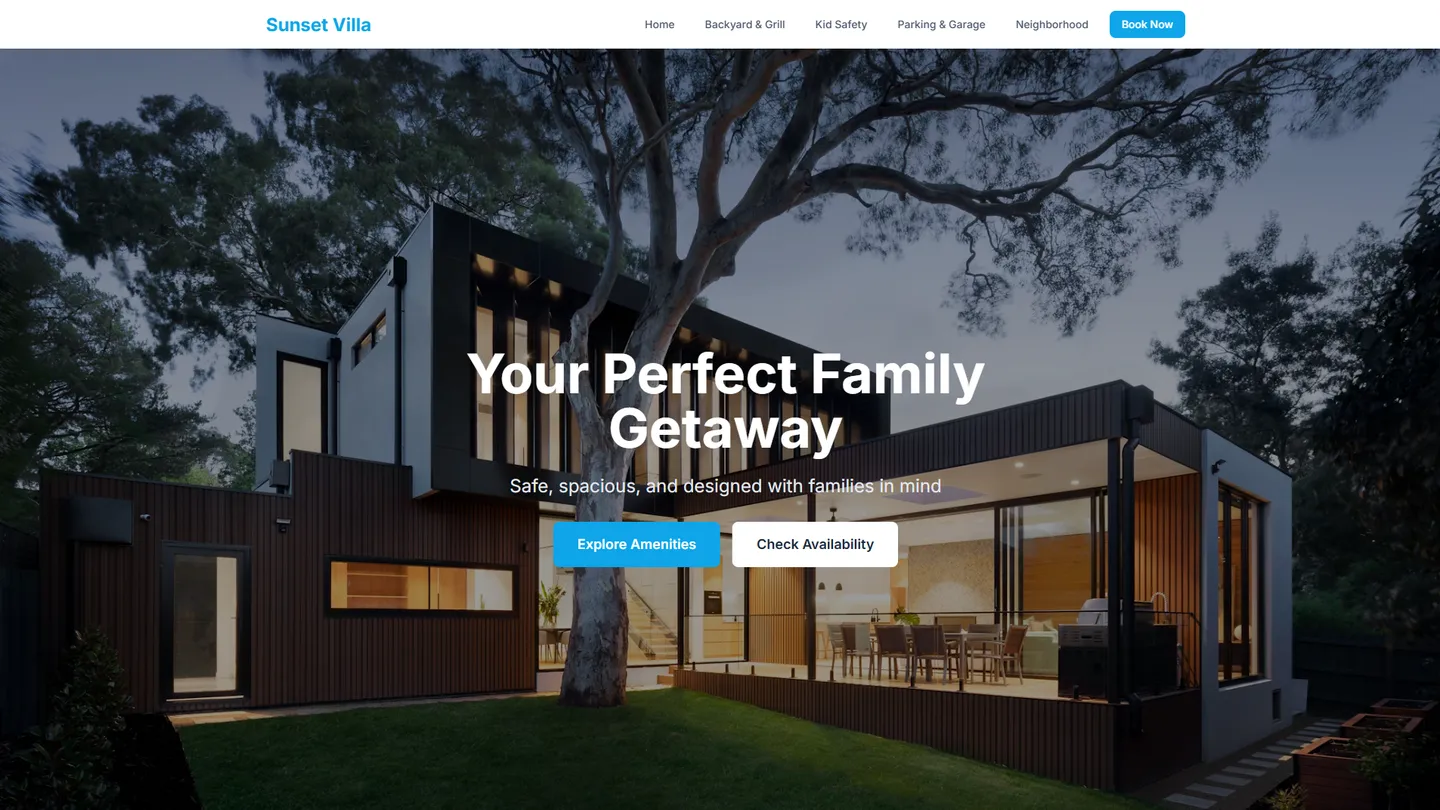
Example
Vacation Rental Website Builder
Prompting the Vacation Rental Website Builder
Single-Family Vacation Rental Website Builder Prompt
Build a single-family vacation rental website that features a dedicated Backyard & Grill section with photos and usage tips (patio, firepit, grill), prominent Kid-Safety Highlights (baby gates, cabinet locks, pool fences, bedroom layouts), detailed Driveway & Garage info (driveway length, garage access, EV charger type, street parking rules), and a Family Neighborhood Guide with a curated map of playgrounds, grocery stores, pharmacies, and family-friendly eateries within 10 minutes.
Use promptApartment Vacation Rental Website Builder Prompt
Build an apartment vacation rental website that prominently displays transparent elevator and access details (elevator availability, stair counts, entry fob pickup, step-free paths), a clear list of building amenities with access hours (gym, laundry, co-working, rooftop), a quiet hours policy with noise sensors and neighbor etiquette, and an interactive transit proximity map showing nearby subway, bus lines, bike share, and average ride times.
Use promptCondo Vacation Rental Website Builder Prompt
Build a condo vacation rental website featuring a concise HOA rules summary (parking, trash, pets, amenity use), integrated amenity booking for pool lanes, clubhouse, grills, and tennis courts with time slots, a secure entry guide with step-by-step instructions for lobby callbox, key lockers, garage gates, and elevator codes, and a balcony view tour offering short 3D/panoramic views at different times of day.
Use promptVillas Vacation Rental Website Builder Prompt
Build a luxury villas vacation rental site with bookable Chef & Butler add-ons (private chef dinners, butler service, daily housekeeping), a digital Pool & Spa Control guide (heat schedules, lighting scenes, safety covers, maintenance visits), an interactive Estate Grounds Map (gardens, guest houses, parking courts, private beach paths), and a Concierge Itinerary planner (airport transfers, excursions, tee times, spa treatments) for seamless upsells, clear controls, intuitive wayfinding, and white-glove logistics.
Use promptTop Vacation Rental Website Features by Type
Backyard & Grill
A dedicated section showcasing the backyard, patio, firepit, and grill setup with photos and usage tips. Single-family guests prioritize private outdoor space for gatherings and this helps them visualize hosting and relaxation.
Kid-Safety Highlights
Clear callouts for baby gates, cabinet locks, pool fences, and bedroom layouts. Families choosing houses care about safety and sleep arrangements, so this builds trust and reduces pre-booking questions.
Driveway & Garage
Detailed parking info including driveway length, garage access, EV charger type, and street rules. Road-tripping families often bring multiple cars or gear, making parking clarity a booking driver.
Family Neighborhood Guide
Curated map of playgrounds, grocery stores, pharmacies, and family-friendly eateries within 10 minutes. It emphasizes convenience and helps parents plan smooth arrivals and daily routines.
Elevator & Access
Transparent details on elevator availability, stair counts, entry fob pickup, and step-free paths. Apartment guests often worry about luggage and mobility, so this removes friction and surprises.
Building Amenities
Clear list of shared amenities like gym, laundry, co-working, and rooftop along with access hours. Apartment stays revolve around building perks, and setting expectations boosts satisfaction and reviews.
Quiet Hours Policy
Prominent display of building quiet hours, noise sensors, and neighbor etiquette. This aligns guests with community norms and prevents conflicts in denser apartment environments.
Transit Proximity Map
Interactive map showing nearest subway, bus lines, bike share, and average ride times. Apartment travelers often skip cars, so transit clarity elevates location value.
HOA Rules Summary
Simple digest of HOA regulations covering parking, trash, pets, and amenity use. Condo guests need to comply with community standards, and clarity avoids fines and friction.
Amenity Booking
In-site scheduling for pool lanes, clubhouse, grills, and tennis courts with time slots. Condos commonly require reservations, and a built-in tool streamlines compliance and enjoyment.
Secure Entry Guide
Step-by-step instructions for lobby callbox, key lockers, garage gates, and elevator codes. Condos can have layered security, so concise guidance reduces check-in headaches.
Balcony View Tour
Short 3D or panoramic tour from the balcony at different times of day. View quality heavily influences condo bookings, and this sets accurate expectations.
Chef & Butler Add-ons
Bookable upgrades for private chef dinners, butler service, and daily housekeeping. Villa guests seek high-touch luxury, and seamless upsells increase revenue and delight.
Pool & Spa Control
Digital guide to heat schedules, lighting scenes, safety covers, and maintenance visits. Villas often feature complex pools, and clear controls enhance comfort and protect equipment.
Estate Grounds Map
Interactive map of gardens, guest houses, parking courts, and private beach paths. Large villa estates can be confusing, and wayfinding elevates the sense of place.
Concierge Itinerary
Built-in planner to schedule airport transfers, excursions, tee times, and spa treatments. High-end villa stays benefit from white-glove logistics that reduce guest effort.
The Vacation Rental Website of Your Dreams
Get started freeFAQ about the Vacation Rental Website Builder
What is the best website builder for vacation rental?
The best website builder depends on your needs. For full control, a code-based platform is ideal. For simplicity, a no-code builder with pre-built rental features is a better choice.
No-code builders offer easy setup and booking systems but have design limitations. Building with code gives you complete creative freedom to add custom features and integrations, though it requires some technical skill.
Replit is a platform for building with code. You can create a custom vacation rental website by starting with a template, such as one for React or Next.js. From there, you can modify the files to build your site. If you need to add a feature like a booking calendar or fix an error, you can ask Agent3 to write or debug the code. When your site is ready, you can deploy it directly from your workspace.
Should I have a website for my vacation rental?
Yes, having a website for your vacation rental is recommended. It gives you more control over your brand and can reduce reliance on third-party booking platforms.
A personal website acts as a central hub for your property. You can display unlimited photos, provide detailed descriptions, and establish direct communication with guests, bypassing the restrictions and fees of listing sites.
To create your site, you can start with a portfolio or business template on Replit. Edit the files in the workspace to add your text and images. For code changes, ask Agent3 for help with prompts like, “create a three-column photo gallery” or “fix the navigation bar.” Replit does not have a built-in booking engine, but you can add a contact form for inquiries or link to an external booking service. When finished, you can deploy the website with a single click.
What features should a vacation rental website include?
A vacation rental website should include property listings with photos, an availability calendar, and a booking or inquiry form. These features allow potential guests to view properties, check for open dates, and initiate a reservation.
You can build this by starting with a website template and editing the files in the workspace. To add specific features, ask Agent3 to generate the code. For example, you can prompt it to "create a photo gallery for property listings" or "add a booking inquiry form to my contact page." If you encounter errors while customizing your site, you can also ask Agent3 to help debug the code.
How do I design a professional-looking vacation rental website?
To design a professional-looking vacation rental site, focus on a clean layout, high-quality images, and intuitive navigation.
A professional design builds trust by making it easy for visitors to find key information like availability, pricing, and amenities. The site must also be responsive to work well on mobile devices, ensuring a good experience for all users.
You can start with a website template on Replit and customize it. Use the workspace to upload your property photos and edit content directly in the files. For design changes, you can modify the HTML and CSS. If you need help with the code, ask Agent3 to make modifications, such as creating a responsive photo gallery or fixing a layout issue.
What is the best way to optimize a vacation rental website for search engines?
The best way to optimize a vacation rental website is by applying Search Engine Optimization (SEO) best practices. This makes your site more visible on search engines like Google.
SEO involves using relevant keywords (e.g., "cabin rental in Lake Tahoe"), ensuring your site loads quickly, and having a mobile-friendly design. It also includes technical aspects like adding meta titles and descriptions to your pages so search engines can understand your content.
On Replit, you can directly edit your HTML files to add keywords and content. To manage technical SEO, open your project's code and modify the <title> and <meta name="description"> tags. If you need assistance, ask Agent3 to write these tags for you or suggest keywords. For example, you can prompt it: "Generate SEO keywords for a beachfront rental in Hawaii." Replit hosting is optimized for speed, which supports your SEO efforts. You can also ask Agent3 to review your code for SEO improvements.
What are you waiting for?
Build an app without knowing how to code. Tell Replit what you have in mind, then make it your own.