Taxi Booking App Builder
Build a taxi booking app in minutes for free with AI. Write in plain English or tap buttons to create your app.
How to Use the Taxi Booking App Builder
Step 1: Share your taxi booking app's features and requirements.
Step 2: Replit generates your app instantly.
Step 3: Customize features and user experience.
Step 4: Launch your new taxi booking app.
Taxi Booking App Builder Example
Built with Replit.
Build your vision in minutes for free without writing a single line of code.
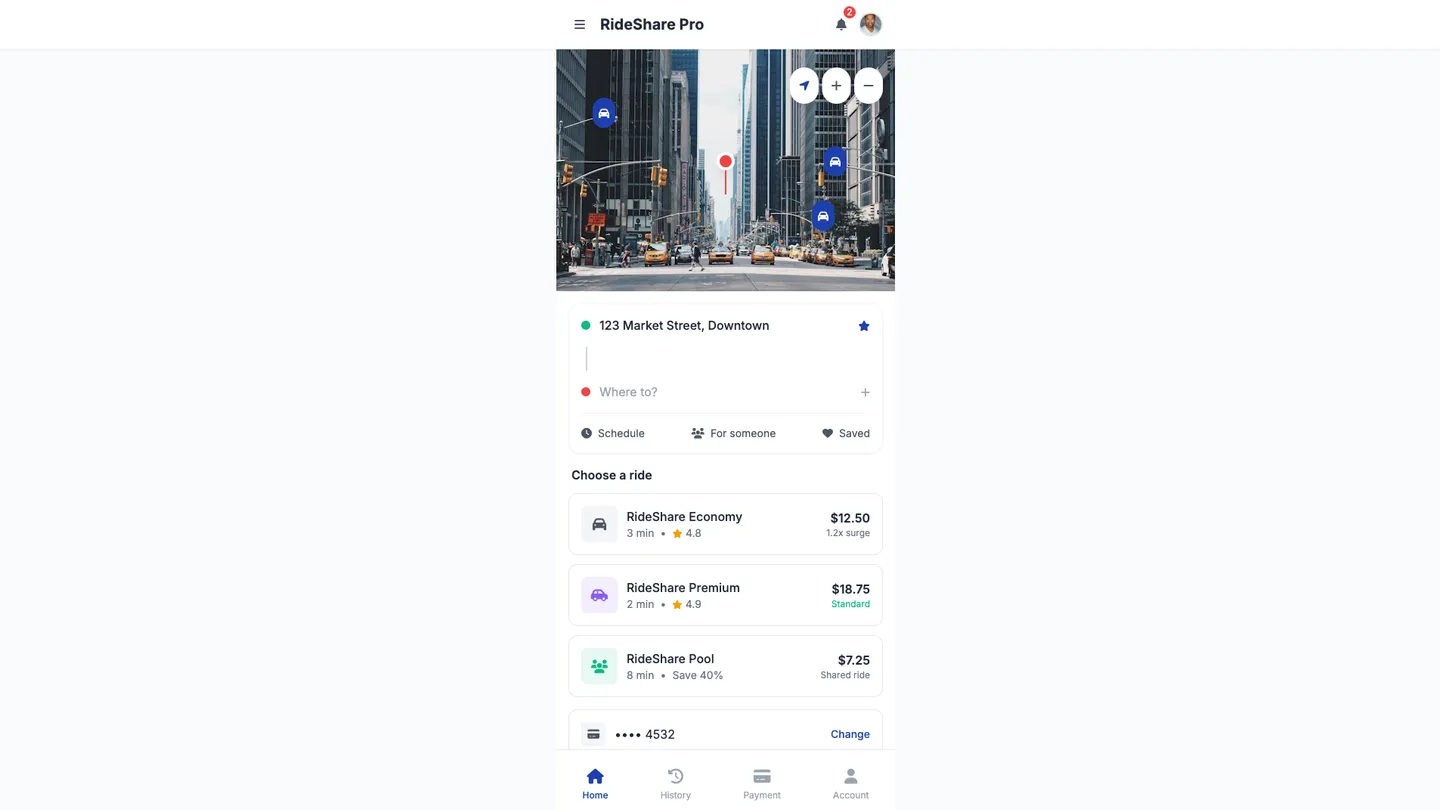
Example
Taxi Booking App Builder
Prompting the Taxi Booking App Builder
Ride-Sharing Taxi Booking App Builder Prompt
Build a ride-sharing taxi booking app with smart ride matching using traffic and demand data, transparent surge pricing showing multipliers and fare estimates before booking, an in-app safety toolkit (SOS, share ride with contacts, driver verification), and split fare payments for multiple riders.
Use promptLuxury Car Service Taxi Booking App Builder Prompt
Build a luxury car service taxi booking app featuring Chauffeur Profiles (driver credentials, ratings, etiquette training, language skills), a Vehicle Concierge to choose specific luxury models, colors, and seating layouts, Amenities Preferences (refreshments, temperature, music, Wi‑Fi), and White-Glove Support with 24/7 concierge chat and phone for itinerary changes and special requests.
Use promptCarpooling Taxi Booking App Builder Prompt
Build a carpooling taxi booking app with a Route Pooling Optimizer to group riders by similar origins/destinations and minimize detours/costs, Compatibility Profiles to match preferences (quiet rides, music, gender comfort) and reduce cancellations, Flexible Pickup Windows to boost match rates and on-time performance, and an Eco Savings Tracker showing CO₂ and money saved versus solo rides.
Use promptAirport Transfer Taxi Booking App Builder Prompt
Build an airport transfer taxi booking app with flight sync tracking that auto-adjusts pickups for delays, a meet & greet inside the terminal with digital/printed sign, luggage booking to specify suitcase counts and oversize items for vehicle allocation, and a delay grace period with built-in waiting time for customs and baggage claims.
Use promptTop Taxi Booking App Features by Type
Smart Ride Matching
Automatically pairs riders with the nearest suitable driver using traffic and demand data. This reduces wait times and increases completed trips for a smoother experience.
Surge Pricing Transparency
Clearly shows price multipliers and fare estimates before booking. This builds trust and helps riders make informed decisions during peak times.
In-App Safety Toolkit
Includes SOS, ride sharing with contacts, and driver verification. Enhanced safety features increase user confidence and retention.
Split Fare Payments
Allows multiple riders to divide the fare automatically. This encourages shared rides and reduces payment friction among friends or coworkers.
Chauffeur Profiles
Displays driver credentials, ratings, etiquette training, and language skills. Clients booking premium rides expect transparency and professionalism.
Vehicle Concierge
Lets users choose specific luxury models, colors, and seating layouts. Tailored selection reinforces the premium brand and meets special preferences.
Amenities Preferences
Pre-select refreshments, temperature, music, and Wi‑Fi needs. Personalized touches elevate the experience and justify higher pricing.
White-Glove Support
24/7 concierge chat and phone line for itinerary changes and special requests. High-touch service drives loyalty among executive and VIP clients.
Route Pooling Optimizer
Groups riders with similar origins and destinations to minimize detours. This increases seat utilization and lowers costs for everyone.
Compatibility Profiles
Match riders by preferences like quiet rides, music, and gender comfort. Better matches improve ride satisfaction and reduce cancellations.
Flexible Pickup Windows
Offers adjustable time windows to enable efficient pooling. Flexibility increases match rates and improves on-time performance.
Eco Savings Tracker
Shows CO₂ saved and money saved compared to solo rides. Visible impact motivates continued use and helps marketing sustainability.
Flight Sync Tracking
Integrates with airline data to auto-adjust pickup based on delays. This prevents missed connections and reduces passenger stress.
Meet & Greet
Driver meets inside terminal with a digital or printed sign. Smooth handoffs are crucial for travelers unfamiliar with the airport.
Luggage Booking
Lets users specify suitcase count and oversize items to allocate vehicle space. Proper planning avoids last-minute vehicle changes and delays.
Delay Grace Period
Includes built-in waiting time for customs and baggage claims. Predictable policies reduce disputes and improve service reliability.
The Taxi Booking App of Your Dreams
Get started freeFAQ about the Taxi Booking App Builder
How to make a taxi booking taxi booking app builder website?
You can build a taxi booking website on Replit by using a web framework template and integrating external services for maps and payments. Once built, you can deploy it directly from your workspace.
A taxi booking website needs a user interface for booking, a back-end to handle logic, a database to store information, a mapping API to show locations and routes, and a payment API to process transactions.
To start, choose a template like Next.js or Python with Flask. You can write the code for your front-end and back-end in the workspace. For features like maps or payments, you will need to integrate third-party APIs; store your API keys securely using the Secrets tool. If you need help writing code for a specific feature or fixing a bug, you can ask Agent3 for assistance. When your website is complete, use the deployment feature to make it live.
What features should a taxi booking app builder website include?
A taxi booking app builder should include features for user accounts, real-time ride tracking, booking management, and payment processing.
These core functions allow passengers to request and monitor rides, while drivers can accept and manage bookings. Essential features also include fare estimation, ride history, and a rating system to build trust and ensure quality.
You can build this on Replit by starting with a web framework template. For specific features, ask Agent3 to generate code. For example, you can prompt it to “create a user registration form” or “write a function to integrate a maps API for tracking.” Agent3 can also help debug your code or explain how to connect third-party services for payments.
How do I design a professional-looking taxi booking app builder website?
To design a professional-looking taxi booking app builder website, start with a suitable template and customize its design elements like layout, colors, and fonts.
A professional design ensures your site is user-friendly and visually consistent. This involves choosing a clean layout, applying a consistent color scheme and typography, and ensuring easy navigation for visitors.
On Replit, you can begin with a website template. Then, you can directly edit the HTML and CSS files to customize the appearance. If you need help with coding, you can ask Agent3 to make changes. For example, you could prompt it with, "Update the CSS to use a modern, professional font and a black-and-yellow color scheme." Agent3 can also help fix layout issues or add new sections. Once your design is ready, you can deploy it as a live website.
What is the best way to optimize a taxi booking app builder website for search engines?
The best way to optimize your site is by implementing on-page SEO basics and local SEO tactics. This involves using relevant keywords, creating descriptive meta tags, and ensuring your site is mobile-friendly.
Search engine optimization helps search engines understand and rank your website. For a taxi booking app builder, this means using keywords that customers in your target service area might search for, like "taxi app builder for [City]" or "create a ride-sharing app." A fast, mobile-responsive design is also critical for ranking.
You can directly edit your project’s HTML files to add SEO-friendly <title> and <meta name="description"> tags and include target keywords in your content. For automated help, ask Agent3 to generate meta tags, review your code for SEO improvements, implement a mobile-responsive design, or fix errors that affect site performance.
How can I customize the layout of my taxi booking app builder website?
You can customize your app's layout by directly editing its HTML and CSS code files. This gives you full control over the visual appearance and structure of your website.
A website's layout is defined by its code. HTML files create the structure and content, while CSS files control styling like colors, fonts, and element positioning. Modifying this code is the standard way to alter a site's design.
In your project, locate the HTML and CSS files in the file tree to make changes. If you need assistance, ask Agent3 to perform specific tasks, such as "change the color of the header to blue" or "rearrange the booking form fields." Agent3 can also help identify and fix errors in your code. Once your customizations are complete, you can deploy the updated app directly from the workspace.
What are you waiting for?
Build an app without knowing how to code. Tell Replit what you have in mind, then make it your own.