Podcast Website Builder
Build a podcast website in minutes for free with AI. Write in plain English or tap buttons to create your website.
How to Use the Podcast Website Builder
Step 1: Share your podcast website's features and requirements.
Step 2: Replit generates your website instantly.
Step 3: Customize features and user experience.
Step 4: Launch your new podcast website.
Podcast Website Builder Example
Built with Replit.
Build your vision in minutes for free without writing a single line of code.
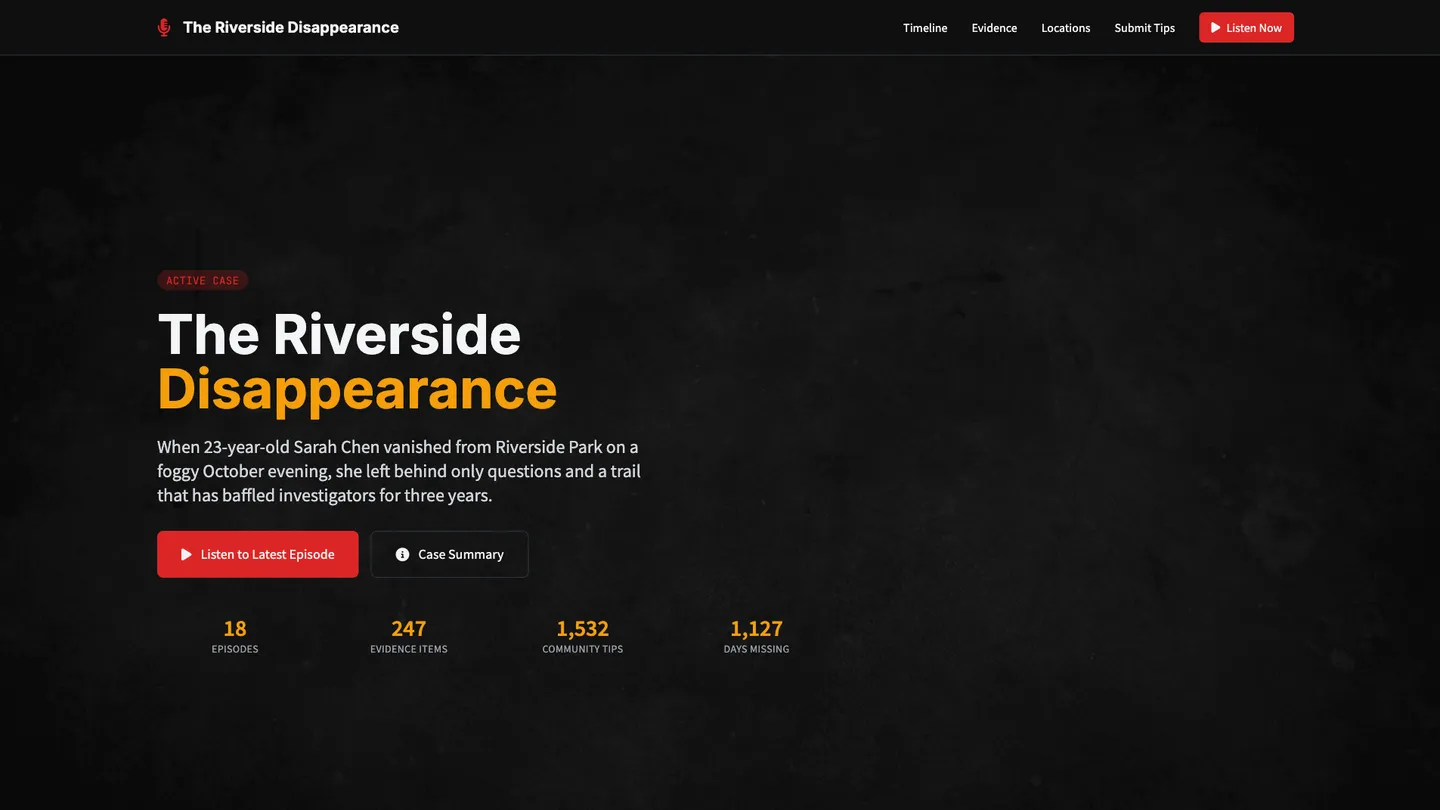
Example
Podcast Website Builder
Prompting the Podcast Website Builder
True Crime Podcast Website Builder Prompt
Build a true crime podcast website with a chronological Case Timeline for events/episodes/updates, an Evidence Archive of documents/photos/audio from episodes, an Interactive Map with episode-linked pins for relevant locations, and a moderated Community Tips portal for submitting credible leads.
Use promptComedy Podcast Website Builder Prompt
Build a comedy podcast website featuring episode soundbites for viral sharing, a meme generator for punchline overlays, a fan submissions hub for jokes and prompts, and a live show calendar with ticketing links, venue maps, and reminders.
Use promptNews And Politics Podcast Website Builder Prompt
Build a news and politics podcast website featuring a real-time Fact-Check Feed linking episode claims to reputable sources and corrections, concise Policy Explainers with summaries and pros/cons, an Issue Tracker dashboard tracking ongoing stories, votes, and statements across episodes, and an interactive Election Map with polls, turnout data, and historical comparisons at national and local levels.
Use promptHealth And Wellness Podcast Website Builder Prompt
Build a health and wellness podcast website featuring a built-in player for categorized guided meditations and breathing exercises that complement episode topics; a simple habit tracker for sleep, hydration, movement, and mood linked to episode challenges with progress over time; a moderated Expert Q&A hub where licensed professionals or vetted guests address common questions with clear boundaries on personalized advice; and a themed resource library of curated worksheets, links, and recommended readings to extend value beyond the audio and support sustainable routines.
Use promptTop Podcast Website Features by Type
Case Timeline
A chronological timeline that organizes key events, episodes, and updates for each case. It helps listeners follow complex stories and quickly catch up on developments.
Evidence Archive
A curated gallery of documents, photos, and audio snippets referenced in episodes. This deepens engagement by letting fans explore sourced materials responsibly.
Interactive Map
A map plotting locations relevant to cases with episode-linked pins. It adds context and immersion, helping users visualize movements and connections.
Community Tips
A moderated portal for listeners to submit credible tips or leads to producers. It fosters community involvement while maintaining verification and safety protocols.
Episode Soundbites
Short, shareable clips highlight the funniest moments from episodes. They drive social discovery and bring new listeners through viral snippets.
Meme Generator
A simple tool to layer punchlines over show images or quotes. It turns fans into content co-creators and boosts organic sharing.
Fan Submissions
A hub where listeners submit jokes, prompts, and bits for future episodes. This keeps content fresh and builds a participatory community.
Live Show Calendar
An events page with ticketing links, venue maps, and reminders. It converts listeners into attendees and increases revenue opportunities.
Fact-Check Feed
A real-time feed linking claims from episodes to reputable sources and corrections. It builds trust and helps listeners verify information quickly.
Policy Explainers
Concise explainers that break down complex policies with summaries and pros/cons. They make issues accessible and reduce listener research time.
Issue Tracker
A dashboard following ongoing stories, votes, and statements across episodes. It keeps audiences updated on changes and outcomes over time.
Election Map
Interactive maps with polls, turnout data, and historical comparisons. They provide context and let users explore trends at national and local levels.
Guided Meditations
A built-in player with categorized meditations and breathing exercises. It supports listener wellbeing and complements episode topics.
Habit Tracker
A simple tracker for sleep, hydration, movement, and mood linked to episode challenges. It encourages consistency and shows progress over time.
Expert Q&A
A moderated question hub where licensed professionals or vetted guests address common questions. It offers credible insights while setting clear boundaries for personalized advice.
Resource Library
A curated list of worksheets, links, and recommended readings organized by theme. It extends value beyond the audio and supports sustainable routines.
The Podcast Website of Your Dreams
Get started freeFAQ about the Podcast Website Builder
How do I build a website for my podcast?
You can build a podcast website by using a web development template and customizing it with your episode audio and show notes.
A standard podcast website includes an audio player for each episode, along with show notes, transcripts, and links for listeners to subscribe on major platforms.
In Replit, you can start with a portfolio or blog template. Then, ask Agent3 to modify the code to add an audio player and create a layout for your episodes. If you run into issues, Agent3 can also help fix errors in your code. When you are finished, you can deploy the website directly from your workspace.
What is the best website to create a podcast?
The best website for a podcast is one that hosts your audio files and generates an RSS feed. While many dedicated services do this, you can build and customize your own podcast website using Replit.
Podcasting requires two core components: storage for your audio files and an RSS feed. The RSS feed is an XML file that podcast directories like Apple Podcasts and Spotify use to find and list your episodes for listeners.
On Replit, you can start with a web server template to build your site. After uploading your audio files, you can create the RSS feed. If you need help generating the XML code for the feed or fixing errors, you can ask Agent3 for assistance. For example, prompt it to "create an RSS feed for a podcast with these episode details." Once deployed, your project can serve both your website and the feed needed by podcast platforms.
Should a podcast have its own website?
Yes, a podcast benefits from having its own website.
A dedicated site acts as a central hub for your audience, improves discoverability through search engines, and offers a space for content like show notes and transcripts. It gives you direct control over your brand, separate from podcasting platforms.
You can build and host your podcast's website using Replit. Start with a portfolio or blog template and edit the files in the workspace. While Replit does not host the audio files, you can embed a player from your podcast hosting service. For code changes, ask Agent3 to add new sections, customize the layout, or fix errors. When your site is ready, you can deploy it with a single click.
What should a podcast website look like?
A podcast website should be a central place for your episodes and show notes, making it easy for listeners to play your content and learn more about your show.
A good podcast site includes an audio player for each episode, show notes, and links to subscribe on different platforms. A clean, mobile-friendly design that matches your podcast's brand is essential for a good user experience.
To build this, start with a static website template in the workspace. You can upload your audio files and use an HTML <audio> tag or an embeddable player to feature them. Write your show notes in the HTML files. If you need to fix code or add a feature like a contact form, you can ask Agent3 for assistance. When finished, deploy your website directly from your project.
What features should a podcast website include?
A podcast website needs an embedded audio player, a list of episodes with show notes, and subscription links for platforms like Apple Podcasts or Spotify.
These features provide a central hub for your content. They let visitors listen directly, get context from show notes, and easily follow your show on their preferred app. A simple, responsive design is crucial for a good experience on any device.
You can build this by starting with a website template in the workspace. To add an audio player, find an HTML5 code snippet and ask Agent3 to integrate it into your files. Agent3 can also help generate the HTML structure for your episode list or debug your CSS code. Once your site is ready, you can deploy it directly from the editor.
What are you waiting for?
Build an app without knowing how to code. Tell Replit what you have in mind, then make it your own.