Photography Website Builder
Build a photography website in minutes for free with AI. Write in plain English or tap buttons to create your website.
How to Use the Photography Website Builder
Step 1: Share your photography website's features and requirements.
Step 2: Replit generates your website instantly.
Step 3: Customize features and user experience.
Step 4: Launch your new photography website.
Photography Website Builder Example
Built with Replit.
Build your vision in minutes for free without writing a single line of code.
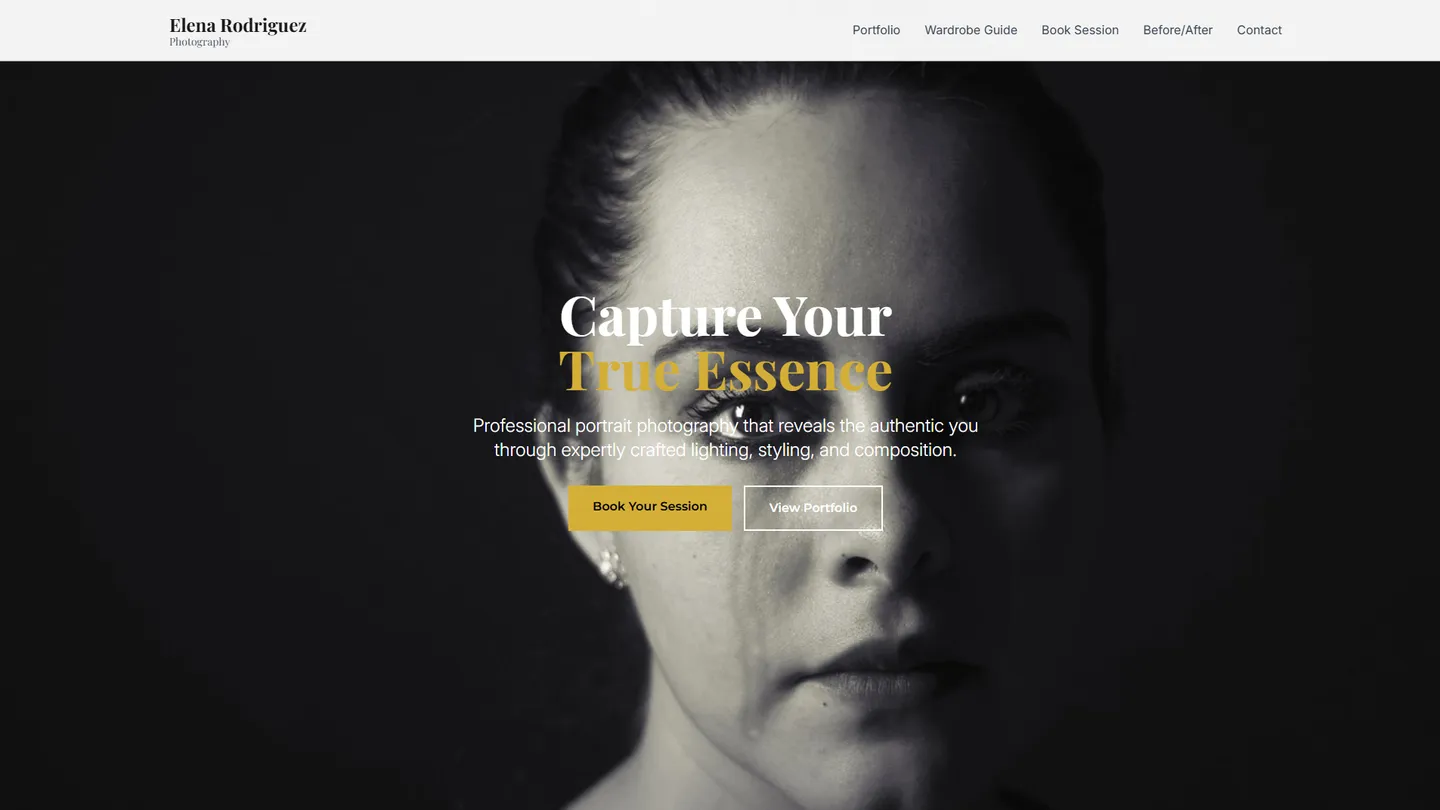
Example
Photography Website Builder
Prompting the Photography Website Builder
Portrait Photography Website Builder Prompt
Build a portrait photography website featuring an interactive Wardrobe Guide for outfits/colors/accessories, a real-time Booking Calendar with automated deposits and confirmations, a Before/After Retouch toggle gallery to show tasteful edits, and a Session Builder questionnaire for location, mood, and lighting preferences.
Use promptWedding Photography Website Builder Prompt
Create a wedding photography website with a Package Configurator to customize coverage hours, number of shooters, and albums that clarifies pricing and aligns with budgets, an interactive Timeline Planner that reduces stress and ensures key moments are covered, a Vendor Portal where planners, DJs, and florists share timelines and shot lists to improve coordination and prevent day-of surprises, and Same-Day Sneak Peeks delivering a mini gallery within 24 hours to fuel excitement and showcase responsiveness and professionalism.
Use promptSports Photography Website Builder Prompt
Build a sports photography site with live game galleries for real-time sideline uploads, automatic athlete tagging by jersey number and name, rapid proofing with one-click selects and batch favorites for coaches and editors, and a password-protected team media portal for downloading licensed images and press kits.
Use promptWildlife Photography Website Builder Prompt
Build a wildlife photography site with a Species Index organizing galleries by species (common and scientific names), an interactive Location & Seasons map showing sighting hotspots with best seasons and times, an Ethics & Conservation section with respectful-practice guidelines and conservation partners, and per-photo Field Settings detailing camera settings and gear notes.
Use promptTop Photography Website Features by Type
Wardrobe Guide
An interactive style guide that helps clients choose outfits, colors, and accessories for their portraits. It reduces pre-shoot anxiety and ensures cohesive, flattering results.
Booking Calendar
A real-time calendar with automated deposits and confirmations. It streamlines scheduling and minimizes no-shows for portrait sessions.
Before/After Retouch
A toggle gallery that shows tasteful retouching comparisons. It sets expectations and demonstrates professional polish without over-editing.
Session Builder
A guided questionnaire to pick location, mood, and lighting preferences. It personalizes the experience and saves time in pre-shoot consultations.
Package Configurator
A tool to customize coverage hours, number of shooters, and albums. It clarifies pricing and helps couples align services with their budget.
Timeline Planner
An interactive wedding-day schedule builder with photography milestones. It reduces stress and ensures key moments are properly covered.
Vendor Portal
A collaboration hub for planners, DJs, and florists to share timelines and shot lists. It improves coordination and prevents day-of surprises.
Same-Day Sneak Peeks
A mini gallery delivered within 24 hours for social sharing. It fuels excitement and showcases responsiveness and professionalism.
Live Game Galleries
Real-time image uploads from the sidelines during games. It engages fans and media while maximizing timely exposure.
Athlete Tagging
Auto-tagging of players with jersey numbers and names. It makes finding, licensing, and sharing specific athletes fast and accurate.
Rapid Proofing
One-click selects and batch favorites for coaches and editors. It drastically shortens turnaround from capture to publish.
Team Media Portal
A passworded hub for teams to download licensed images and press kits. It centralizes assets and simplifies compliance with usage rights.
Species Index
Galleries organized by species with common and scientific names. It aids discovery and adds educational value for enthusiasts.
Location & Seasons
Interactive map showing sighting hotspots with best seasons and times. It helps viewers plan trips and appreciate seasonal behaviors.
Ethics & Conservation
Guidelines on respectful wildlife practices and conservation partners. It builds trust and aligns the brand with responsible fieldwork.
Field Settings
Camera settings and gear notes attached to each photo. It educates aspiring photographers and showcases technical expertise.
The Photography Website of Your Dreams
Get started freeFAQ about the Photography Website Builder
What photography website builder do most photographers use?
Most photographers use no-code website builders like Squarespace or Wix for their simplicity.
These platforms offer templates and drag-and-drop editors, which makes building a site fast but can limit creative control. They are a good option if you do not want to manage any code.
Replit allows you to build a more custom photography website. You can start with a basic web template and then ask Agent3 to generate the code for your portfolio, create a specific layout, or add custom features. This approach gives you full control over the design. If you run into issues, Agent3 can also help debug your code.
What is the best site to create a photography website?
The best site depends on your goals. For maximum creative control, the best approach is to build a custom website. For users who prefer simplicity over customization, a template-based website builder may be a better fit.
A good photography website must be visual, fast, and unique. Website builders offer pre-made templates but can be restrictive. Building your site from code gives you complete freedom to design custom galleries, unique page layouts, and specific interactive features.
You can build and host a photography website on Replit. Start with an HTML, CSS, and JS template and upload your photos. If you need to create a complex photo grid or fix a styling issue, you can ask Agent3 to write or debug the code. Once your site is complete, you can deploy it directly from the workspace.
How much does a photography website cost?
A photography website can cost anywhere from free to over $5,000. The final price depends on whether you use a template, hire a developer, or need special features like client proofing and print sales.
You can build and host a basic photography website for free on Replit by starting with a portfolio template. If you need to customize the design, add a new gallery, or fix a layout issue, you can ask Agent3 to write or modify the code for you. This approach avoids the high cost of hiring a developer.
For a professional site, you will likely want a custom domain and more powerful hosting, which are available through paid plans. While there is no built-in e-commerce for print sales, you can integrate third-party services by having Agent3 help you add the necessary code.
What is the best photography website builder for beginners?
The best builder depends on your technical goals. If you want to learn code and have complete creative control, a code-based platform is best. If you prefer a simpler, template-driven experience without coding, a dedicated website builder is a better fit.
Website builders provide drag-and-drop tools that are easy to use but can be restrictive. Building with code offers unlimited customization and helps you develop valuable programming skills.
On Replit, you can start with a portfolio template to create your photography site. You can then customize it by editing the HTML and CSS files in the workspace. If you need to add a feature like a photo carousel or fix a bug, you can ask Agent3 to write or debug the code for you. When your site is finished, you can deploy it with a single click.
What features should a photography website include?
A photography website should include a portfolio or gallery, an "About Me" page, and a contact form. A blog can also be a valuable addition for sharing stories and improving search visibility.
These core features allow you to display your work, tell your personal story to connect with visitors, and give potential clients a straightforward way to inquire about your services or purchase prints.
You can build your site by choosing a portfolio template and then uploading your photos into the project's files. Edit the HTML and CSS files to customize the layout and text. For more complex features, like a dynamic gallery or a functional contact form, you can ask Agent3 to write the necessary code. If you run into issues, Agent3 can also help debug your code and suggest fixes.
What are you waiting for?
Build an app without knowing how to code. Tell Replit what you have in mind, then make it your own.