Online Grocery Store Website Builder
Build a online grocery store website in minutes for free with AI. Write in plain English or tap buttons to create your website.
How to Use the Online Grocery Store Website Builder
Step 1: Share your online grocery store website's features and requirements.
Step 2: Replit generates your website instantly.
Step 3: Customize features and user experience.
Step 4: Launch your new online grocery store website.
Online Grocery Store Website Builder Example
Built with Replit.
Build your vision in minutes for free without writing a single line of code.
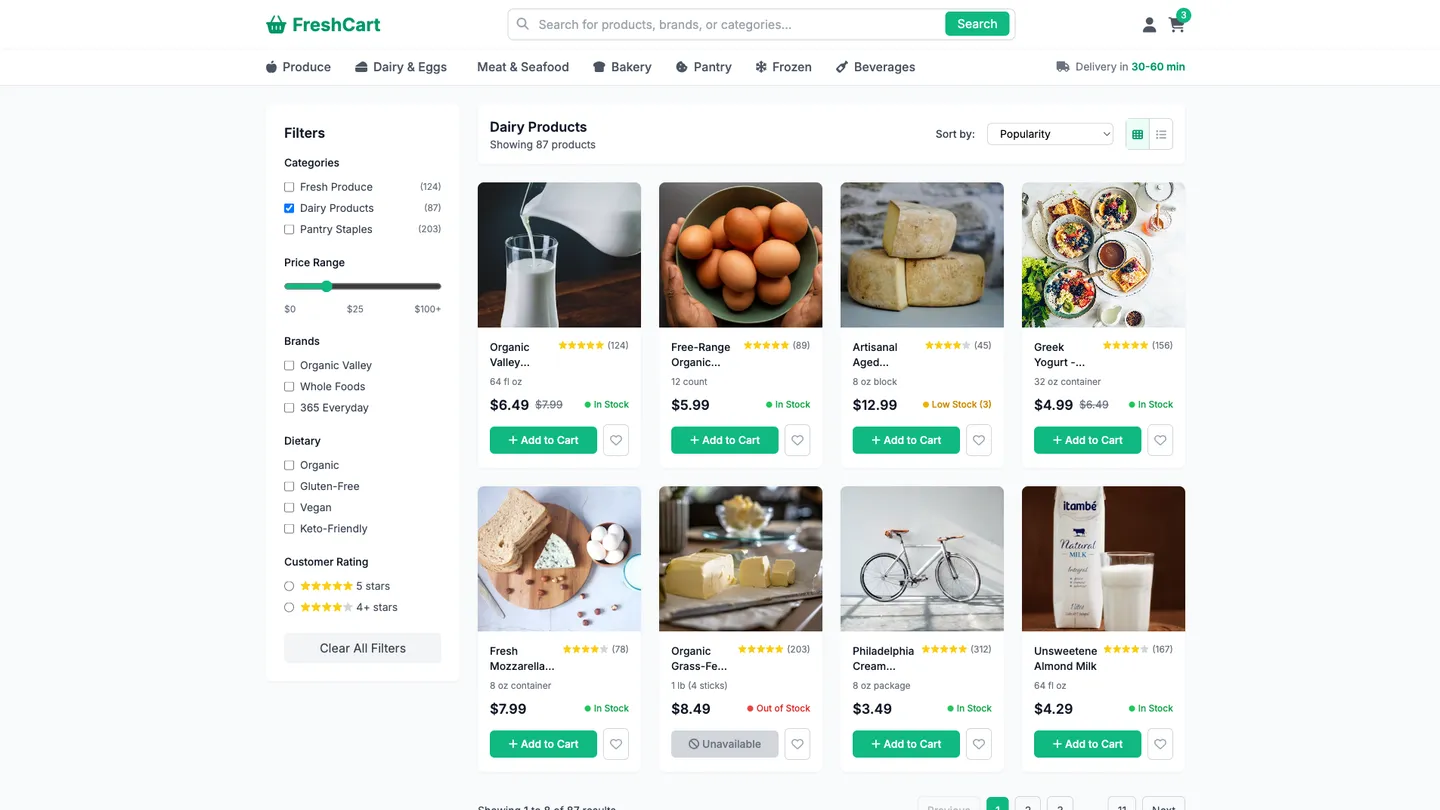
Example
Online Grocery Store Website Builder
Prompting the Online Grocery Store Website Builder
General Online Grocery Store Website Builder Prompt
Build a general online grocery store with smart search (filters by brand, diet, price, and ratings), real-time inventory that updates availability as users shop, flexible delivery offering multiple windows and same-day options with clear ETAs, and user-controlled substitution rules by item or category with an opt-out.
Use promptRetailer-Specific Online Grocery Store Website Builder Prompt
Build a retailer-branded online grocery store with loyalty integration (sync rewards card for points, personalized pricing, and coupons), a pickup scheduler (reserve curbside or in-store slots tied to local capacity), a weekly circular (auto-synced promotions with digital clipping), and a private label boost (highlight house brands via comparisons and bundles).
Use promptSpecialty Online Grocery Store Website Builder Prompt
Build a specialty online grocery store that displays Provenance Badges (farm origin, certifications, producer stories) on product pages, enables Small-Batch Preorders for limited/seasonal drops with timed windows, includes expert Pairing Guides to boost cross-sells, and offers robust Allergen Filters to flag and filter by dietary needs.
Use promptTop Online Grocery Store Website Features by Type
Smart Search
A robust search with filters for brand, diet, price, and ratings to quickly narrow choices. It reduces friction for shoppers and increases conversion on a general marketplace.
Real-Time Inventory
Product availability updates as users shop, reflecting store stock in real time. This reduces out-of-stock disappointments and improves trust.
Flexible Delivery
Multiple delivery windows and same-day options with clear ETAs. It accommodates varied schedules and drives orders across peak and off-peak times.
Substitution Controls
Users set substitution rules by item or category, including opt-out. This minimizes bad surprises and lowers customer support costs.
Loyalty Integration
Link and sync the retailer’s rewards card for points, pricing, and coupons. It reinforces brand loyalty and unlocks personalized savings.
Pickup Scheduler
Reserve curbside or in-store pickup slots tied to local store capacity. This streamlines operations and offers a no-fee fulfillment option customers love.
Weekly Circular
Auto-synced promotions from the retailer’s circular with digital clipping. It increases basket size and aligns online deals with in-store campaigns.
Private Label Boost
Highlight the retailer’s house brands with comparisons and bundles. It lifts margins and differentiates from third-party marketplaces.
Provenance Badges
Show farm origin, certifications (organic, Fair Trade), and producer stories. This builds trust for discerning shoppers and justifies premium pricing.
Small-Batch Preorders
Allow preorder windows for limited runs and seasonal drops. It reduces waste, rallies community demand, and creates launch excitement.
Pairing Guides
Expert suggestions that pair items (cheese with wines, spices with recipes). It increases cross-sells and helps customers discover niche products.
Allergen Filters
Filter and flag products for allergens and dietary needs like gluten-free or vegan. It ensures safety and makes specialty shopping effortless.
The Online Grocery Store Website of Your Dreams
Get started freeFAQ about the Online Grocery Store Website Builder
Which online grocery store website builder is best for online stores?
The best online grocery store website builder depends on your technical needs. For full customization, a code-based environment is a strong choice.
Website builders range from no-code platforms with templates to flexible development environments. No-code builders are simpler but offer less control, while code-based platforms provide complete freedom to build custom features.
Replit is a development environment, not a drag-and-drop builder. You can start with an e-commerce template and modify the code to fit your grocery store's needs. As you build, you can ask Agent3 to write new code, fix errors, or explain parts of the codebase. When your store is complete, you can deploy it directly from your workspace.
How to create an online grocery store?
You can create an online grocery store by using a web development template and customizing it for your needs.
An e-commerce site generally requires a front-end for customers to browse products and a back-end to manage inventory, orders, and payments. This often involves integrating with databases and payment processors.
On Replit, start with an e-commerce template and edit the code in the workspace to add your grocery items. For tasks like setting up a product database or connecting a payment API, you can ask Agent3 to write or modify the code. When your site is ready, deploy it directly from the workspace.
How do I create an online grocery store website for my online store?
You can create an online grocery store website by using a web development template and customizing it. This involves setting up the site structure, adding product listings, and configuring a checkout process.
An e-commerce site requires a front-end for customers and a back-end to manage inventory, orders, and payments. This usually involves integrating with payment gateways and managing a product database.
To start, fork an e-commerce template in the workspace. You can edit the HTML, CSS, and JavaScript files to add your grocery items and customize the design. For coding assistance, you can ask Agent3 to "add a search bar to the product page" or "fix an error in my shopping cart script." While Replit does not have a native payment system, you can integrate third-party services like Stripe or PayPal. Once finished, you can deploy your website directly from the workspace.
What is the best site to start an online store?
The best site depends on your technical needs. Platforms like Shopify are simple for beginners, while building a custom store provides full control.
All-in-one e-commerce platforms offer templates and payment processing, but they can limit your design and features. Building your own site requires coding but allows you to create a unique store that matches your brand perfectly.
You can build a custom online store using a template. From the workspace, you can edit the code to change the design or add functionality. If you need help, ask Agent3 to modify the code, fix errors, or add features like a shopping cart. For payments, you can integrate a service like Stripe or PayPal. Ask Agent3 to "add the Stripe payments API to this project." Once finished, you can deploy your store directly from the editor.
Is there a 100% free online grocery store website builder?
No, a truly 100% free builder with full e-commerce functionality is uncommon.
Most platforms advertised as "free" have limitations or require paid plans for essential features like payment processing, removing ads, or using a custom domain. A genuinely free option typically means you build and host the code yourself.
You can build and host a grocery store website on Replit using a free plan. Start with a web framework template and write the code for your store's features. If you need to add functionality or fix bugs, you can ask Agent3 to generate or modify the code. While basic hosting is included, you will need a paid plan for features like a custom domain.
What are you waiting for?
Build an app without knowing how to code. Tell Replit what you have in mind, then make it your own.