Online Course Website Builder
Build a online course website in minutes for free with AI. Write in plain English or tap buttons to create your website.
How to Use the Online Course Website Builder
Step 1: Share your online course website's features and requirements.
Step 2: Replit generates your website instantly.
Step 3: Customize features and user experience.
Step 4: Launch your new online course website.
Online Course Website Builder Example
Built with Replit.
Build your vision in minutes for free without writing a single line of code.
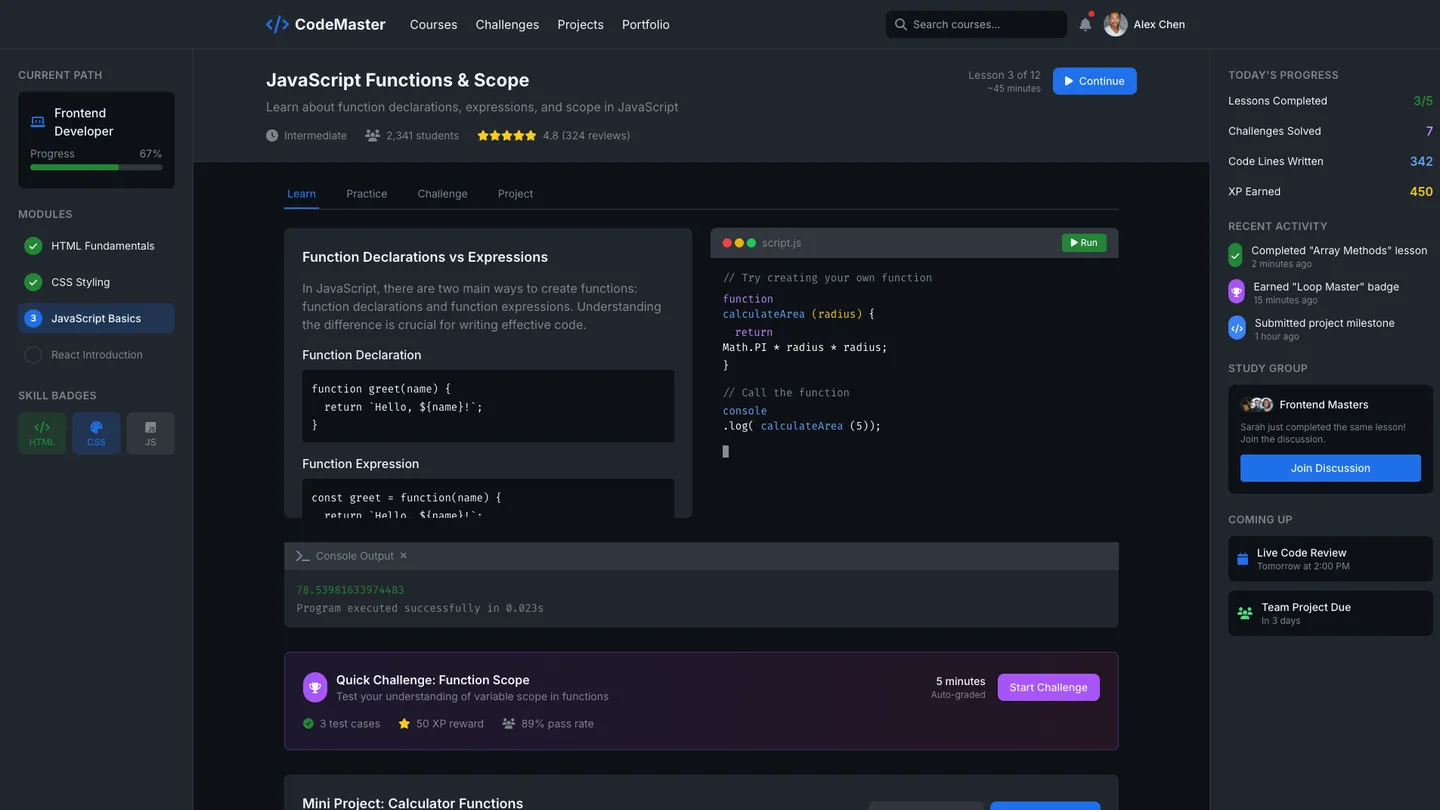
Example
Online Course Website Builder
Prompting the Online Course Website Builder
Coding And Programming Online Course Website Builder Prompt
Build a coding course website featuring a browser-based interactive sandbox for writing/running/debugging code, auto-graded timed challenges with edge-case test suites, Git-based project tracks with PRs/code reviews and public portfolios, and curated career pathways (Frontend/Backend/Data Engineer) with milestones and skill badges.
Use promptBusiness And Management Online Course Website Builder Prompt
Create a business and management online course website with interactive case simulations modeling market shocks, budgets, and stakeholder tradeoffs with quantified outcomes, weekly mentor hours pairing students with experienced managers, hands-on KPI dashboard projects (CAC, LTV, churn) for data-first decision-making, and negotiation labs with roleplay, scoring, BATNA framing, and debriefs.
Use promptCreative Arts Online Course Website Builder Prompt
Build a creative arts online course website featuring live studio workshops with real-time Q&A, masterclass breakdowns of renowned works, robust portfolio critiques by peers and mentors, and bundled asset libraries of royalty-free brushes, textures, sound packs, and templates.
Use promptHealth And Wellness Online Course Website Builder Prompt
Build a Type 4 health and wellness online course site with guided multi-week programs (video, meal guides, workouts), a habit tracker with daily check-ins/streaks/reminders, live telehealth Q&A with certified experts, and biometric sync to wearables (heart rate, sleep, steps) for personalized content and adaptive intensity/recovery.
Use promptTop Online Course Website Features by Type
Interactive Sandbox
A browser-based coding sandbox lets learners write, run, and debug code without setup. It shortens time-to-first-success and keeps beginners engaged through instant feedback.
Auto-Graded Challenges
Timed exercises with test suites evaluate solutions across edge cases automatically. This scales assessment reliably while teaching clean, test-driven thinking.
Git Project Tracks
Real-world projects use Git workflows, pull requests, and code reviews. Students build a public portfolio and learn collaboration practices used by employers.
Career Pathways
Curated syllabi lead to roles like Frontend, Backend, and Data Engineer. Clear milestones and skill badges motivate progress and signal job readiness.
Case Simulations
Interactive business cases simulate market shocks, budgets, and stakeholder tradeoffs. Learners practice decision-making and see quantified outcomes from their strategies.
Mentor Hours
Weekly office hours pair students with experienced managers for targeted feedback. Live guidance accelerates problem-solving on real workplace challenges.
KPI Dashboards
Hands-on projects build dashboards with metrics like CAC, LTV, and churn. Executives-in-training learn to prioritize decisions using data, not intuition.
Negotiation Labs
Roleplay modules with scoring and debriefs teach bargaining tactics and BATNA framing. Safe practice environments build confidence for high-stakes conversations.
Portfolio Critiques
Peer and mentor critiques provide structured feedback on works-in-progress. Artists learn to iterate effectively and present pieces for clients or galleries.
Masterclass Breakdowns
Step-by-step deconstructions of renowned artworks or performances reveal process and choices. This demystifies technique and inspires personal experimentation.
Asset Libraries
Royalty-free brushes, textures, sound packs, and templates are bundled with courses. Ready tools remove friction so creators focus on storytelling and craft.
Live Studio Workshops
Real-time sessions let learners follow along with instructors and ask questions. The studio vibe fosters community and mirrors professional creative workflows.
Habit Tracker
Daily check-ins, streaks, and reminders reinforce healthy routines. Behavior tracking increases adherence and shows measurable progress over time.
Guided Programs
Multi-week plans combine video, meal guides, and workouts tailored to goals. Structured paths reduce decision fatigue and improve consistency.
Telehealth Q&A
Certified experts host live Q&A for nutrition, fitness, and mental health topics. Trusted answers increase safety and dispel misinformation.
Biometric Sync
Integrations pull heart rate, sleep, and steps from wearables to personalize content. Data-driven adjustments optimize intensity and recovery for each user.
The Online Course Website of Your Dreams
Get started freeFAQ about the Online Course Website Builder
What is the best website to create an online course?
The best website for an online course depends on your technical needs. All-in-one platforms offer simple setup, while building your own site gives you full control over features and design.
Replit allows you to build and host a custom website for your online course. You can start with a website template and edit the files directly in the workspace to create pages for lessons, quizzes, and student dashboards. If you need to add a feature, like a progress tracker, or fix a bug in your code, you can instruct Agent3 to modify the project for you. When your site is complete, you can deploy it with a single click.
How to make a course online course website for free?
Yes, you can create a free online course website using a template and a free hosting service.
Building a course website typically involves selecting a pre-made site structure, adding your course content like text and videos, and then publishing it online. This process usually requires editing files and using a web hosting platform.
You can start by forking a website template in the workspace. Edit the HTML and CSS files to add your course lessons and materials. If you need to customize the design, add new sections, or fix code, you can ask Agent3 for assistance. When your site is ready, you can deploy it for free directly from your project.
What features should an online course website include?
An online course website should include user authentication, course content pages, progress tracking, and a payment gateway. These elements work together to manage users, deliver lessons, monitor student advancement, and process enrollments.
You can build this on Replit by starting with a website template. Replit Auth can handle user sign-ups and logins. Course materials like text and videos can be added to your project files. For features like progress tracking or payment processing, you may need to integrate external services. Agent3 can assist with this by writing the necessary code. For example, you can ask Agent3 to "add a database to track which lessons a user has completed" or "integrate a payment API like Stripe." Agent3 can also help modify your site's design or debug code.
How do I design a professional-looking online course website?
To design a professional-looking online course website, start with a template and customize its design. This is the fastest way to get a polished result.
A professional site has a consistent visual identity, including colors, fonts, and logos. It also needs a clean layout and simple navigation so users can easily find your courses. The design should be responsive, meaning it looks good on desktops, tablets, and phones.
You can begin with a website template and edit the HTML and CSS files in the workspace to change the design. For example, update the CSS file to change the color palette or font styles. If you need help, ask Agent3 to modify the code. You could prompt it to "make the header sticky" or "change all button colors to blue." Once your design is complete, you can deploy the site directly from your Repl.
What is the best way to optimize an online course website for search engines?
The best way to optimize an online course website for search engines is to use relevant keywords, create high-quality course descriptions, and ensure your site has a clean technical structure.
Search Engine Optimization (SEO) helps search engines understand and rank your content. For an online course site, this means making it easy for potential students to find your courses through search. This involves using terms they might search for, creating unique pages for each course, and ensuring your site is fast and easy to navigate.
You can edit your website’s HTML files directly in the workspace to add keywords to page titles, headings, and meta descriptions. For more advanced tasks, you can ask Agent3 to help. For instance, prompt it to "add structured data for my online course" to improve how search engines display your listings, or ask it to "generate a sitemap" to help search engines crawl your site more effectively.
What are you waiting for?
Build an app without knowing how to code. Tell Replit what you have in mind, then make it your own.