Mortgage Website Builder
Build a mortgage website in minutes for free with AI. Write in plain English or tap buttons to create your website.
How to Use the Mortgage Website Builder
Step 1: Share your mortgage website's features and requirements.
Step 2: Replit generates your website instantly.
Step 3: Customize features and user experience.
Step 4: Launch your new mortgage website.
Mortgage Website Builder Example
Built with Replit.
Build your vision in minutes for free without writing a single line of code.
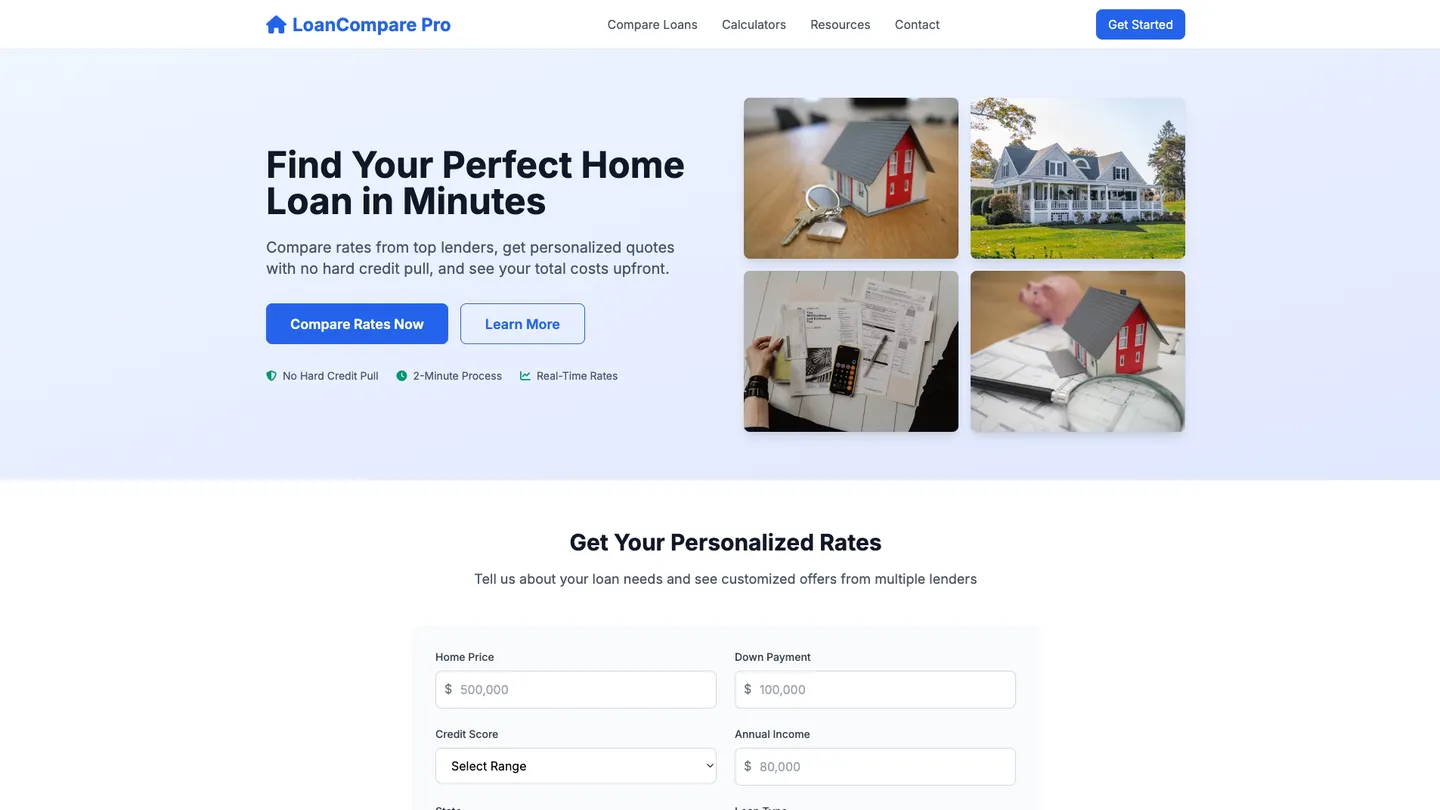
Example
Mortgage Website Builder
Prompting the Mortgage Website Builder
Home Loan Comparison Mortgage Website Builder Prompt
Build a home loan comparison site with side-by-side comparisons of multiple lenders/products/APRs/fees/terms, personalized quotes from user inputs (credit score, down payment, location) with no hard pull, a total cost breakdown (itemized closing costs, points, mortgage insurance, projected APR), and eligibility filters for minimum credit score, DTI, LTV, and loan type.
Use promptRefinance Calculators Mortgage Website Builder Prompt
Create a refinance calculators website featuring: Break-Even Calculator (months to recover closing costs and refi viability), Savings Estimator (monthly and lifetime savings vs current loan), Cash-Out Impact (payment, interest, equity trade-offs by cash-out amount), and ARM vs Fixed (time-based comparison with caps/index); Output: interactive inputs plus charts/tables showing break-even month, payment change, lifetime savings, total interest, equity trajectory, and a clear recommendation.
Use promptFirst-Time Buyer Guides Mortgage Website Builder Prompt
Build a first‑time homebuyer mortgage guide website with a Buying Roadmap (step-by-step from preapproval to closing with timelines, tasks, and milestones), a Program Finder that matches users to down-payment assistance, grants, and FHA/VA/USDA options by location and profile, a Jargon Translator explaining terms like escrow, PMI, points, and underwriting in plain language, and a Readiness Check quiz assessing credit, savings, income stability, and budget with personalized tips.
Use promptInterest Rate Tracking Mortgage Website Builder Prompt
Build a mortgage interest-rate tracking website with a live rate feed (continuously updated by loan type, term, and credit tier), smart alerts (notify when rates cross user-set thresholds or drop by X bps), interactive history charts (daily rates, spreads, volatility with filters), and consumer-friendly market insights (Fed moves, inflation, lender commentary).
Use promptTop Mortgage Website Features by Type
Side-by-Side Compare
Instantly compare multiple lenders, products, APRs, fees, and terms on one screen. It speeds decision-making and highlights the true cheapest option.
Personalized Quotes
Get tailored rates by entering credit score, down payment, and location—no hard pull. Personalized pricing increases accuracy and trust.
Total Cost Breakdown
See itemized closing costs, points, mortgage insurance, and projected APR. Transparency prevents surprise expenses and improves conversions.
Eligibility Filters
Filter results by minimum credit score, DTI, LTV, and loan type. Users avoid ineligible options and focus on realistic choices.
Break-Even Calculator
Calculates how many months it takes for refi savings to recover closing costs. It clarifies whether refinancing makes financial sense.
Savings Estimator
Projects monthly and lifetime savings versus current loan terms. Clear numbers motivate action and reduce decision anxiety.
Cash-Out Impact
Models how cash-out amounts affect payment, interest, and equity. Users see trade-offs before tapping home value.
ARM vs Fixed
Compares adjustable-rate and fixed-rate scenarios over time with caps and index assumptions. It helps choose the most stable, cost-effective option.
Buying Roadmap
Step-by-step guidance from preapproval to closing with timelines and tasks. Clear milestones reduce overwhelm for first-timers.
Program Finder
Matches users to down-payment assistance, grants, and FHA/VA/USDA options by location and profile. Free money and flexible programs improve affordability.
Jargon Translator
Plain-language glossary for terms like escrow, PMI, points, and underwriting. Demystifying terms boosts confidence and reduces mistakes.
Readiness Check
Interactive quiz assessing credit, savings, income stability, and budget. Personalized tips show exactly what to fix before applying.
Live Rate Feed
Continuously updated mortgage rates by loan type, term, and credit tier. Real-time data lets users time applications better.
Smart Alerts
Custom notifications when rates cross user-set thresholds or drop by X basis points. Timely pings prevent missed opportunities.
History Charts
Interactive charts of daily rates, spreads, and volatility with filters. Visual trends make patterns and seasonality obvious.
Market Insights
Context from Fed moves, inflation releases, and lender commentary summarized for consumers. Actionable insights turn noise into decisions.
The Mortgage Website of Your Dreams
Get started freeFAQ about the Mortgage Website Builder
What is the best mortgage website builder for finance?
The best mortgage website builder depends on your technical needs. For full control over security and custom features, building your own site is often the best approach.
Mortgage websites handle sensitive financial data and must comply with industry regulations. While template-based builders offer simplicity, a custom solution provides greater flexibility for features like loan calculators, secure client portals, and unique branding.
You can build a custom mortgage site using a web framework template. The workspace allows you to edit files and structure your project. For specific functions, you can ask Agent3 to write code for a loan amortization calculator or help debug secure form submissions. Once your site is complete, you can deploy it directly from the platform.
What features should a mortgage website include?
A mortgage website should include features like mortgage calculators, secure online application forms, information on loan types, and clear contact details.
These features help users understand their options, estimate costs, and begin the application process. A functional site builds trust and streamlines the user's journey from initial research to formal application.
You can build this on Replit by starting with a website template and editing the files in the Workspace. For interactive features like a calculator, you will need to add JavaScript. If you need help, ask Agent3 to write the code with a prompt like, "Create a JavaScript mortgage calculator." Agent3 can also fix errors or modify the code to fit your design. Once ready, you can deploy the site directly from your project.
How do I design a professional-looking mortgage website?
To design a professional-looking mortgage website, begin with a clean template and customize it with a consistent brand identity, clear navigation, and high-quality content.
A professional design builds trust through a logical layout, mobile responsiveness, and cohesive branding. Key elements include an intuitive user interface and essential pages like a home page, services, a mortgage calculator, and contact information.
You can start by selecting a website template in Replit. Use the workspace to edit the HTML and CSS files to match your brand's colors and fonts. For custom features like a mortgage calculator, you can write the necessary code or ask Agent3 to generate it for you. If you need to adjust the design or fix bugs, you can ask Agent3 for assistance with prompts like, "Make this page mobile-friendly." Once finished, you can deploy your site directly from the workspace.
What is the best way to optimize a mortgage website for search engines?
The best way to optimize a mortgage website is by using relevant keywords, creating helpful content for borrowers, and ensuring the site is technically sound for search engines.
Search engine optimization (SEO) makes your site more visible on search engines like Google. When people search for mortgage-related terms, good SEO helps your site appear higher in the results, bringing in potential clients.
In Replit, you can directly edit your website’s HTML files to add meta titles, descriptions, and keywords. You can also optimize images and code for faster page speeds. For assistance, ask Agent3 to perform specific tasks. For instance, you can prompt it to "write a meta description for a page about FHA loans" or "refactor this code for better performance." This gives you direct control over your site's technical SEO from the workspace.
How can I customize the layout of my mortgage website?
You can customize your mortgage website's layout by directly editing its HTML and CSS files. This gives you control over the structure and visual style of your pages.
A website's layout is defined by its code. HTML organizes the content, while CSS handles the design, such as colors, fonts, and element positioning. Changing these files is how you customize the look and feel.
In your workspace, open the project files to make changes. You can edit the HTML and CSS by hand. For assistance, you can ask Agent3 to write or modify the code. For instance, you can prompt it to "rearrange the sections on the homepage" or "fix the alignment of the contact form." Agent3 can also help you resolve errors or adjust the layout for different screen sizes.
What are you waiting for?
Build an app without knowing how to code. Tell Replit what you have in mind, then make it your own.