Life Coach Website Builder
Build a life coach website in minutes for free with AI. Write in plain English or tap buttons to create your website.
How to Use the Life Coach Website Builder
Step 1: Share your life coach website's features and requirements.
Step 2: Replit generates your website instantly.
Step 3: Customize features and user experience.
Step 4: Launch your new life coach website.
Life Coach Website Builder Example
Built with Replit.
Build your vision in minutes for free without writing a single line of code.
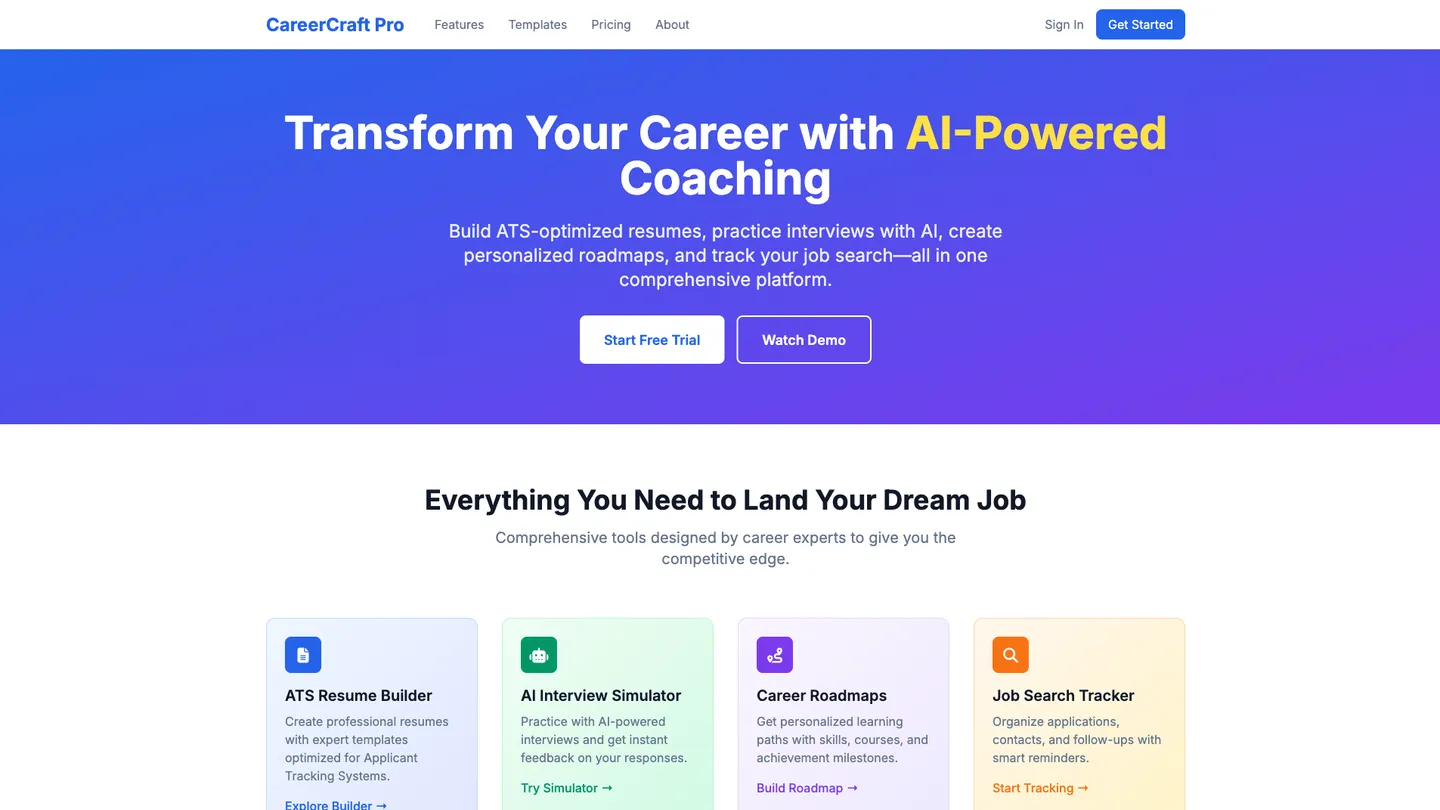
Example
Life Coach Website Builder
Prompting the Life Coach Website Builder
Career Coaching Life Coach Website Builder Prompt
Build a career coaching life coach website featuring an interactive ATS-optimized resume/portfolio builder with expert templates, an AI interview simulator with role-specific question banks and instant feedback, personalized career roadmaps outlining skills, courses, and milestones, and a job search tracker for applications, contacts, follow-ups, and reminders.
Use promptHealth And Wellness Life Coach Website Builder Prompt
Build a health and wellness life coach website featuring a Habit Tracker with daily tracking, streaks, reminders, and progress insights; coach-curated Meal & Fitness Plans tailored to goals and restrictions; a Mindfulness Library of guided meditations, breathwork, and sleep audios categorized by need and duration; and Telehealth Check-ins via secure video sessions and chat for quick touchpoints and accountability.
Use promptRelationship Coaching Life Coach Website Builder Prompt
Create a relationship coaching site featuring a Conflict Toolkit with step-by-step exercises and scripts to navigate disagreements without escalation, a Love Languages Test with tips to boost connection, a shared Couples Goal Board for goals/budgets/timelines to align priorities, and a Communication Coach chatbot to practice active listening, I-statements, and repair attempts between sessions.
Use promptExecutive Coaching Life Coach Website Builder Prompt
Build an executive coaching website that integrates 360 Feedback (anonymous multi-rater feedback with role-based insights and trends to reveal blind spots), Leadership Pathways (competency-based learning paths with micro-lessons and on-the-job drills to accelerate mastery), an OKR Dashboard (real-time Objectives and Key Results tracking with dependencies and health flags for visible strategy execution), and an Exec Scheduler (priority-based scheduling with focus blocks and stakeholder routing to protect time and boost decision quality).
Use promptTop Life Coach Website Features by Type
Resume Builder
An interactive resume and portfolio builder with expert templates and keyword optimization. It helps clients present their experience effectively and get past applicant tracking systems.
Interview Simulator
AI-powered mock interviews with role-specific question banks and instant feedback. This builds confidence and sharpens responses for real-world interviews.
Career Roadmaps
Personalized career path roadmaps outlining skills, courses, and milestones. It gives clients a clear, actionable plan to reach their next role faster.
Job Search Tracker
A pipeline tracker for applications, contacts, and follow-ups with reminders. It keeps the job hunt organized and increases response and offer rates.
Habit Tracker
Daily habit tracking with streaks, reminders, and progress insights. It encourages consistency and makes wellness routines stick.
Meal & Fitness Plans Coach:
Curated meal plans and workout programs tailored to goals and restrictions. This reduces decision fatigue and accelerates visible results.
Mindfulness Library
Guided meditations, breathwork, and sleep audios categorized by need and duration. It supports stress reduction and better recovery.
Telehealth Check-ins
Secure video sessions and chat for quick coach touchpoints and accountability. Easy access improves adherence and early problem-solving.
Conflict Toolkit
Step-by-step conflict resolution exercises and scripts for tough conversations. It helps couples navigate disagreements without escalation.
Love Languages
Test An assessment to identify each partner’s primary love languages with tips. Understanding needs improves connection and appreciation.
Couples Goal Board
Shared vision board with goals, budgets, and timelines for joint projects. Aligning on priorities builds teamwork and trust.
Communication Coach
A chatbot that practices active listening, I-statements, and repair attempts. It turns skills into habits between live sessions.
360 Feedback
Anonymous multi-rater feedback collection with role-based insights and trends. Leaders get clear blind-spot data to guide development.
Leadership Pathways
Competency-based learning paths with micro-lessons and on-the-job drills. It accelerates mastery of critical executive skills.
OKR Dashboard
Real-time Objectives and Key Results tracking with dependencies and health flags. It aligns teams and keeps strategy execution visible.
Exec Scheduler
Priority-based scheduling with focus blocks and stakeholder routing. Protecting time boosts decision quality and throughput.
The Life Coach Website of Your Dreams
Get started freeFAQ about the Life Coach Website Builder
How to build a life coaching website?
To build a life coaching website, you can start with a pre-built template and customize it with your own content. This is the most direct way to get a professional site online.
Building a website generally involves choosing a design, adding your unique text and images, and publishing it for others to see. Key pages for a life coach often include a homepage, an "about me" section, a description of services, and a contact form.
You can start by using a portfolio or business website template. From the workspace, you can edit the HTML and CSS files to change the text, images, and colors to match your brand. If you need to add a new feature or fix a problem with the code, you can ask Agent3 for help. Once your site is ready, you can deploy it with one click.
What features should a life coach website include?
A life coach website should include pages for your services, your background, client testimonials, and a contact form. A blog is also effective for sharing your expertise.
These core elements build trust and provide clear information for potential clients. They explain what you do, demonstrate your credibility, and make it easy for people to inquire about your services.
You can start with a portfolio template and edit the HTML and CSS files to add your content. While there isn't a drag-and-drop form builder, you can ask Agent3 to generate the code for a contact page or help integrate a third-party booking tool. For instance, prompt Agent3 to "create an HTML page for my coaching services" or "help me fix this CSS layout issue."
How do I design a professional-looking life coach website?
To design a professional-looking life coach website, use a clean template and customize it with consistent branding, high-quality images, and clear navigation.
A professional design builds credibility with potential clients. This includes using a simple color palette, readable fonts, and an intuitive layout. Visitors should easily find information about your services, your background, and how to contact you.
You can start with a website template and edit the HTML and CSS files directly in the workspace. For design changes, you can ask Agent3 to modify the code. For instance, you could prompt it to “change the color scheme to blue and white” or “add a section for client testimonials.” Agent3 can also help fix layout errors or write new code sections. Once the design is complete, you can deploy the website from the workspace.
What is the best way to optimize a life coach website for search engines?
The best way to optimize your life coach website is by using relevant keywords, creating valuable content for your target audience, and ensuring your site has a clean technical structure. This helps search engines understand what your site is about and show it to potential clients.
Search Engine Optimization (SEO) improves your site's visibility in search results. For a life coach, this means including terms people search for, such as "career coaching services" or "finding a life purpose," in your site's text, titles, and descriptions.
You can edit your website’s HTML files directly in the workspace to add these keywords. While Replit does not have a built-in SEO dashboard, you can use Agent3 for assistance. Ask it to "add SEO meta tags for a life coach to my index.html" or "suggest keywords for a life coach specializing in mindfulness." Agent3 can generate or modify the necessary code to improve your site's optimization.
How can I customize the layout of my life coach website?
You can customize your website's layout by directly editing its HTML and CSS files. This gives you control over the structure and visual style of your pages.
A website's layout is defined by its code. HTML files organize the content, while CSS files manage the design, such as colors, fonts, and element placement. Changing these files alters how your site appears.
Within your Replit workspace, locate and open the HTML and CSS files for your template. You can edit the code to make adjustments. If you encounter errors or need assistance, you can ask Agent3 to perform tasks. For example, you could ask it to "add a new section to the homepage" or "make the text in the footer larger."
What are you waiting for?
Build an app without knowing how to code. Tell Replit what you have in mind, then make it your own.