Landing Page Builder
Build a landing page in minutes for free with AI. Write in plain English or tap buttons to create your website.
How to Use the Landing Page Builder
Step 1: Share your landing page's features and requirements.
Step 2: Replit generates your website instantly.
Step 3: Customize features and user experience.
Step 4: Launch your new landing page.
Landing Page Builder Example
Built with Replit.
Build your vision in minutes for free without writing a single line of code.
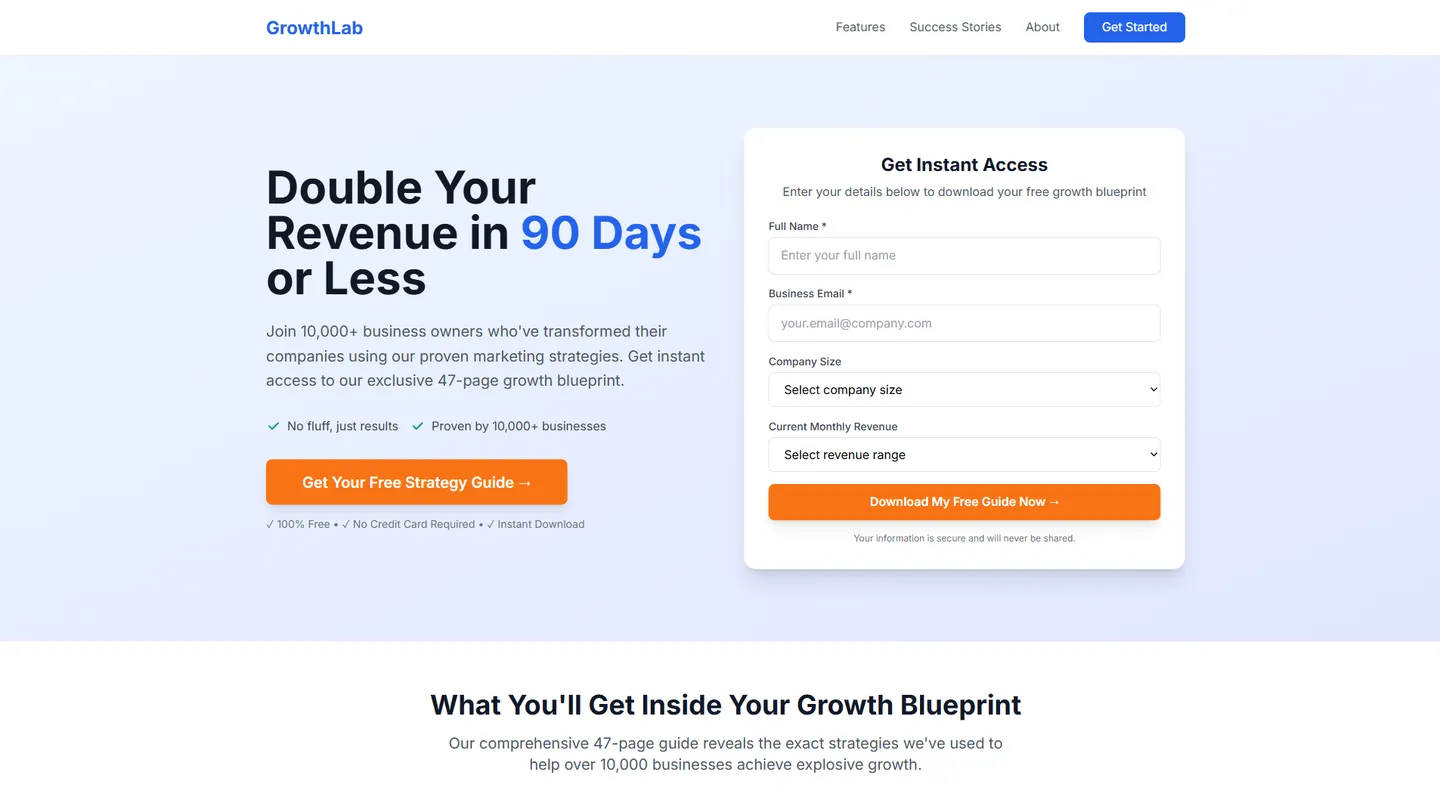
Example
Landing Page Builder
Prompting the Landing Page Builder
Lead Generation Landing Page Builder Prompt
Build a high-converting lead gen landing page with an above-the-fold primary CTA, a short lead capture form (name, email, key qualifiers), compelling social proof (testimonials and client logos), and a valuable lead magnet offered in exchange for contact info.
Use promptProduct Launch Landing Page Builder Prompt
Build a product launch landing page featuring a hero video demo showcasing core value, a real-time launch countdown, an interactive feature gallery with quick previews, and a preorder waitlist for reservations or pre-purchase to validate demand and drive urgency.
Use promptWhite Label Landing Page Builder Prompt
Build a white-label landing page with live branding preview (logo, colors, domain), clear tiered reseller pricing and margins, downloadable marketing assets (pitch decks, one-pagers, ad creatives), and a concise integration overview covering APIs, SSO, and provisioning options.
Use promptEcommerce Landing Page Builder Prompt
Build an ecommerce landing page featuring high-resolution product photos with 360° views, prominent ratings, testimonials, and secure checkout badges, a limited-offer promo banner with a ticking countdown timer, and a sticky add-to-cart bar that follows users while scrolling to boost conversions.
Use promptTop Landing Page Features by Type
Primary CTA
A prominent call-to-action button is visible immediately on page load. It focuses attention and boosts conversions by reducing friction.
Lead Capture Form
A short form collects name, email, and key qualifiers. Fewer fields increase submissions while still qualifying leads for follow-up.
Social Proof
Testimonials and client logos demonstrate credibility. Trust signals reduce hesitation and improve opt-in rates.
Lead Magnet
A valuable guide or tool is offered in exchange for contact info. This incentive raises conversions and attracts the right audience.
Hero Video Demo
A short video quickly showcases the product’s core value. Visual storytelling builds excitement and understanding during launch.
Preorder Waitlist
Visitors can reserve their spot or pre-purchase. Early commitment validates demand and builds momentum.
Launch Countdown
A real-time timer shows time until release. Scarcity and urgency drive signups and shares.
Feature Gallery
An interactive gallery highlights key features with quick previews. It educates visitors and encourages early commitment.
Branding Preview
A live preview shows the product with the partner’s logo, colors, and domain. Seeing their brand applied clarifies value and speeds decisions.
Reseller Pricing
Tiered partner pricing and margins are displayed clearly. Transparent economics help prospects model revenue and convert.
Marketing Assets
Downloadable pitch decks, one-pagers, and ad creatives are provided. Ready-made assets reduce onboarding friction for agencies.
Integration Overview
A concise summary of APIs, SSO, and provisioning options is included. Technical clarity reassures buyers and eases IT approval.
Product Imagery
High-resolution photos and 360 views showcase the item. Rich visuals increase confidence and reduce returns.
Reviews and Badges
Ratings, testimonials, and secure checkout badges are featured. Social proof and trust signals lift conversion.
Limited Offer
A promo banner with a ticking timer highlights a deal. Urgency nudges shoppers to act now.
Sticky Add to Cart
A persistent add-to-cart bar follows users while scrolling. Easy access shortens the path to purchase.
The Landing Page of Your Dreams
Get started freeFAQ about the Landing Page Builder
What is the best landing page builder?
The best landing page builder depends on your technical skill and project goals. Visual builders are ideal for users who prefer not to code, while code-based platforms offer maximum customization.
Visual builders provide drag-and-drop interfaces for creating pages quickly. In contrast, building with code gives you complete control over the design and functionality but requires knowledge of HTML, CSS, and often JavaScript.
Replit provides a code-based environment for building landing pages. You can start with a template and modify the HTML and CSS files to fit your needs. If you need help, you can ask Agent3 to generate code snippets, modify existing elements, or debug errors. For instance, you can ask Agent3 to "add a contact form" or "make the header sticky." After building your page, you can deploy it directly from the workspace.
Is there a free landing page builder?
Yes, many free landing page builders are available. These tools typically offer templates and visual editors to create web pages without coding.
While Replit is not a visual, drag-and-drop builder, you can create and host a free landing page. Start with an HTML/CSS template and edit the files in the workspace. To customize your page, fix errors, or add features, you can instruct Agent3 to write or update the code. When your page is ready, you can deploy it with a single click.
How much does a landing page builder cost?
Building a landing page on Replit can be free.
Traditional landing page builders have costs that vary widely, from free basic plans to hundreds of dollars per month for advanced features. Pricing is often tied to traffic limits, integrations, and A/B testing capabilities.
Replit offers a code-based environment, not a drag-and-drop builder. You can start with a template and edit the HTML and CSS files in the workspace to create your page. Static landing pages can be built and hosted for free. If you need help with the code, you can ask Agent3 to write new sections, modify the design, or fix errors.
Is a landing page builder worth the investment?
A landing page builder is worth the investment if you need to create pages quickly without writing code. These tools typically offer pre-made templates and drag-and-drop editors that simplify the process, but often at the cost of flexibility and ownership.
You can build and host a landing page on Replit by starting with a template. Instead of a visual editor, you get full control by editing the HTML and CSS files directly in the workspace. If you need assistance, you can ask Agent3 to write code for new sections, fix errors, or explain how to customize your page. When your page is ready, you can deploy it directly from your project.
Can I build my own landing page?
Yes, you can build and host a landing page using Replit.
A landing page is a single web page, typically built with HTML and CSS, designed to capture a visitor's attention. You can start from a template or create one from scratch.
To begin, select a landing page template and edit the files in the workspace to add your content and styling. If you need to modify code, fix an error, or generate a new section, you can ask Agent3 for assistance. Once your page is ready, you can deploy it as a live website directly from your Repl.
What are you waiting for?
Build an app without knowing how to code. Tell Replit what you have in mind, then make it your own.