Interactive Website Builder
Build a interactive website in minutes for free with AI. Write in plain English or tap buttons to create your website.
How to Use the Interactive Website Builder
Step 1: Share your interactive website's features and requirements.
Step 2: Replit generates your website instantly.
Step 3: Customize features and user experience.
Step 4: Launch your new interactive website.
Interactive Website Builder Example
Built with Replit.
Build your vision in minutes for free without writing a single line of code.
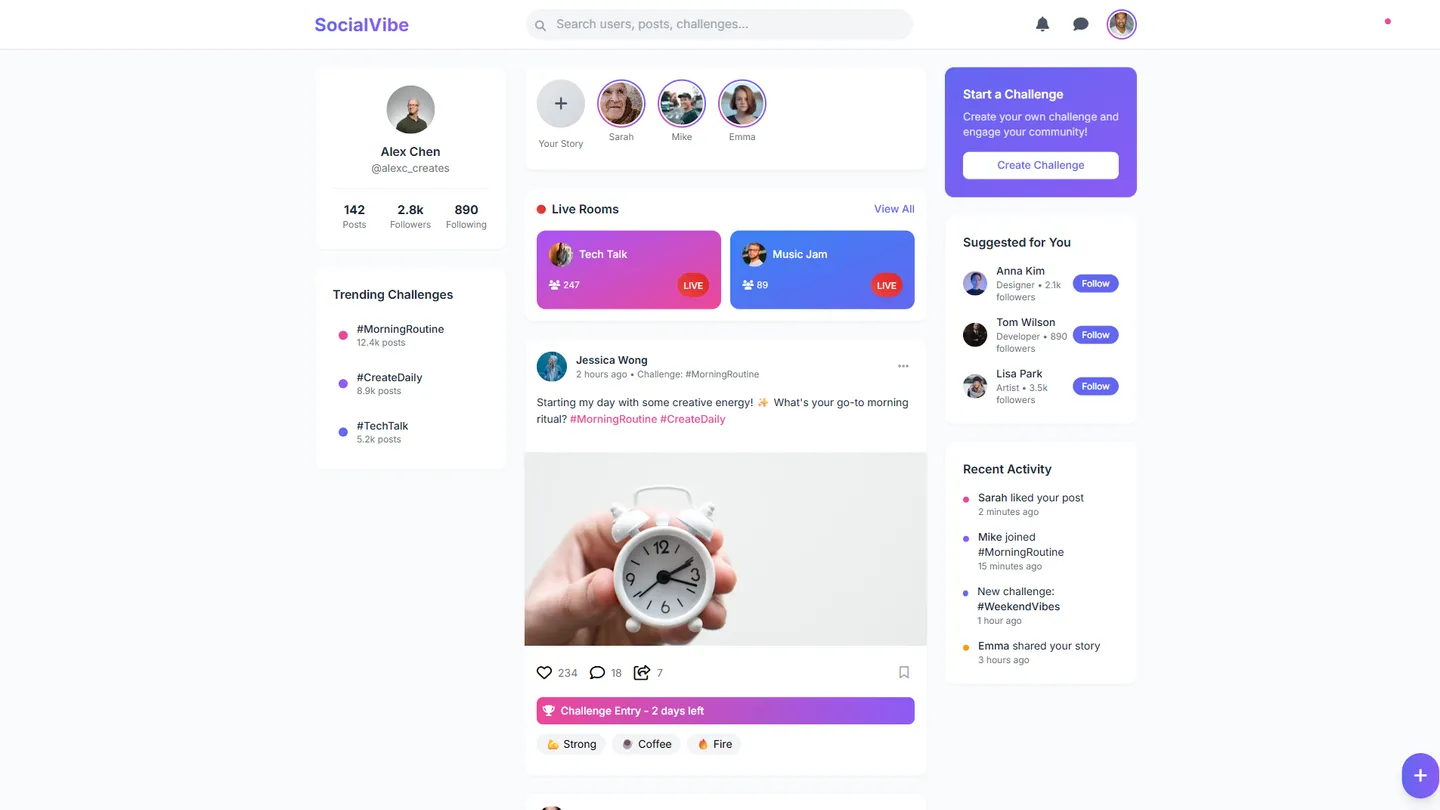
Example
Interactive Website Builder
Prompting the Interactive Website Builder
Social Media Interactive Website Builder Prompt
Build an interactive social platform featuring Live Rooms where users can host video sessions with follower reactions and co-host requests, ephemeral Stories with emoji reactions and quick replies, Creator Challenges with timed hashtags, templates, and auto-edit tools, and a Smart Feed that ranks posts using behavior signals and suggests new accounts.
Use promptE-Commerce Interactive Website Builder Prompt
Build an e-commerce site featuring AR Try-On for camera-based visualization (glasses, shoes, furniture), Live Shopping with real-time chat, product pins, and limited-time deals, One-Click Checkout using saved payment/address profiles, and Personalized Picks with dynamic recommendations from browsing and purchase history.
Use promptNews Interactive Website Builder Prompt
Build an interactive news site where users personalize their homepages via a Topic Feed (follow topics, regions, writers), articles include an inline Fact-Check Layer with credibility badges and sources, stories feature Interactive Timelines and maps with date/location/event filters, and comments host scheduled Reporter AMAs for transparent Q&As.
Use promptForums Interactive Website Builder Prompt
Build an interactive forum website with threaded replies featuring collapsible nested threads and best-answer pins, reputation badges with karma points for helpful posts, accepted answers, and moderation, built-in polls and surveys within threads with real-time results, and auto-moderation using rule-based and AI filters for spam, toxicity, and duplicates with moderator review queues.
Use promptTop Interactive Website Features by Type
AR Try-On
Camera-based augmented reality to visualize products like glasses, shoes, or furniture. Reduces uncertainty and returns by letting shoppers see fit and style instantly.
Live Shopping
Shoppable livestreams with real-time chat, product pins, and limited-time deals. It blends entertainment and purchasing to boost conversion and basket size.
One-Click Checkout
Saved payment and address profiles enabling single-tap purchases. It minimizes friction and cart abandonment, especially on mobile.
Personalized Picks
Dynamic recommendations based on browsing, purchase history, and trends. It increases discoverability and lifts average order value.
Topic Feed
Users follow topics, regions, and writers to tailor their homepage. Personalization cuts noise and ensures readers see the news that matters to them.
Fact-Check Layer
Inline credibility badges and sources attached to claims within articles. It builds trust and helps readers quickly evaluate information quality.
Interactive Timelines
Scrollable timelines and maps with filters for dates, locations, and key events. They make complex stories easier to understand and revisit.
Reporter AMAs
Scheduled ask-me-anything sessions with journalists in comments. Direct access increases transparency and reader loyalty.
Threaded Replies
Deeply nested conversations with collapsible threads and best-answer pins. It keeps discussions organized and highlights the most useful responses.
Reputation Badges
Karma points and badges for helpful posts, accepted answers, and moderation. Recognition motivates quality contributions and community stewardship.
Polls & Surveys
Built-in polls within threads with real-time results. They spark participation and quickly gather community sentiment.
Auto-Moderation
Rule-based and AI filters for spam, toxicity, and duplicates with mod review queues. It maintains healthy discourse while reducing manual workload.
The Interactive Website of Your Dreams
Get started freeFAQ about the Interactive Website Builder
How can I make an interactive website?
To make an interactive website, you need to add code that responds to user actions. This is typically done using JavaScript, which can change a page’s content or appearance based on inputs like clicks, mouse movements, or form entries.
You can build an interactive site by starting with an HTML, CSS, JS template. Edit the files to create your site’s structure (HTML), style (CSS), and behavior (JavaScript). For assistance, you can ask Agent3 to write or modify code. For example, prompt it to “create a button that reveals hidden text when clicked.” When your site is complete, you can deploy it with one click from the workspace.
How much does it cost to build an interactive website?
The cost to build an interactive website can range from free to thousands of dollars.
This cost depends on the site's complexity and whether you build it yourself or hire a developer. Interactive sites need both a front-end for user interaction and a back-end for data processing, which influences the final price.
You can build and deploy an interactive website for free on Replit. Start with a template to get a basic structure, then edit the front-end and back-end code in the workspace. If you need help writing code, fixing bugs, or adding features, you can ask Agent3 for assistance. Once your site is ready, you can deploy it directly from your workspace.
What features should an interactive website include?
An interactive website should include features that let users engage with the content, such as forms, user accounts, or dynamic elements that update without a page reload.
These features make a site feel responsive by collecting user input and personalizing the experience. They usually require front-end code for the user interface and back-end code to process data and manage logic.
You can build these features by starting with a template and editing the code in the workspace. If you need to add server logic, fix a bug, or connect a front-end form to a back-end script, you can ask Agent3 to write or modify the code for you.
How do I design a professional-looking interactive website?
To design a professional-looking interactive website, you combine clean visual design with front-end code that responds to user actions. This can be done by customizing a template or building from scratch.
A professional design relies on a consistent layout, clear navigation, and a cohesive color scheme. Interactivity is created with JavaScript, which allows your site to react to clicks, form submissions, and other user inputs without needing to reload the page.
You can start with a Replit template for a framework like React or Vite. Edit the HTML and CSS files in the workspace to apply your visual design. For interactivity, write JavaScript code to create dynamic elements. If you need help, you can ask Agent3 to generate code for a specific feature, suggest CSS changes for a professional look, or fix errors in your code.
What is the best way to optimize an interactive website for search engines?
The best way to optimize an interactive website for search engines is to use server-side rendering (SSR) or static site generation (SSG). This ensures your content is visible to search engine crawlers.
Interactive sites often rely on JavaScript to display content, which can be difficult for search engines to index. SSR and SSG solve this by pre-building pages into static HTML files that crawlers can easily read.
You can use a template for an SSR framework like Next.js to get started. In your project, you can directly edit files to add meta tags or create a robots.txt file. If you need to implement SSR or fix indexing issues, you can ask Agent3 to modify your code. For example, prompt it to "add relevant SEO meta tags to my index.html" or "help me set up server-side rendering for this page."
What are you waiting for?
Build an app without knowing how to code. Tell Replit what you have in mind, then make it your own.