Grocery App Builder
Build a grocery app in minutes for free with AI. Write in plain English or tap buttons to create your app.
How to Use the Grocery App Builder
Step 1: Share your grocery app's features and requirements.
Step 2: Replit generates your app instantly.
Step 3: Customize features and user experience.
Step 4: Launch your new grocery app.
Grocery App Builder Example
Built with Replit.
Build your vision in minutes for free without writing a single line of code.
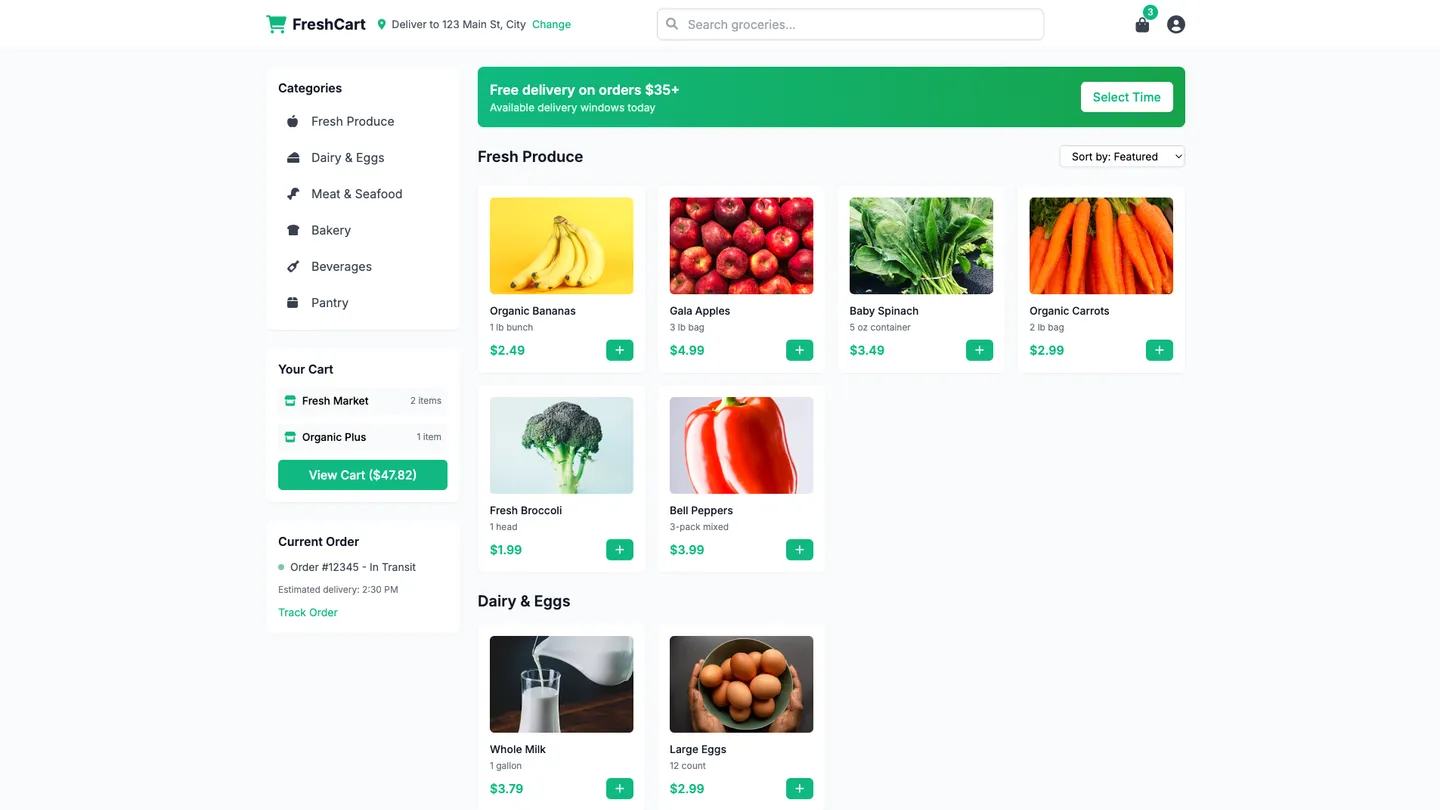
Example
Grocery App Builder
Prompting the Grocery App Builder
Delivery Service Grocery App Builder Prompt
Build a grocery delivery app with real-time tracking (live courier location, ETAs, and order status), smart substitutions (brand/size/dietary-based suggestions with instant in-app approval), delivery windows (precise slots with paid priority or eco-batched options), and a multi-store cart that enables consolidated delivery from nearby stores.
Use promptMeal Kits Grocery App Builder Prompt
Build a meal kits grocery app with a Meal Plan Builder to assemble weekly plans by servings, cuisine, and cook time with auto-generated shopping lists (streamlining decisions and preventing overbuying), Dietary Filters for allergens, macros, and diets like vegan, keto, and gluten-free (ensuring safe, goal‑aligned choices), a Guided Cook Mode with step-by-step timers, photos, substitutions, and pan-readiness cues (boosting recipe success), and Pre-Portioned Packs with pre-measured, color-coded ingredients and QR-linked freshness info (reducing prep time and food waste).
Use promptDiscount Finder Grocery App Builder Prompt
Build a discount-finder grocery app that aggregates digital coupons from brands and stores with one-tap clipping, compares real-time prices including unit costs across nearby retailers, sends personalized deal alerts when favorite items drop below target prices, and enables receipt scanning to auto-match eligible offers and deposit cash or credits.
Use promptLocal Produce Grocery App Builder Prompt
Build a local produce grocery app with an interactive Farm Finder Map (nearby farms/markets, distance, hours), a Seasonality Calendar (what’s in season and peak freshness), CSA Subscriptions (box size selection, skip weeks, add-ons), and Producer Profiles (practices, certifications, reviews) to support community commerce.
Use promptTop Grocery App Features by Type
Real-Time Tracking
Users can see live courier location, ETA updates, and order status from picking to drop-off. This reduces anxiety, increases transparency, and cuts support tickets for missed deliveries.
Smart Substitutions
Shoppers get suggested replacements based on brand, size, and dietary rules with instant in-app approval. It keeps orders accurate when items are out of stock and prevents refunds.
Delivery Windows
Customers choose precise delivery slots and can pay for priority or eco-batched options. This improves convenience and optimizes routing to lower costs.
Multi-Store Cart
Users can add items from multiple nearby stores and receive a consolidated delivery. It increases selection and basket size without extra friction.
Meal Plan Builder
Customers assemble weekly plans by servings, cuisine, and cook time with auto-generated shopping lists. It streamlines decisions and prevents overbuying.
Dietary Filters
Recipes are filterable by allergens, macros, and diets like vegan, keto, and gluten-free. This ensures safe, goal-aligned choices and broadens appeal.
Guided Cook Mode
A step-by-step timer-driven mode shows photos, substitutions, and pan readiness cues. It shortens learning curves and boosts recipe success rates.
Pre-Portioned Packs
Ingredients arrive pre-measured with color-coded packets and QR-linked freshness info. It reduces prep time and food waste while improving quality control.
Coupon Aggregator
The app aggregates digital coupons from brands and stores with one-tap clipping. It saves time and guarantees users don’t miss stackable savings.
Price Comparison
Users compare real-time prices across nearby retailers including unit costs. This makes smart trade-offs effortless and drives tangible savings.
Deal Alerts
Personalized notifications trigger when favorite items drop below a target price. It automates bargain hunting and increases repeat engagement.
Receipt Cash-Back
Scan receipts to auto-match eligible offers and deposit cash or credits. It captures savings even after checkout and encourages consistent use.
Farm Finder Map
An interactive map shows nearby farms, markets, and pickup points with distance and hours. It makes discovering local produce simple and supports community commerce.
Seasonality Calendar
A visual calendar lists what’s in season locally with peak freshness windows. It guides better choices and educates users on sustainable eating.
CSA Subscriptions
Manage CSA shares with box size selection, skip weeks, and add-on items from producers. It stabilizes farmer revenue and gives consumers flexible access.
Producer Profiles
Each producer has a profile with practices, certifications, and reviews. Transparency builds trust and helps justify premium pricing for quality.
The Grocery App of Your Dreams
Get started freeFAQ about the Grocery App Builder
How much does it cost to build a shopping app?
The cost to build a shopping app ranges from a few hundred dollars to over $100,000. On Replit, you can start for free.
The final price depends on complexity. Custom features, unique designs, payment integrations, and the number of products all influence the cost. Using a template is generally less expensive than hiring a team to build a custom app from scratch.
You can build a shopping app on Replit by starting with an e-commerce template. From there, you can edit the code in the workspace to customize your store. If you need help, you can ask Agent3 to add features, modify the design, or fix errors in your code. While Replit does not have a visual app builder, it provides a coding environment where Agent3 can help automate development steps. Once ready, you can deploy your app directly from the workspace.
How to create a shopping app for free?
Yes, you can create a basic shopping app for free. Building a shopping app generally requires setting up a product display, a cart, and a way to check out. While the development can be free, services like payment processing typically have their own costs.
You can start with an e-commerce template to get a functional base. Then, modify the code in the Workspace to add your products and customize the design. If you encounter errors or want to add a new feature, you can ask Agent3 to write or fix the code. When your app is ready, you can deploy it directly from your project.
What features should a grocery app builder website include?
A grocery app builder needs features for product catalogs, a shopping cart, user profiles, and a secure checkout process.
These components form the core of an online store, enabling customers to browse, select, and purchase items. Advanced features can include search filters, order tracking, and multiple payment options.
You can build this by starting with an e-commerce template and customizing it in the workspace. If you need help with the code, ask Agent3 to perform tasks like "add a product search bar" or "create a user login page." Agent3 can also modify existing code or help debug errors during development.
How do I design a professional-looking grocery app builder website?
To design a professional-looking grocery app builder website, start with a clean template and customize it with a consistent color scheme, clear typography, and high-quality images.
A professional design prioritizes user experience through an intuitive layout, fast performance, and branding that builds trust. A clean, uncluttered interface helps users find information easily and focus on key features.
In Replit, you can begin with a website template. Customize the design by editing the HTML and CSS files in the workspace to adjust colors, fonts, and layout. If you need to modify the design or fix an error, you can ask Agent3 to write or correct the code. Upload your brand assets, such as logos and images, and update the file paths in the code. When ready, deploy the site directly from the workspace.
What is the best way to optimize a grocery app builder website for search engines?
The best way to optimize your site is by editing its HTML to include relevant keywords, descriptive meta tags, and well-structured content.
Search engine optimization (SEO) helps search engines understand your site's purpose, making it easier for users to find it. For a grocery app builder, this involves using terms potential customers might search for, like “create a grocery app” or “online grocery store builder.”
In your Replit project, you can edit the HTML files directly. Add a descriptive <title> and <meta name="description"> tag inside the <head> section of your main HTML file. You can also ask Agent3 to help by prompting it to write or fix your code. For instance, ask it to “add SEO meta tags for a grocery app builder website” to your file.
What are you waiting for?
Build an app without knowing how to code. Tell Replit what you have in mind, then make it your own.