Festival App Builder
Build a festival app in minutes for free with AI. Write in plain English or tap buttons to create your app.
How to Use the Festival App Builder
Step 1: Share your festival app's features and requirements.
Step 2: Replit generates your app instantly.
Step 3: Customize features and user experience.
Step 4: Launch your new festival app.
Festival App Builder Example
Built with Replit.
Build your vision in minutes for free without writing a single line of code.
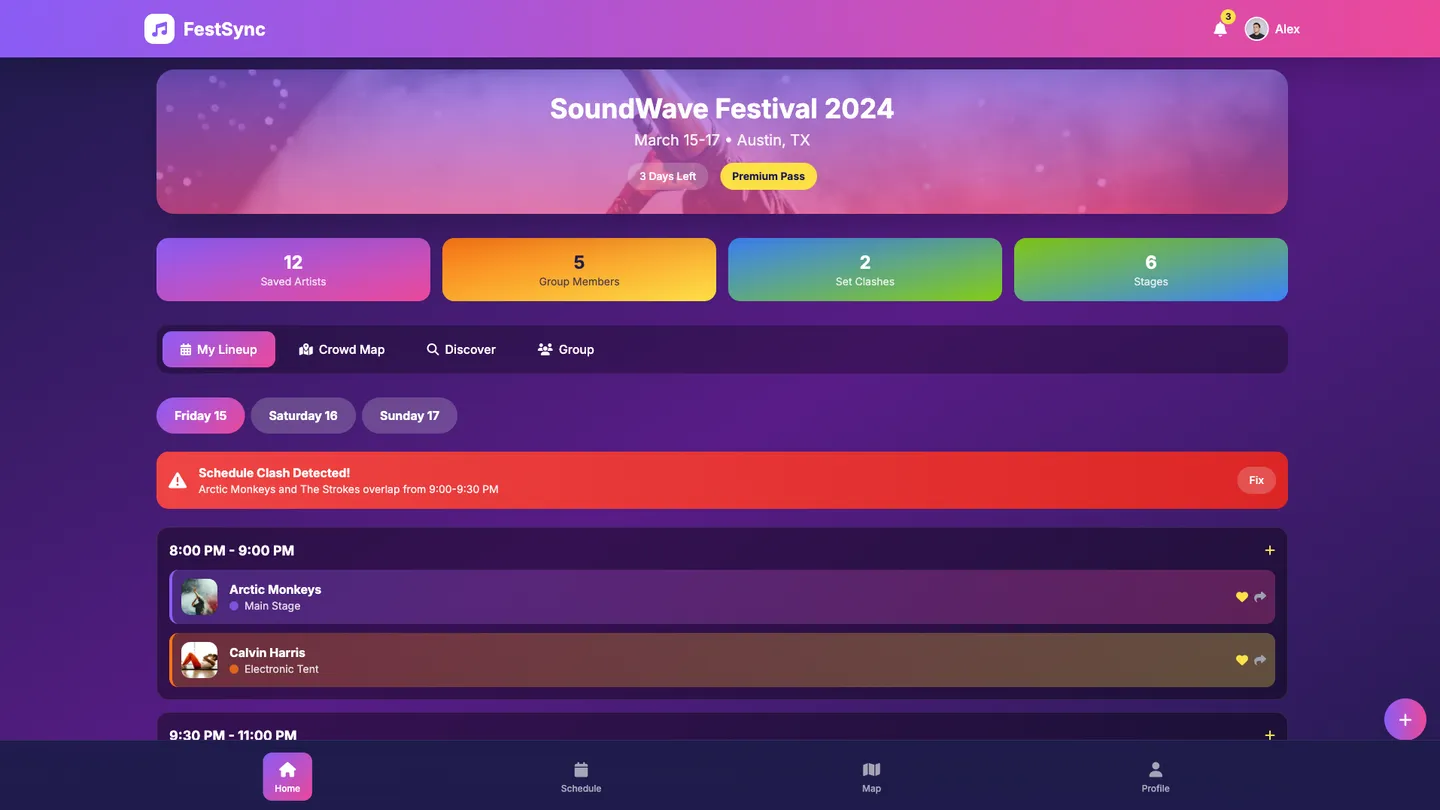
Example
Festival App Builder
Prompting the Festival App Builder
Music Event Planner Festival App Builder Prompt
Build a festival planner app with a Lineup Builder for personalized artist/stage schedules, a Live Crowd Map with real-time crowd density and stage status, Set Clash Alerts for overlapping or delayed sets, and Group Sync to share schedules and view friends’ plans for easy meetups.
Use promptFood And Drink Guide Festival App Builder Prompt
Build a festival food & drink guide app with a Vendor Finder (search by cuisine, price, rating, distance), live Queue Times with stock status, a gamified Taste Passport (digital stamps, rewards, favorites), and an Allergy Guard to filter menus by allergens and dietary needs using verified ingredients.
Use promptArt Exhibition Scheduler Festival App Builder Prompt
Build an art exhibition festival scheduler app that lets users reserve timed entries for exhibitions and talks, follow themed curated routes with estimated durations, access an AR guide overlaying artist info, provenance, and process videos on artworks, and save a wishlist of artworks and galleries with personal notes.
Use promptCultural Celebration Organizer Festival App Builder Prompt
Build a cultural celebration festival app with a Parade Planner to explore route maps, timing, and vantage points, Tradition Cards with audio pronunciations and etiquette tips, a Volunteer Hub for managing shifts, roles, training, and messaging, and a Local Marketplace to discover artisans, cultural foods, and services with pre-orders and pickup windows.
Use promptTop Festival App Features by Type
Lineup Builder
Create a personalized schedule by selecting artists and stages across the festival. It helps attendees maximize their experience by ensuring they never miss their must-see acts.
Live Crowd Map
View real-time crowd density and stage status on an interactive map. This reduces congestion and improves comfort by guiding users to less crowded routes and viewing areas.
Set Clash Alerts
Get notifications when chosen sets overlap or are running late. It saves fans from last-minute surprises and helps them make quick, informed decisions.
Group Sync
Share schedules and see friends’ plans to find overlap. Coordinating meetups becomes effortless, keeping groups together without endless messaging.
Vendor Finder
Discover food and drink stalls by cuisine, price, rating, and distance. It helps attendees quickly locate options that match their tastes and budgets.
Queue Times
See live wait times and stock status for each vendor. This reduces time wasted in lines and directs crowds to faster, well-stocked options.
Taste Passport
Collect digital stamps, earn rewards, and track favorites as you try vendors. It drives exploration and repeat purchases while building a memorable food journey.
Allergy Guard
Filter menus by allergens and dietary needs with verified ingredient lists. It increases safety and confidence for guests with restrictions.
Slot Booking
Reserve timed entries for popular exhibitions and talks. This smooths attendance peaks and ensures visitors get guaranteed access.
Curated Routes
Follow themed itineraries (e.g., Modern Masters, Emerging Voices) with estimated durations. It helps guests navigate efficiently while discovering cohesive narratives.
AR Guide
Use augmented reality to overlay artist info, provenance, and process videos on artworks. It deepens engagement and learning without crowding wall text.
Wishlist & Notes
Save artworks, galleries, and take personal notes for later reference. Collectors, students, and enthusiasts can track interests and follow up post-event.
Parade Planner
Explore route maps, timing, and vantage points for parades and performances. It improves flow and helps families plan safe, convenient viewing.
Tradition Cards
Browse short cultural explainers with audio pronunciations and etiquette tips. This promotes respectful participation and enriches understanding of customs.
Volunteer Hub
Manage shifts, roles, training, and messaging for volunteers. It streamlines coordination and boosts reliability for community-run events.
Local Marketplace
Discover artisans, cultural foods, and services with pre-orders and pickup windows. It supports local economies and reduces on-site congestion.
The Festival App of Your Dreams
Get started freeFAQ about the Festival App Builder
Can I build a festival app without prior coding experience?
Yes. Replit’s AI Agent provides natural language app generation, and the AI Assistant helps refine and explain the code in a browser-based IDE. You can make quick UI tweaks with the visual editor and dive into code customization when you want more control. It’s beginner-friendly but not strictly no‑code, so you always retain access to the underlying code.
What core features can my festival app include (schedule, lineup, maps, alerts)?
Your app can include a schedule and lineup with stages, plus a stage map and interactive map for navigation. Add in‑app alerts or SMS/email notices, and use real-time preview to iterate quickly on a responsive UI. The Agent can help with image generation for posters or icons and use web search for live data like weather, transit, or set-time updates.
How do payments, tickets, and confirmations work?
Integrate Stripe or PayPal for secure checkout, then send confirmations via SendGrid (email) and Twilio (SMS). Secrets are stored in the built‑in Secrets manager, and you can add sign‑in with Replit Auth or Google OAuth. The Agent scaffolds these flows end‑to‑end so payments, tickets, and confirmations work together.
Can I import my festival’s design and brand assets?
Bring your design in with Figma import to generate a React UI with components and CSS that match your brand assets. Use the Visual Editor to fine‑tune layouts and styles, and leverage AI image/logo/icon generation to fill any gaps. You can set brand colors and swap logos or other assets directly in the project.
How do I manage data for lineup, stages, vendors, and updates?
Back your app with a database using Replit Database or managed PostgreSQL, depending on complexity. Define schemas, run migrations, and add seeding data with AI guidance, or connect external services via API integrations. This lets you manage lineup, stages, vendors, and real‑time updates reliably.
Can my team collaborate and safely undo changes?
Work together with real-time collaboration and built‑in version control. The Assistant proposes code diffs you can review and apply, and automatic checkpoints let you create save points. If something goes wrong, rollbacks restore your project instantly.
How do I deploy and use a custom domain securely?
Deploy to cloud hosting in one click, then attach a custom domain with HTTPS for connection encryption. Configure environment variables for keys and settings without exposing secrets. Your festival app goes from draft to production in minutes.
Can I build and edit the app on site during the festival?
Yes—use the Replit mobile app on iOS or Android for on‑the‑go edits with live preview. You can ship fixes with instant deploy and keep collaborating with your team from the field. Perfect for updating set times, alerts, or maps during the festival.
What are you waiting for?
Build an app without knowing how to code. Tell Replit what you have in mind, then make it your own.