Event App Builder
Build a event app in minutes for free with AI. Write in plain English or tap buttons to create your app.
How to Use the Event App Builder
Step 1: Share your event app's features and requirements.
Step 2: Replit generates your app instantly.
Step 3: Customize features and user experience.
Step 4: Launch your new event app.
Event App Builder Example
Built with Replit.
Build your vision in minutes for free without writing a single line of code.
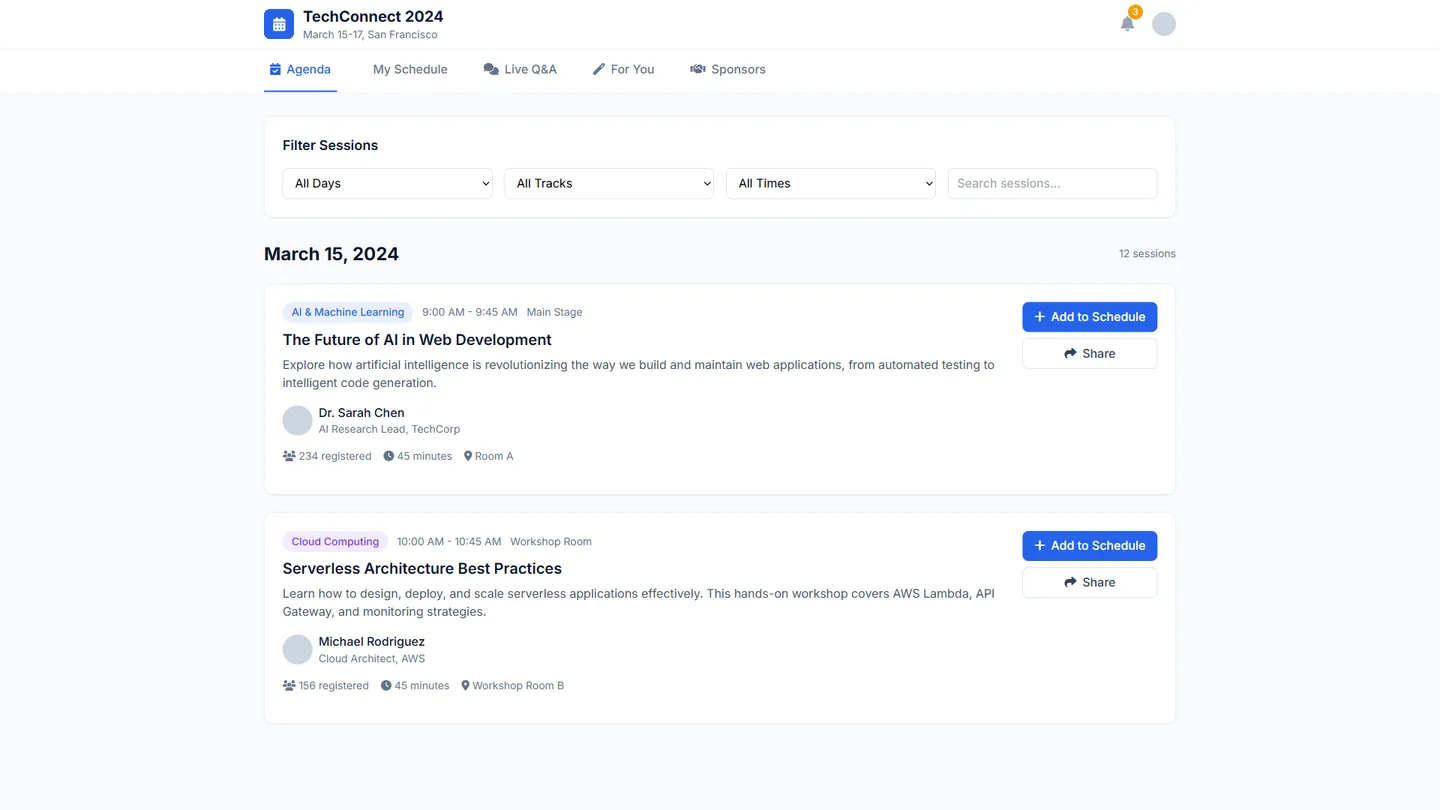
Example
Event App Builder
Prompting the Event App Builder
Conference Event App Builder Prompt
Build a conference event app with an agenda builder for personalized schedules, live moderated speaker Q&A with question upvoting, AI-driven session recommendations based on interests/role/history, and a sponsor showcase hub featuring videos, offers, and CTAs.
Use promptTrade Show Event App Builder Prompt
Build a trade show event app with a live, searchable interactive floor map showing booths, amenities, and traffic hotspots; an exhibitor lead scanner to capture badge data with notes and tags for streamlined follow-ups; a vendor product catalog with specs, pricing ranges, and media so buyers can compare and save items; and a built-in meeting scheduler coordinating on-site meetings with availability and location pins.
Use promptWorkshop Event App Builder Prompt
Build a workshop event app with hands-on step-by-step checklists for consistent outcomes, a live in-app notebook syncing instructor snippets and examples, facilitated small-group breakouts with assigned roles and prompts for peer feedback, and timed post-workshop assignments with reminders and submission tracking to reinforce learning and demonstrate ROI.
Use promptNetworking Event App Builder Prompt
Build a networking event app that uses smart matchmaking (profiles, goals, interests) to suggest high-value connections, offers context-aware icebreaker prompts based on shared topics or goals, includes topic-based drop-in audio rooms for spontaneous mingling, and supports tap-to-share digital business cards with verified contact saving, notes, and tags.
Use promptTop Event App Features by Type
Agenda Builder
Attendees can create personalized schedules from sessions, panels, and keynotes. This helps them maximize time and reduces missed talks at large conferences.
Speaker Q&A
Live moderated Q&A lets attendees submit and upvote questions to speakers. It boosts engagement and surfaces the most relevant topics in big rooms.
Session Recommendations
AI suggests sessions based on interests, role, and past choices. This improves discovery and spreads attendance across parallel tracks.
Sponsor Showcase
A dedicated hub highlights sponsors with videos, offers, and CTAs. It delivers measurable value to sponsors and funding for the event.
Interactive Floor Map
A live, searchable map shows booths, amenities, and traffic hotspots. It shortens navigation time and increases booth visitation.
Lead Scanner
Exhibitors scan badges to capture contact data with notes and tags. It streamlines lead capture and powers post-show follow-ups.
Product Catalog
Vendors upload products with specs, pricing ranges, and media. Buyers can compare and save items, accelerating sourcing decisions.
Meeting Scheduler
Built-in scheduling coordinates on-site meetings with availability and location pins. It converts casual interest into structured buyer-seller conversations.
Hands-on Checklists
Step-by-step checklists guide participants through exercises. This ensures mastery of skills and consistent outcomes across the cohort.
Live Notebook
An in-app coding or note notebook syncs examples and instructor snippets. It keeps everyone aligned and reduces context switching.
Small-Group Breakouts
Facilitated breakout rooms assign roles and prompts. They increase participation and deepen practice through peer feedback.
Post-Workshop Assignments
Timed follow-up tasks with reminders and submission tracking reinforce learning. This maintains momentum and proves ROI for attendees and employers.
Smart Matchmaking
Profiles, goals, and interests power algorithmic match suggestions. It raises the chance of high-value conversations and follow-ups.
Icebreaker Prompts
Context-aware prompts kickstart conversations based on shared topics or goals. This reduces awkwardness and increases first-contact success.
Drop-in Rooms
Topic-based audio rooms let attendees mingle spontaneously. It recreates serendipitous hallway chats at scale.
Digital Business Cards
Tap-to-share cards save verified contacts with notes and tags. It eliminates lost cards and simplifies post-event outreach.
The Event App of Your Dreams
Get started freeFAQ about the Event App Builder
How fast can I create a custom event app with AI?
With Replit’s AI-assisted event app builder, you can spin up a customizable, feature-rich, budget-friendly custom event app in minutes. Use Replit Agent as your event app maker/event app creator for complete app generation, then refine with Replit Assistant. Quickstarts: Remix an existing app (~1 minute), Ask AI (~7 minutes), or Build from Scratch (~15 minutes). This event app creation software keeps you in control while accelerating every step.
Can I import my Figma designs to jump-start an event app UI?
Yes—Import from Figma (~3 minutes) to convert your frames into responsive React applications, giving your event app template and UI components a fast design-to-code starting point. After import, use the Visual Editor to tweak layout, styles, and copy for an engaging mobile event app. You can also create your own custom event template and remix to adapt different event branding.
What core event features can I add (registration, schedule, tickets, sponsors)?
Describe what you need and Replit Agent wires it up: event registration and attendees, event calendar/itinerary, event guide/details with event fields and event metadata, plus event sponsors and event programs. Add secure tickets and payments via Stripe or PayPal, email confirmations with SendGrid, SMS via Twilio, and login with Google OAuth or Replit Auth. These conference apps and corporate events workflows are powered by integrations with third-party services the Agent sets up for you.
How do I manage event content, fields, and metadata with a database?
Ask the Agent to add Database integration and it will provision Replit Database or a managed PostgreSQL instance for database hosting. Define data models for event fields, event metadata, user profiles, and content management; the AI can help with data migrations and seed data. You get a connected backend immediately, ready to query from your UI.
Can my event app support hybrid and virtual events with real-time engagement?
Yes—build hybrid events and virtual events that deliver event notifications and real-time updates. Integrate Twilio for SMS, SendGrid for email, Slack for live chat/alerts, and use webhooks for event-driven applications. The Agent can scaffold live chat and activity feeds, and you can connect social platforms via their APIs as needed.
How do I deploy, share, and secure my event app on a custom domain?
Deploy in minutes to Replit’s cloud hosting, then share links instantly for testing on desktop and mobile devices. Attach a custom domain with connection encryption (SSL) in a few clicks. Use Remix to let collaborators fork your project, and rely on built-in version control integration for safe iteration and rollbacks.
Can I publish my event app to the Apple App Store or Google Play Store?
Replit produces web apps that run great on mobile devices, so you can share a mobile event app instantly via the web. Native publishing to the Apple App Store or Google Play Store is not provided by Replit. If you require app stores distribution, you’ll need an external mobile packaging workflow outside of Replit.
Do I need coding experience, or can I use drag-and-drop tools?
Replit offers AI coding tools in a full-featured code editor with a Visual Editor for quick UI tweaks, providing a low-code experience without heavy drag-and-drop. It’s not a traditional no-code, drag-and-drop builder—logic, state, and backend remain code-first—yet the Agent and Assistant reduce the need to write everything by hand. Because it’s a browser native app with zero installation, both developers and non-technical collaborators can build together in real time.
What are you waiting for?
Build an app without knowing how to code. Tell Replit what you have in mind, then make it your own.