Competition Website Builder
Build a competition website in minutes for free with AI. Write in plain English or tap buttons to create your website.
How to Use the Competition Website Builder
Step 1: Share your competition website's features and requirements.
Step 2: Replit generates your website instantly.
Step 3: Customize features and user experience.
Step 4: Launch your new competition website.
Competition Website Builder Example
Built with Replit.
Build your vision in minutes for free without writing a single line of code.
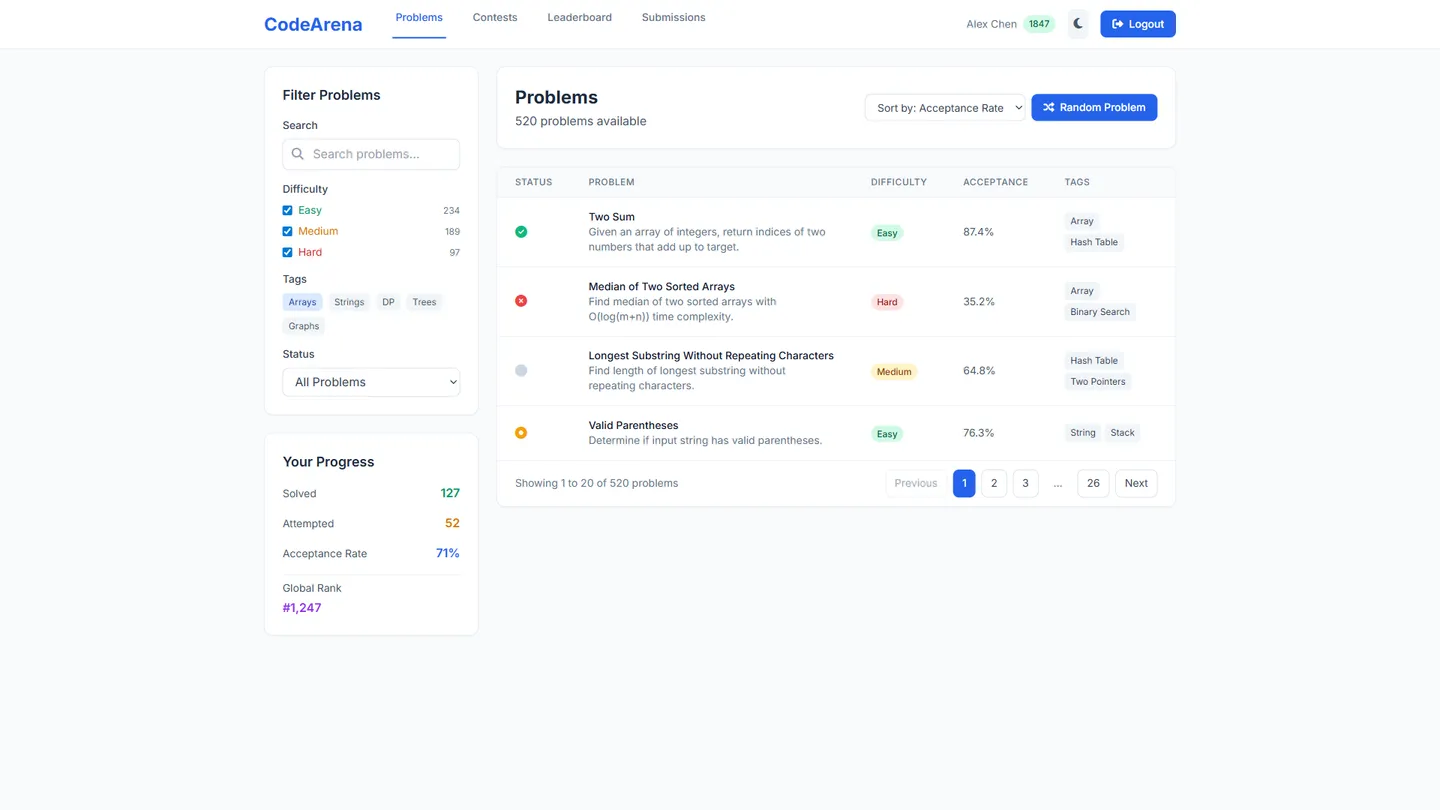
Example
Competition Website Builder
Prompting the Competition Website Builder
Programming Competition Website Builder Prompt
Build a programming competition website featuring a real-time online judge that compiles and executes submissions instantly with verdicts and runtime/memory stats, taggable problem sets with difficulty tiers, anti-cheat leaderboards with plagiarism detection and anomaly flags, and an in-browser multi-language IDE with templates, test input, and quick-run.
Use promptDesign Competition Website Builder Prompt
Create a design competition website featuring a clean anonymous gallery with blind voting and comments, contests that include a clear brief, brand guidelines, and downloadable asset kits, built-in moodboard templates for organizing references, palettes, and typography, and versioned feedback threads where creators upload iterations and receive timestamped critique that showcases growth.
Use promptWriting Competition Website Builder Prompt
Build a writing competition website with a Blind Judging Queue (anonymized, balanced routing), a Prompt Library (curated by genre, theme, and length), a Word Count Validator (real-time word/character limits), and Peer Critique Circles (structured feedback groups before final submission).
Use promptGaming Competition Website Builder Prompt
Create a gaming competition site featuring automated brackets (single/double elimination, Swiss, seeding, smooth scheduling), anti-cheat sync (major integrations, replay verification for sponsor-trusted legitimacy), a live stats hub (real-time data, streams, highlights for shareable spectator experiences), and team scheduling (rosters, time zones, automated reminders to reduce forfeits).
Use promptTop Competition Website Features by Type
Real-time Online Judge
Submissions are compiled and executed instantly with detailed verdicts and runtime/memory stats. Fast feedback accelerates learning and keeps contests engaging for programmers.
Taggable Problem Sets
Problems are organized by tags like DP, Graphs, and Greedy with difficulty tiers. This helps participants target weaknesses and organizers curate balanced contests.
Anti-Cheat Leaderboards
Leaderboards integrate plagiarism detection and anomaly flags. Fair rankings build trust and preserve the integrity of competitive programming.
In-Browser IDE
A multi-language editor with templates, test input, and quick-run capability. Lowering setup friction encourages participation and speeds up iteration.
Anonymous Gallery Voting
Submissions appear in a clean gallery with blind voting and comments. This reduces bias and highlights the strength of the work itself.
Brief & Asset Kit
Each contest includes a clear brief, brand guidelines, and downloadable assets. Designers spend less time hunting resources and more time creating on-brief work.
Versioned Feedback Threads
Creators upload iterations and receive timestamped feedback on each version. Structured critique improves outcomes and showcases growth for judges.
Moodboard Templates
Built-in moodboards let entrants organize references, palettes, and typography. Aligning on visual direction early leads to stronger, more cohesive designs.
Blind Judging Queue
Entries are anonymized and routed to judges via a balanced queue. This ensures fairness and consistent coverage across all submissions.
Prompt Library
Curated prompts by genre, theme, and length ignite ideas for entrants. Strong prompts raise submission quality and diversify storytelling.
Word Count Validator
Real-time word and character checks enforce contest limits and formatting. Clear compliance avoids disqualification and eases judging.
Peer Critique Circles
Writers exchange structured feedback in small groups before final submission. Constructive critique sharpens drafts and builds community.
Automated Brackets
Dynamic brackets support single/double elimination and Swiss formats with seeding. Smooth scheduling reduces admin overhead and player confusion.
Anti-Cheat Sync
Integrations with major anti-cheat systems and replay verification. Trustworthy competition protects legitimacy and attracts sponsors.
Live Stats Hub
Real-time match data, streams, and highlight clips in one dashboard. Spectator-friendly experiences boost engagement and shareability.
Team Scheduling
Roster management, time zone syncing, and automated match reminders. Fewer forfeits mean tighter tournaments and happier players.
The Competition Website of Your Dreams
Get started freeFAQ about the Competition Website Builder
How to create a competition website?
To create a competition website, you can use a template as a starting point and then customize its code.
A competition website generally needs a frontend for users to see and interact with, and a backend to handle tasks like storing submissions and user data. This requires building with languages like HTML, CSS, JavaScript, and a backend language like Python or Node.js.
You can start by forking a website template in Replit. Use the workspace to edit the files and tailor the site to your competition's rules and branding. If you need to add a feature, such as a gallery for entries, or fix a bug, you can ask Agent3 to modify the code. When the site is complete, you can deploy it directly from the workspace.
What features should a competition website include?
A competition website needs features for user registration, entry submissions, a gallery to display entries, and a page to announce results. These elements are essential for managing participation and showcasing the competition.
You can build this on Replit by starting with a website template and editing the HTML and CSS files in the Workspace. For dynamic features like submission forms or user accounts, you will need to write backend code. If you need to generate code for a specific feature or fix an error, you can ask Agent3 for help. Once your site is complete, you can deploy it directly from your project.
How do I design a professional-looking competition website?
To design a professional-looking competition website, focus on a clean layout, consistent branding, and intuitive navigation. This ensures participants can easily find information and trust the legitimacy of your event.
A professional design uses a consistent color palette, readable fonts, and a logical structure. Key information like rules, submission guidelines, and deadlines should be easy to locate. The overall look should be polished and free of visual clutter.
You can start with a website template and edit the HTML and CSS files in the workspace. For a custom design, ask Agent3 to generate code for specific elements, modify the color scheme, or adjust the layout. If you run into issues, Agent3 can also help debug your code to fix errors.
What is the best way to optimize a competition website for search engines?
The best way to optimize a competition website is by implementing on-page SEO. This involves using relevant keywords, clear meta tags, and structured data.
SEO helps search engines understand your site's content, increasing its visibility in search results. For a competition, this means clearly communicating the topic, prize, and rules so potential participants can find it easily.
In your Replit workspace, you can directly edit the HTML files to improve SEO. Add descriptive <title> tags and a compelling <meta name="description">. You can ask Agent3 to generate these tags for you or suggest relevant keywords. For more advanced optimization, ask Agent3 to add structured data markup to your code, which can enhance your site's appearance in search results.
How can I customize the layout of my competition website?
You can customize your Competition website's layout by editing its HTML and CSS files. Replit does not offer a visual drag-and-drop editor, so all changes are made directly in the code.
A website's layout is defined by its code. HTML files create the structure and content, while CSS files control the visual styling, like colors, fonts, and element positioning.
In your Replit workspace, locate the relevant HTML and CSS files for your site. You can edit these files to change the layout. For assistance, you can ask Agent3 to modify the code. For example, you can prompt it to "change the header font to Arial" or "add a two-column section to the main page." Agent3 can also help debug errors if your changes don't work as expected.
What are you waiting for?
Build an app without knowing how to code. Tell Replit what you have in mind, then make it your own.