CMS Website Builder
Build a CMS website in minutes for free with AI. Write in plain English or tap buttons to create your website.
How to Use the CMS Website Builder
Step 1: Share your CMS website's features and requirements.
Step 2: Replit generates your website instantly.
Step 3: Customize features and user experience.
Step 4: Launch your new CMS website.
CMS Website Builder Example
Built with Replit.
Build your vision in minutes for free without writing a single line of code.
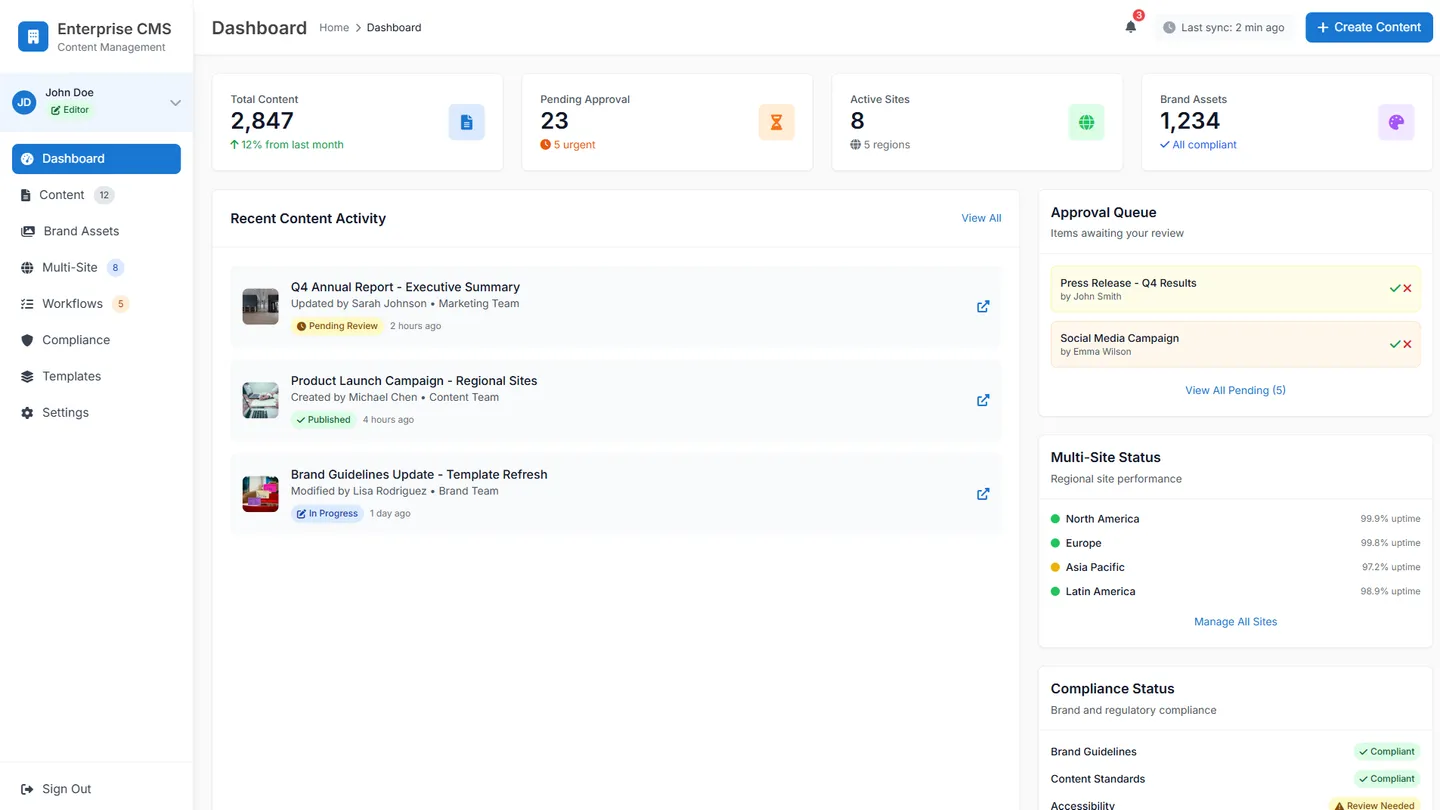
Example
CMS Website Builder
Prompting the CMS Website Builder
Corporate CMS Website Builder Prompt
Build a corporate CMS with role-based access for executives, editors, and IT to control view/edit/approve/publish, centralized brand governance for assets/templates/style rules, multi-site management of regional/subsidiary/campaign sites from a single dashboard with shared components, and comprehensive compliance audit logs tracking all changes, approvals, and publishes with timestamps.
Use promptContent Publishing CMS Website Builder Prompt
Build a content publishing CMS with an editorial workflow (pitch→draft→review→publish) featuring automations and notifications, an SEO toolkit with keyword suggestions, metadata, schema markup, and real-time scoring, content scheduling via a visual calendar for auto-publishing across channels, and reader analytics tracking reads, scroll depth, CTR, and subscriptions per article.
Use promptOnline Store CMS Website Builder Prompt
Build an online store CMS with rich product pages (variants, attributes, media, recommendations), secure checkout (PCI-compliant, multiple gateways, one-click wallets), real-time inventory sync across warehouses/marketplaces/POS, and a promotions engine for coupons, bundles, tiered discounts, and loyalty rewards with targeting rules.
Use promptEducational CMS Website Builder Prompt
Build an educational CMS with a drag-and-drop course builder (modules, lessons, media, prerequisites), LMS integration (LTI/SCORM with grade and enrollment sync), robust assessment tools (quizzes, assignments, rubrics, timed auto-graded exams), and student analytics (progress, engagement, competency mastery across cohorts for timely interventions and personalized learning paths).
Use promptTop CMS Website Features by Type
Role-Based Access
Define granular permissions for executives, editors, and IT to control who can view, edit, approve, or publish content. This reduces risk and ensures consistent governance across departments.
Brand Governance
Centralize brand assets, templates, and style rules to ensure every page meets corporate standards. This protects brand integrity and speeds up compliant content creation.
Multi-Site Management
Manage regional, subsidiary, and campaign sites from a single dashboard with shared components. This streamlines operations and ensures consistent messaging at scale.
Compliance Audit Logs
Track every change, approval, and publish event with time-stamped records. This supports regulatory compliance and simplifies internal audits.
Editorial Workflow
Set up pitch, draft, review, and publish stages with automations and notifications. This keeps teams aligned and accelerates high-quality content production.
SEO Toolkit
Provide keyword suggestions, metadata fields, schema markup, and real-time scoring. This improves discoverability and drives organic traffic growth.
Content Scheduling
Plan and auto-publish posts across channels with a visual calendar. This maintains a steady cadence and maximizes audience engagement times.
Reader Analytics
Measure reads, scroll depth, CTR, and subscriptions per article. This informs editorial decisions and optimizes content strategy.
Product Catalog
Create rich product pages with variants, attributes, media, and recommendations. This helps shoppers evaluate options and increases conversion.
Secure Checkout
Offer PCI-compliant payments, multiple gateways, and one-click wallets. This builds trust and reduces cart abandonment.
Inventory Sync
Sync stock levels across warehouses, marketplaces, and POS in real time. This prevents overselling and improves fulfillment accuracy.
Promotions Engine
Run coupons, bundles, tiered discounts, and loyalty rewards with targeting rules. This boosts average order value and repeat purchases.
Course Builder
Assemble modules, lessons, media, and prerequisites with drag-and-drop. This speeds course creation and keeps curricula structured.
LMS Integration
Connect to LMS standards like LTI and SCORM and sync grades and enrollments. This ensures compatibility with institutional systems.
Assessment Tools
Create quizzes, assignments, rubrics, and timed exams with auto-grading options. This supports measurable learning outcomes at scale.
Student Analytics
Track progress, engagement, and competency mastery across cohorts. This enables timely interventions and personalized learning paths.
The CMS Website of Your Dreams
Get started freeFAQ about the CMS Website Builder
Can I build a headless or traditional CMS on Replit, and which approach is best for my project?
Yes—on Replit you can build both a traditional CMS and a headless CMS. Choose headless for an API-first design that serves multiple front-ends, and traditional when you want a simple website builder experience with everything in one app. Developers can define content types and content models, expose content APIs, and host both front end and back end in a single workspace. Replit’s AI and instant environment make custom development fast for any content management approach.
How do Replit Agent and Assistant accelerate CMS creation and ongoing customization?
Replit Agent can generate a CMS scaffold from natural language, including routes, components, data schemas, and integrations. The Assistant refines code, explains changes, and applies safe edits with previewable diffs. A lightweight visual editor lets you tweak UI text and styles, but Replit is code-first rather than a full drag-and-drop editor. Version control integration plus automatic checkpoints and rollbacks let you experiment and revert quickly. Together, the AI tools speed both initial build and continuous customization.
How do I structure content and manage roles for content editors and creators?
Model your content by defining content types and fields in code and persist them with Replit Database or PostgreSQL. Implement user permissions and roles using Replit Auth, Google OAuth, or Firebase Auth, then enforce access control in your routes and APIs. Coordinate workflow with Git-based version control and Replit’s automatic checkpoints and rollbacks for safe iteration. The Assistant can generate documentation and guidelines to help content editors and creators follow your process.
Can I add e-commerce, authentication, and CRM integrations to my CMS?
Yes—prompt the Agent to integrate payments with Stripe or PayPal, and it will add the necessary SDKs and code. Add authentication with Replit Auth, Google OAuth, or Firebase Auth to power a secure customer portal. Connect CRMs or inventory management systems via their APIs; the Agent can wire up SDK setup and sample calls so you can extend with custom plugins. You can also include messaging and email via Twilio, Slack, or SendGrid. Secrets are stored securely with Replit’s Secrets manager.
What are my options for design: themes, Figma import, and responsive layouts?
Import from Figma to generate a responsive React UI, then iterate with AI to match your brand. Use the Visual Editor for quick text and style adjustments, while deeper customization happens in code. Developers can structure reusable components and styles to implement a theme system suited to your CMS. Ask the Agent to make layouts responsive across breakpoints and tidy up design details.
Does the platform support SEO, blogging, and marketing features?
You can build a blogging platform by creating post and page content types with tags, categories, and archives. SEO features like meta tags, sitemaps, and structured data can be added in code, and the Assistant can help generate them. Integrate marketing tools through APIs—for example email with SendGrid, SMS with Twilio, analytics, or social media sharing. This gives you flexible marketing capabilities without being locked into a specific toolset.
How do I deploy, host, and secure my CMS website?
Deploy to Replit’s cloud in minutes, connect a custom domain, and get HTTPS encryption out of the box. Use built-in database hosting and manage API keys with the Secrets manager. Implement authentication and authorization in code, and rely on version control for auditability. Automatic checkpoints and one-click rollbacks act like backups so you can safely update your CMS.
Can I build multilingual or corporate websites and collaborate with my team?
Yes—implement multilingual websites by adding locale-aware content models and i18n libraries in your codebase. Replit’s real-time collaboration lets developers and stakeholders work together in the same workspace and share previews instantly. The Assistant helps non-technical teammates make safe, guided changes with checkpoints if you need to undo. This approach scales from small sites to corporate websites with headless or traditional architectures.
What are you waiting for?
Build an app without knowing how to code. Tell Replit what you have in mind, then make it your own.