Chat App Builder
Build a chat app in minutes for free with AI. Write in plain English or tap buttons to create your app.
How to Use the Chat App Builder
Step 1: Share your chat app's features and requirements.
Step 2: Replit generates your app instantly.
Step 3: Customize features and user experience.
Step 4: Launch your new chat app.
Chat App Builder Example
Built with Replit.
Build your vision in minutes for free without writing a single line of code.
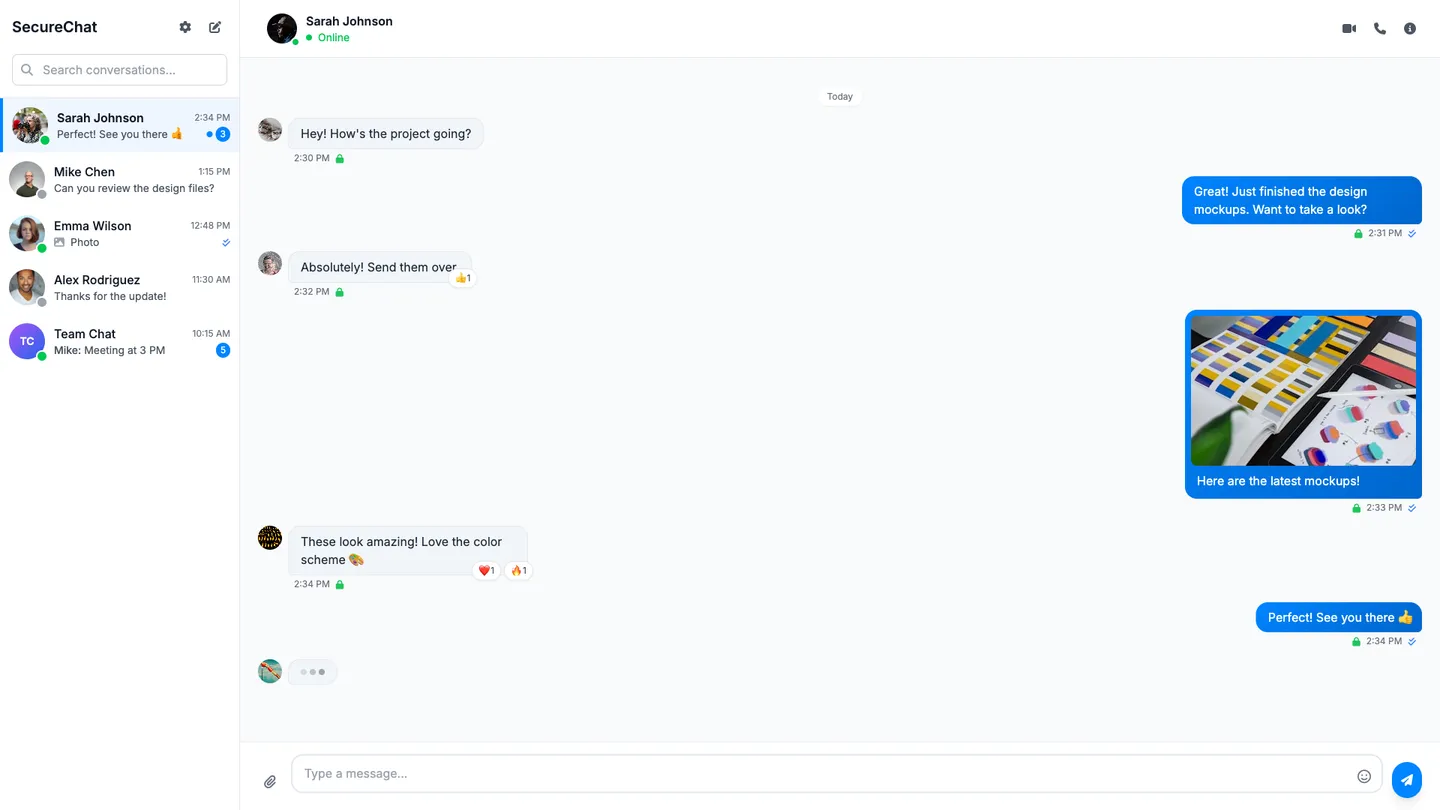
Example
Chat App Builder
Prompting the Chat App Builder
Instant Messaging Chat App Builder Prompt
Build a modern instant messaging app with end-to-end encryption, real-time typing and read status indicators, rich media sharing (photos, videos, voice notes, files), and quick emoji message reactions.
Use promptVideo Conferencing Chat App Builder Prompt
Build a no-code video conferencing chat app with HD video and audio optimized for varying bandwidth, real-time screen sharing of screens or specific windows, breakout rooms for small-group collaboration, and cloud recording with sharable playback links.
Use promptTeam Collaboration Chat App Builder Prompt
Build a team collaboration chat app with organized channels and threaded conversations, integrated task creation/assignment/tracking directly from messages, file sharing with versioning and change history, and integrations with calendars, code repositories, and CRMs to centralize workflows and reduce context switching.
Use promptCustomer Support Chat App Builder Prompt
Build a customer support chat that uses AI bot triage to handle FAQs and collect issue details, seamlessly hands off to the right agent with full context, auto-suggests knowledge base articles to deflect tickets, and includes in-chat CSAT surveys with analytics dashboards for satisfaction, response times, and outcomes.
Use promptTop Chat App Features by Type
End-to-End Encryption
Messages are encrypted on the sender’s device and decrypted only on the recipient’s device. This protects privacy and builds user trust, essential for a modern instant messenger.
Typing & Read Status
Real-time indicators show when someone is typing and when messages are read. This reduces uncertainty and makes conversations feel more responsive.
Rich Media Sharing
Users can send photos, videos, voice notes, and files seamlessly. It keeps chats engaging and reduces the need to switch to other apps.
Message Reactions
Quick emoji reactions let users respond without composing a full message. This speeds communication and adds expressive nuance to chats.
HD Video & Audio
High-quality video and audio optimize clarity across bandwidth conditions. Better fidelity reduces fatigue and improves meeting effectiveness.
Screen Sharing
Participants can share their screen or a specific window. It enables demos, walkthroughs, and collaborative reviews in real time.
Breakout Rooms
Hosts can split attendees into smaller groups for focused discussions. This scales large meetings while maintaining interactivity.
Cloud Recording
Sessions can be recorded and stored in the cloud with playback links. It preserves institutional knowledge and helps absent participants catch up.
Channels & Threads
Organized channels with threaded conversations keep topics tidy. This reduces noise and makes information easier to find later.
Integrated Tasks
Create, assign, and track tasks directly from messages. It turns conversations into action without switching tools.
File Versioning
Files shared in chat keep versions and change history. Teams avoid confusion and ensure everyone works from the latest document.
App Integrations
Connects with tools like calendars, repos, and CRMs. Centralizing workflows in chat saves time and reduces context switching.
Bot Triage
An AI chatbot handles FAQs and collects issue details before an agent joins. It shortens resolution times and lowers support costs.
Agent Handoff
Seamless transfer from bot to the right human agent with full context. Customers avoid repeating themselves and get faster solutions.
KB Suggestions
Automatically suggests knowledge base articles based on user input. Many tickets resolve instantly, improving deflection and satisfaction.
CSAT & Analytics
In-chat surveys and dashboards measure satisfaction, response times, and outcomes. Data-driven insights help optimize staffing and workflows.
The Chat App of Your Dreams
Get started freeFAQ about the Chat App Builder
How do I create a real-time chat app with group chat using AI?
Describe your chat app to Replit Agent (real-time rooms, DMs, typing indicators), and it will generate a full-stack instant messaging app with a chat feature, persistence, and deployment in minutes. You can ask the chat app builder to add group chat, moderation, and smart replies using an AI API (e.g., OpenAI) and it will wire up the code and configuration. Agent can also integrate authentication and storage, then deploy instantly so you can test new features live. Iterate with the Assistant to refine UI, performance, and add any API integrations you need.
Do I need coding skills, or is this a no-code app builder?
Replit is not a pure no-code platform; it’s an AI-powered app maker that reduces required coding skills by generating and editing code for you. It offers a user-friendly workflow with tutorials and a lightweight visual editor, but it’s not a full drag-and-drop no-code app builder. You can build largely through natural language and quick edits, then adjust code when you want deeper control. This hybrid approach is ideal for beginners and developers alike.
What backend, database, and APIs should I use for messaging and presence?
Use Replit Agent to scaffold the backend with real-time functionality and connect a database for presence and messages—choose Replit Database or managed PostgreSQL. Add authentication (Replit Auth, Google OAuth, or Firebase Auth) so app users can sign in securely. You can integrate APIs like Twilio or Slack for notifications and SendGrid for email, and the Agent will include the SDKs and glue code. This gives you a production-ready backend, API routes, and storage aligned to your app development needs.
Can I start from templates or import designs (e.g., Figma) to speed up app design?
Yes—Remix community apps to start from templates and app templates, then have Agent add new features. Import from Figma to turn your designs into a responsive React UI, streamlining app design and improving user experience fast. Use the Visual Editor for quick tweaks, and ask the Assistant to refine layout, accessibility, or styles. This flow accelerates iteration from concept to polished interface.
How do I publish my chat app to the web, App Store, or Google Play?
Deploy to the web from Replit in minutes with custom domains and HTTPS, then share instantly. For iOS and Android distribution (Apple App Store and Google Play/Google Play Store), build your mobile app using appropriate native or cross-platform tooling outside Replit and submit via the official pipelines. You can still host your backend on Replit and reuse the same APIs for your ios apps and android app clients. This gives you a simple web launch now and a path to app store publishing later.
Can I add push notifications, video calls, and social sign-in?
Yes—add social sign-in with Replit Auth, Google OAuth, or Firebase Auth in a few prompts. For push notifications and alerts, integrate APIs like Twilio (SMS) or SendGrid (email), or bring a third-party push service; Agent will wire up the necessary SDKs and functionality. You can implement a video call experience using WebRTC or a video API provider, and the Assistant can help with client and server code. Iterate quickly to ship new features without leaving the workspace.
How can I monetize my messenger app?
Integrate payments with Stripe or PayPal to monetize your messenger app via subscriptions, credits, or one‑time e-commerce purchases. Ask Agent to add checkout flows, pricing pages, and webhooks, and it will generate the code and configuration. If you later add native clients, implement platform in-app purchases separately while continuing to use your Replit-hosted backend. Deploy updates fast and test pricing changes safely with checkpoints and rollbacks.
What are you waiting for?
Build an app without knowing how to code. Tell Replit what you have in mind, then make it your own.