Catalog App Builder
Build a catalog app in minutes for free with AI. Write in plain English or tap buttons to create your app.
How to Use the Catalog App Builder
Step 1: Share your catalog app's features and requirements.
Step 2: Replit generates your app instantly.
Step 3: Customize features and user experience.
Step 4: Launch your new catalog app.
Catalog App Builder Example
Built with Replit.
Build your vision in minutes for free without writing a single line of code.
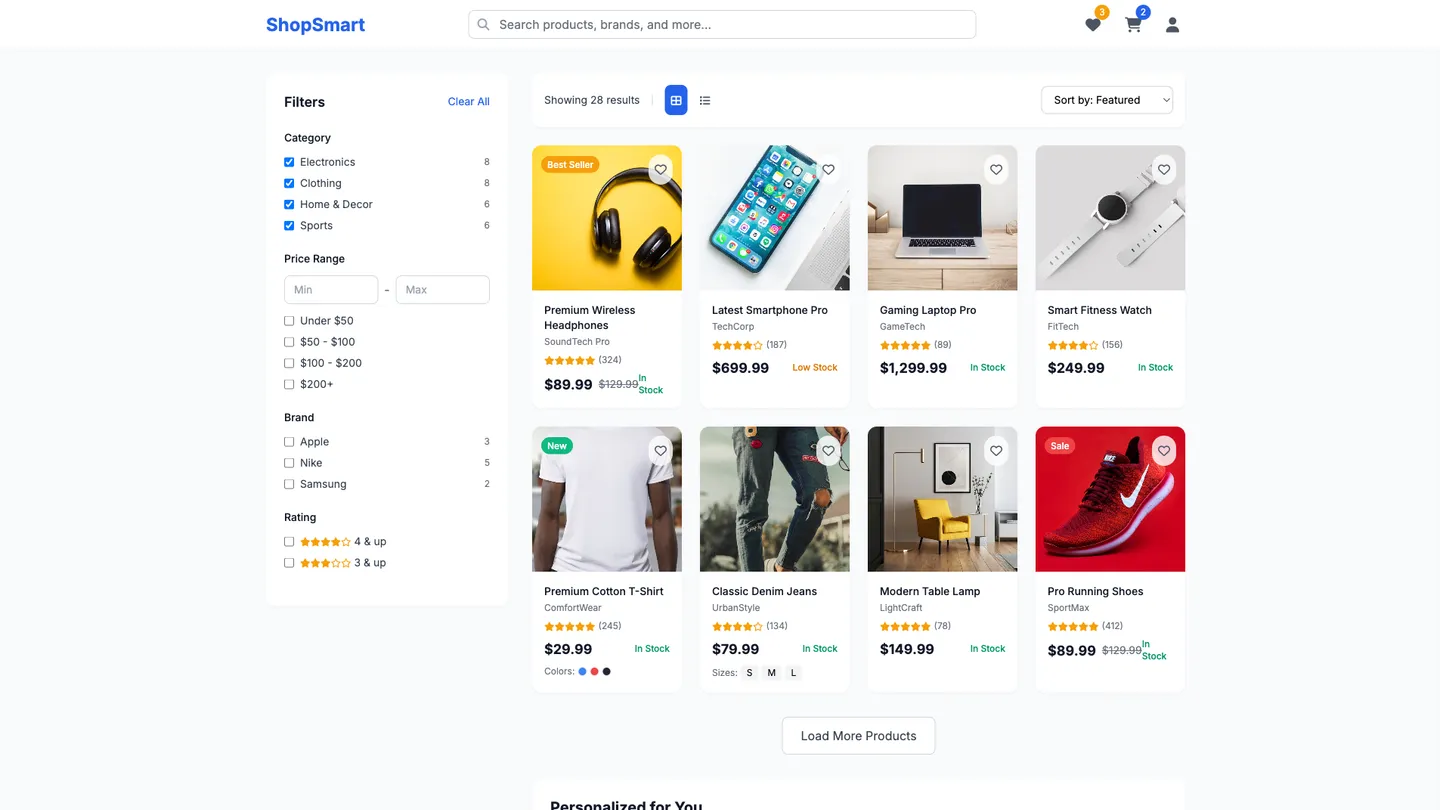
Example
Catalog App Builder
Prompting the Catalog App Builder
E-Commerce Catalog App Builder Prompt
Build an e-commerce catalog app with Smart Search (autosuggest and typo tolerance), Dynamic Filters (price, brand, size, color, ratings) updating results in real time, Rich Product Cards (images, price, badges, quick add-to-cart, stock indicators), and AI-powered Personalized Recommendations (trending, similar, complementary items).
Use promptProduct Inventory Catalog App Builder Prompt
Build a product inventory catalog app with real-time stock syncing across locations, mobile barcode scanning for intake/picking/counts, automated low-stock alerts that trigger notifications and draft purchase orders, and SKU analytics dashboards for turnover, aging stock, and demand forecasting.
Use promptDigital Library Catalog App Builder Prompt
Build a digital library catalog app with advanced full-text and metadata search with filters (author, subject, year), curated and user-created reading lists, offline access to downloaded items, and one-click citation export (APA, MLA, BibTeX).
Use promptArt Collection Catalog App Builder Prompt
Build an art collection catalog app with high‑res deep zoom tiling to inspect brushwork, interactive provenance timelines of ownership/exhibitions/restoration, curator notes with annotations and audio guides, and a drag‑and‑drop exhibition builder for themed digital showcases.
Use promptTop Catalog App Features by Type
Smart Search
A search bar with autosuggest and typo tolerance helps shoppers quickly find products. This reduces friction and boosts conversion by surfacing relevant items fast.
Dynamic Filters
Facet filters for price, brand, size, color, and ratings update results in real time. This lets users narrow choices efficiently, improving decision confidence and speed.
Rich Product Cards
Cards show images, price, badges, quick add-to-cart, and stock indicators. Shoppers can act without opening product pages, shortening the purchase path.
Personalized Recommendations
AI-driven suggestions highlight trending, similar, and complementary items. This increases average order value and keeps users engaged with relevant products.
Real-Time Stock
Live inventory counts across locations sync instantly with sales and returns. This prevents stockouts and overordering by providing accurate visibility.
Barcode Scanning
Mobile scanning for intake, picking, and cycle counts speeds up operations. It reduces manual errors and improves traceability throughout the warehouse.
Low-Stock Alerts
Automated thresholds trigger notifications and draft purchase orders. This ensures timely replenishment and avoids lost sales from empty shelves.
SKU Analytics
Dashboards show turnover, aging stock, and demand forecasting per SKU. Managers can optimize reorder points and clear dead stock proactively.
Advanced Search
Full-text and metadata search supports filters like author, subject, and publication year. Users find precise materials faster, improving research efficiency.
Reading Lists
Curated lists and user-created collections organize materials by course or theme. This supports learning paths and encourages deeper exploration.
Offline Access
Downloadable items enable reading without an internet connection. Learners can study anywhere, increasing engagement and completion rates.
Citation Export
One-click exports to formats like APA, MLA, and BibTeX streamline referencing. This saves time and reduces errors in academic work.
High-Res Zoom
Deep zoom with tiling lets viewers inspect brushwork and textures in detail. This delivers a gallery-like experience that highlights craftsmanship.
Provenance Timeline
Interactive timelines show ownership, exhibitions, and restoration history. It builds trust and scholarly value by documenting an artwork’s journey.
Curator Notes
Expert annotations and audio guides provide context, techniques, and stories. This enriches appreciation and educates both collectors and the public.
Exhibition Builder
Drag-and-drop tools create digital exhibitions and themed sets. Museums and collectors can showcase narratives and promote pieces dynamically.
The Catalog App of Your Dreams
Get started freeFAQ about the Catalog App Builder
Can I build a catalog app without heavy setup or coding experience?
Yes—on Replit you can describe your idea in natural language and the AI Agent will handle code generation, scaffolding a working catalog app in an online IDE with no-install setup. The Assistant then helps refine features, fix issues, and explain code, giving you a low-code path even if you’re new to development. Use the Visual Editor for quick UI adjustments while leaving complex logic to code the AI writes. Safe experimentation is built in via automatic checkpoints and one-click rollback so you can iterate confidently.
How should I structure products, categories, and inventory data?
Use PostgreSQL for a normalized schema with tables for products, categories, and a join table for relations, plus variants with SKU and attribute definitions linked by foreign keys. Keep attributes either in a dedicated attributes table or JSON columns, depending on the breadth of customization. Manage migrations and seed data with the AI Agent so your entities and relations evolve safely over time. For simpler needs or caching, a built-in key-value store can complement Postgres.
How do I add search, filters, and sorting to my catalog?
Implement full-text search with Postgres indexing and add faceted search via precomputed aggregations in SQL. Expose query params for server-side filtering and sort options, and use debounce on client inputs to reduce noisy requests. Support pagination or infinite scroll for performance, with the heavy lifting done server-side and optional client-side filtering for minor refinements. The AI Agent can scaffold endpoints and UI components that wire up these patterns cleanly.
What’s the best way to handle product images and media?
Store assets in object storage and serve them through a CDN to minimize latency and cost. Add image optimization pipelines to generate thumbnails, responsive images (srcset), and WebP, with compression and caching headers for fast loads. Use lazy loading and descriptive alt text to improve performance and accessibility. The AI Agent can integrate common libraries and services to automate these steps.
Can I import designs or existing code to speed up setup?
Yes—use Figma import to convert frames into React components (respecting autolayout) and get an instant UI scaffold. Pull existing projects with GitHub import or remix a community project to jump-start features. Start from templates and let the AI Agent adapt them to your requirements. You can keep iterating in code or ask the Assistant to make targeted changes.
How do I add login, checkout, and order notifications?
Mention oauth or auth in your prompt and the AI Agent can wire Google OAuth or Replit Auth for secure login flows. Add Stripe or PayPal for checkout and configure webhooks to process order events reliably. For notifications, integrate SendGrid for email and Twilio for SMS, keeping secrets in the Replit secrets manager as environment variables. Payments remain PCI-managed by providers like Stripe/PayPal, while you focus on app logic.
What are the limits of drag-and-drop when building a catalog app?
Replit’s Visual Editor excels at UI tweaks—text edits, styles, and layout—directly on the live preview. Complex changes still happen in the code editor, where you manage state management and backend logic. It’s a pragmatic low-code vs code approach: use visual tools for polish and AI-driven code edits for deeper functionality. This balance keeps you fast without boxing you into a pure drag-and-drop system.
How do I deploy, use a custom domain, and iterate safely?
Deploy to the cloud in minutes, attach a custom domain, and get automatic https via ssl/tls. For staging, deploy a separate Repl or branch-based environment before promoting to production, leveraging version control to track changes. Use checkpoints and rollback as built-in backups to recover instantly from bad releases. If you need monitoring, connect third-party services or webhooks to observe health and alerts post-deployment.
What are you waiting for?
Build an app without knowing how to code. Tell Replit what you have in mind, then make it your own.