Builder Project Management App
Build a project management app in minutes for free with AI. Write in plain English or tap buttons to create your app.
How to Use the Builder Project Management App
Step 1: Share your project management app's features and requirements.
Step 2: Replit generates your app instantly.
Step 3: Customize features and user experience.
Step 4: Launch your new project management app.
Builder Project Management App Example
Built with Replit.
Build your vision in minutes for free without writing a single line of code.
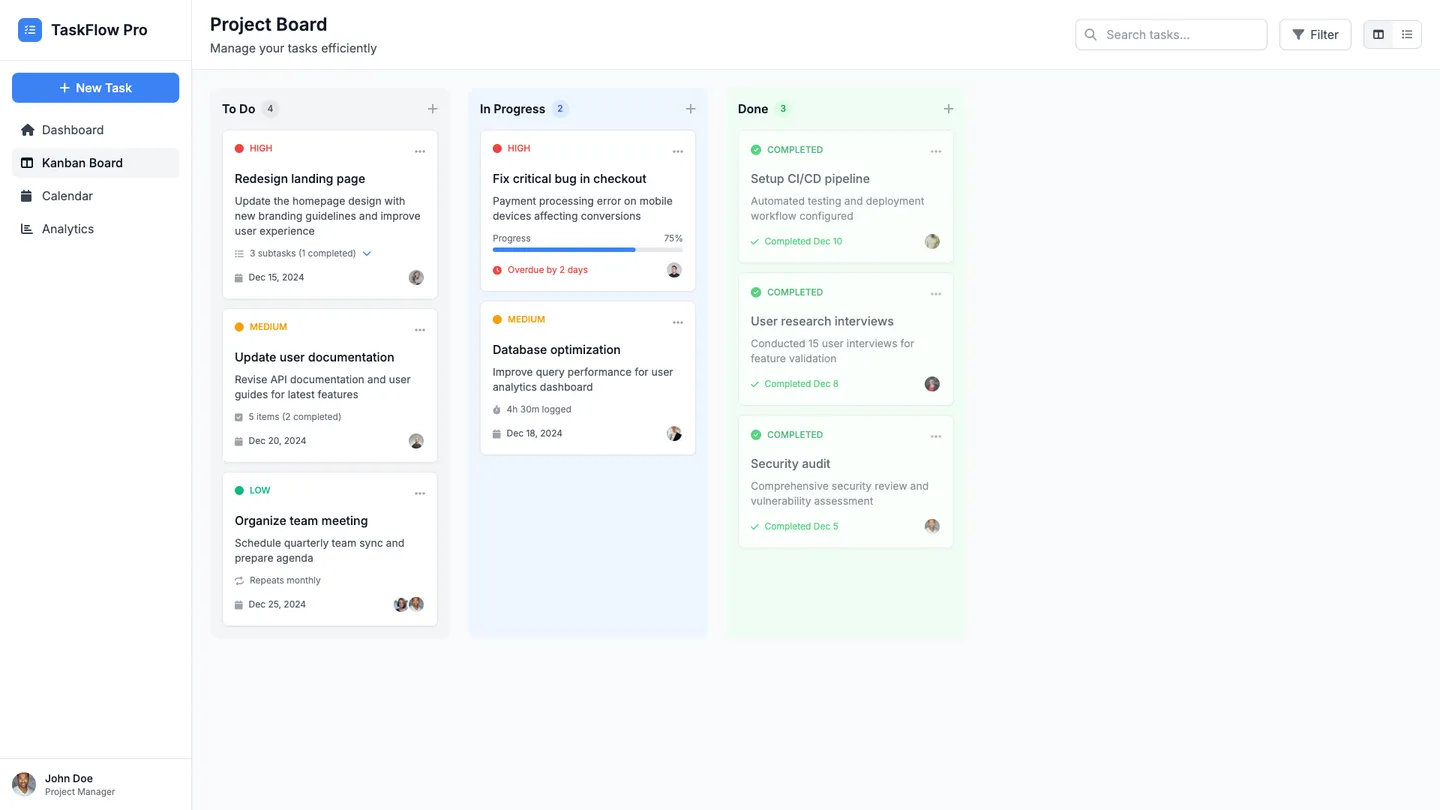
Example
Builder Project Management App
Prompting the Builder Project Management App
Task Management Builder Project Management App Prompt
Build a project management task builder with Kanban boards (To Do/Doing/Done), nested subtasks and checklists, per-task priority and due dates, and smart recurrence rules (e.g., every weekday or after completion).
Use promptCollaboration Tools Builder Project Management App Prompt
Build a project management app with real-time co-editing (live cursors) for docs/plans, threaded comments with mentions on tasks/files/docs, shared infinite whiteboards (sticky notes/shapes/templates), and team announcements with read receipts and pinning.
Use promptResource Planning Builder Project Management App Prompt
Build a resource planning project management app that catalogs team skills, proficiencies, and certifications (Skills Matrix), models workload against availability weeks/months ahead to prevent overbooking and set realistic delivery dates (Capacity Forecasting), visualizes utilization with color-coded charts by person, team, and role to spot bottlenecks and idle capacity (Resource Heatmap), and plans by roles then matches to specific people as projects firm up to keep plans flexible while ensuring coverage (Role-based Scheduling).
Use promptTime Tracking Builder Project Management App Prompt
Build a project management time tracking app with one-click timers to start/pause/switch tasks, timesheet approvals with automated reminders, configurable billable/non-billable rates by client/project/role for precise invoicing, and idle detection that prompts users to discard or reassign inactive time.
Use promptTop Project Management App Features by Type
Kanban Boards
Visual boards let users organize tasks into columns like To Do, Doing, and Done. This makes progress obvious at a glance and reduces planning overhead.
Subtasks & Checklists
Break big tasks into actionable steps with nested subtasks and checklists. This ensures clarity on what’s needed and improves completion rates.
Priority & Due Dates
Set priority levels and deadlines for every task. Teams focus on what matters most and hit timelines consistently.
Smart Recurrence
Create recurring tasks with rules like every weekday or after completion. This automates routine work and keeps workflows predictable.
Real-time Co-editing
Multiple users edit documents and project plans simultaneously with live cursors. This removes version chaos and speeds up decision-making.
Threaded Comments
Conversations stay attached to tasks, files, and documents with threads and mentions. Context stays intact and feedback cycles are shorter.
Shared Whiteboards
Teams brainstorm on infinite canvases with sticky notes, shapes, and templates. This enables visual problem solving and alignment in remote settings.
Team Announcements
Broadcast updates to relevant groups with read receipts and pinning. Everyone stays informed without noisy chat overload.
Skills Matrix
Catalog team skills, proficiencies, and certifications. Managers assign the right people faster and reduce project risk.
Capacity Forecasting
Model workload against availability weeks or months ahead. This prevents overbooking and supports realistic delivery dates.
Resource Heatmap
Visualize utilization with color-coded charts by person, team, and role. Leaders quickly spot bottlenecks and idle capacity.
Role-based Scheduling
Plan resources by roles, then match to specific people as projects firm up. It keeps plans flexible while ensuring coverage.
One-click Timers
Start, pause, and switch timers from tasks with a single click. This reduces friction and improves time capture accuracy.
Timesheet Approvals
Submit weekly timesheets for manager review with automated reminders. Governance is simpler and billing cycles speed up.
Billable Rates
Assign billable/non-billable flags and custom rates by client, project, or role. This enables precise invoicing and profitability tracking.
Idle Detection
Detect inactivity and prompt users to discard or reassign time. It keeps logs clean and prevents accidental time inflation.
The Project Management App of Your Dreams
Get started freeFAQ about the Builder Project Management App
How do I quickly start a Builder Project Management App?
Open a new Replit workspace and choose the Quickstart path that fits your style: Ask AI to generate a working PM app from a plain‑English prompt, or Build from Scratch for full control. You can Remix community templates to jump in fast and customize from there. The Agent sets up the project and dependencies automatically so you can iterate immediately.
Can I import existing designs or code to jumpstart my PM app?
Use GitHub Import to bring in your existing repository, or Figma Import for design-to-code that converts your frames into React components with a responsive UI. After import, refine layouts and copy with the Visual Editor, then continue coding as needed. This keeps your design system intact while accelerating implementation.
How does AI help me build core PM features (tasks, kanban, sprints)?
Replit Agent handles feature planning and code generation for task models, kanban boards, and sprint views from a short prompt. Replit Assistant speeds you up with autocomplete, debugging, and in-editor documentation as you iterate. Together they scaffold back end and UI, then help you refine behavior and polish details.
Which database and backend options fit tasks, users, and permissions?
Ask the Agent to provision PostgreSQL or Replit Database and define a schema for tasks, users, and permissions. It can scaffold migrations, seed data, and add RBAC checks in your routes. You can have it generate a REST API or GraphQL resolvers to power your UI and integrations.
How do I add authentication, notifications, and third-party integrations?
Request Google OAuth, Replit Auth, or Firebase Auth and the Agent wires up sign‑in flows. For alerts and messaging, add SendGrid, Twilio, or Slack, and expose webhooks for event-driven updates. Store API keys in Secrets Manager so credentials stay secure while you ship quickly.
How can I support real-time boards, comments, and team presence?
Have the Agent implement real-time updates with WebSockets or Server-Sent Events for kanban boards and comment threads. Use the Assistant to add optimistic updates and presence indicators to keep the UI snappy. For concurrent edits, it can guide conflict resolution strategies and help integrate CRDTs if you choose that approach.
How do I deploy, secure, and share my app with stakeholders?
Click Deploy to host your app, attach a custom domain, and serve it over HTTPS with encryption by default. Configure environment variables for secrets and connect managed database hosting in a few steps. Share live links for feedback, and keep iterating or monitoring on the go with Replit Mobile.
What safety nets exist if generated changes break my app?
Replit saves automatic checkpoints before Agent or Assistant edits, so you can rollback any time. Review proposed diffs before applying changes, and rely on built-in version control to track your history. This lets you experiment confidently and restore a stable state in one click.
What are you waiting for?
Build an app without knowing how to code. Tell Replit what you have in mind, then make it your own.