Blog Website Builder
Build a blog website in minutes for free with AI. Write in plain English or tap buttons to create your website.
How to Use the Blog Website Builder
Step 1: Share your blog website's features and requirements.
Step 2: Replit generates your website instantly.
Step 3: Customize features and user experience.
Step 4: Launch your new blog website.
Blog Website Builder Example
Built with Replit.
Build your vision in minutes for free without writing a single line of code.
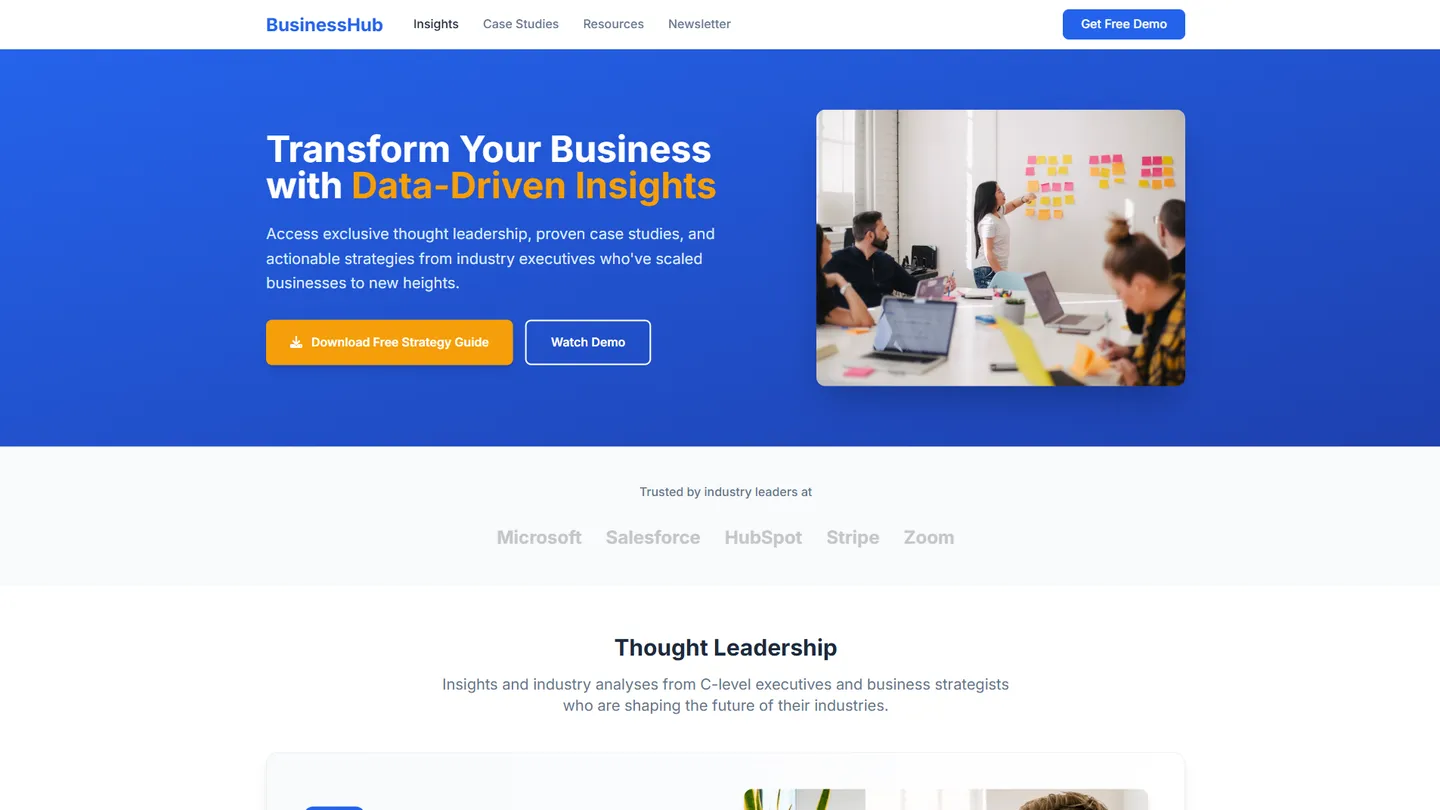
Example
Blog Website Builder
Prompting the Blog Website Builder
Business Blog Website Builder Prompt
Build a conversion-focused business blog featuring a Thought Leadership hub for executive insights and industry analyses, detailed Case Studies with measurable outcomes, prominent Lead Magnet CTAs for ebooks/templates/webinars, and a Segmented Newsletter signup that categorizes subscribers by role, industry, or interest.
Use promptAffiliate Blog Website Builder Prompt
Build an affiliate blog with interactive product comparison tables (specs, pros/cons, ratings), a centralized link manager for cloaking/tracking/auto-updating, long-form buyer guides (use cases, budgets, decision criteria), and real-time deal alert widgets for coupons, limited-time offers, and price drops.
Use promptNiche Blog Website Builder Prompt
Build a niche blog website with a finely structured topic taxonomy (categories/tags) for SEO and discoverability, a moderated community Q&A section, a curated resource directory with filters and brief reviews, and an alphabetized niche glossary with internal links.
Use promptNews Blog Website Builder Prompt
Build a news blog with real-time updates (live blog modules and auto-refresh for breaking stories), a public-facing and internal editorial calendar for upcoming coverage and beats, fact-check badges with citations tied to claims, and browser and mobile push notifications for breaking news, topics, and local alerts.
Use promptTop Blog Website Features by Type
Thought Leadership
A section highlighting executive insights, industry analyses, and opinion pieces. It builds authority and trust, positioning the business as an expert to attract high-value leads.
Case Studies
In-depth stories showcasing client problems, solutions, and outcomes with metrics. They provide social proof and help prospects envision results, shortening sales cycles.
Lead Magnet CTA
Prominent calls-to-action offering ebooks, templates, or webinars in exchange for email. This converts readers into leads and fuels the sales pipeline.
Segmented Newsletter
Email signup with audience segmentation by role, industry, or interest. Tailored content increases engagement and nurtures prospects more effectively.
Comparison Tables
Interactive product comparison tables with specs, pros/cons, and ratings. They boost conversions by simplifying decisions and keeping users on your page.
Link Manager
Centralized affiliate link cloaking, tracking, and auto-updating. It protects commissions, improves UX, and speeds up maintenance when offers change.
Buyer Guides
Long-form guides that explain use cases, budgets, and decision criteria. They pre-sell products ethically and rank well for high-intent keywords.
Deal Alerts
Real-time alerts and widgets for coupons, limited-time deals, and price drops. This drives urgency and repeat visits, lifting affiliate revenue.
Topic Taxonomy
A finely structured category and tag system tailored to the niche’s subtopics. It improves discoverability and SEO while guiding readers to depth content.
Community Q&A
A moderated Q&A area where readers ask and answer niche-specific questions. It builds loyalty, generates UGC, and surfaces long-tail content ideas.
Resource Directory
Curated tools, suppliers, and references with filters and brief reviews. It becomes a go-to hub that earns backlinks and recurring traffic.
Niche Glossary
An alphabetized glossary explaining jargon and concepts with internal links. It lowers entry barriers for newcomers and strengthens topical authority.
Real-Time Updates
Live blog modules and auto-refresh for breaking stories. It increases time on site and establishes you as the first source to check.
Editorial Calendar
A public-facing and internal schedule showing upcoming coverage and beats. It improves newsroom planning and sets audience expectations.
Fact-Check Badges
Visible verification badges and citations tied to claims in articles. They reinforce credibility and reduce misinformation risk.
Push Notifications
Browser and mobile push for breaking news, topics, and local alerts. This drives rapid return visits and boosts story reach.
The Blog Website of Your Dreams
Get started freeFAQ about the Blog Website Builder
What website builder is best for blogs?
The best builder for a blog depends on your technical comfort and customization needs. No-code builders are easy for beginners but can be restrictive. Building with code offers full control over design and functionality.
Replit allows you to build a blog using code. You can begin with a blog template for a framework like Next.js or Astro. This provides a working blog that you can customize by editing files in the workspace. If you want to change the layout, fix an error, or add a feature, you can ask Agent3 to write or debug the code. When your site is ready, you can deploy it from the workspace.
How to create a blog website for free?
Yes, you can create and host a blog website for free.
Creating a free blog generally involves choosing a pre-built template, customizing its content and design, and then publishing it online through a hosting service.
On Replit, you can start with a blog template and edit the files directly in the workspace. Once your content is ready, you can deploy the site with a single click. For customization, you can ask Agent3 to modify the code, fix errors, or automate steps like adding a contact form. While Replit does not have a visual drag-and-drop editor, Agent3 can make code changes based on your plain-language descriptions.
What features should a blog website include?
A blog needs a homepage to display recent posts, individual article pages, and a way to organize content, such as categories or tags. A search function is also essential for usability.
These features help readers discover and navigate your content. Additional elements like a comments section, an author bio page, and an RSS feed can further engage your audience and encourage them to return.
You can start with a blog template and then ask Agent3 to add or modify features, such as implementing a search bar or creating a category system. If you run into issues while customizing, Agent3 can also help identify and fix errors in your code.
How do I design a professional-looking blog website?
To design a professional-looking blog, focus on a clean layout, consistent branding, and a responsive design that works on all devices.
This involves using a simple color palette, readable fonts, and clear navigation. A good design guides the reader's eye and makes your content easy to consume without distractions.
You can start with a blog template in the workspace. While Replit does not have a visual design editor, you can customize your site by editing the HTML and CSS files directly. For help, ask Agent3 to modify your design, such as changing the font or adjusting the layout. Agent3 can also write code to make your blog responsive or fix display errors.
What is the best way to optimize a blog website for search engines?
The best way to optimize a blog for search engines is to consistently publish high-quality, relevant content and ensure your site is technically sound. This involves using targeted keywords, optimizing meta tags, and ensuring your site is fast and mobile-friendly.
Search Engine Optimization (SEO) is the process of improving your site to increase its visibility in search engine results. Key elements include on-page factors like content and keywords, and technical aspects like site speed and mobile-friendliness. Good SEO helps your blog appear in front of people searching for the topics you cover.
In your Replit project, you can directly edit the HTML files to add or update meta titles and descriptions for each page. To improve site speed, you can ask Agent3 to help you optimize images or minify CSS and JavaScript files. If you encounter technical errors affecting your site’s performance, Agent3 can also help you debug the code.
What are you waiting for?
Build an app without knowing how to code. Tell Replit what you have in mind, then make it your own.