Birthday Website Builder
Build a birthday website in minutes for free with AI. Write in plain English or tap buttons to create your website.
How to Use the Birthday Website Builder
Step 1: Share your birthday website's features and requirements.
Step 2: Replit generates your website instantly.
Step 3: Customize features and user experience.
Step 4: Launch your new birthday website.
Birthday Website Builder Example
Built with Replit.
Build your vision in minutes for free without writing a single line of code.
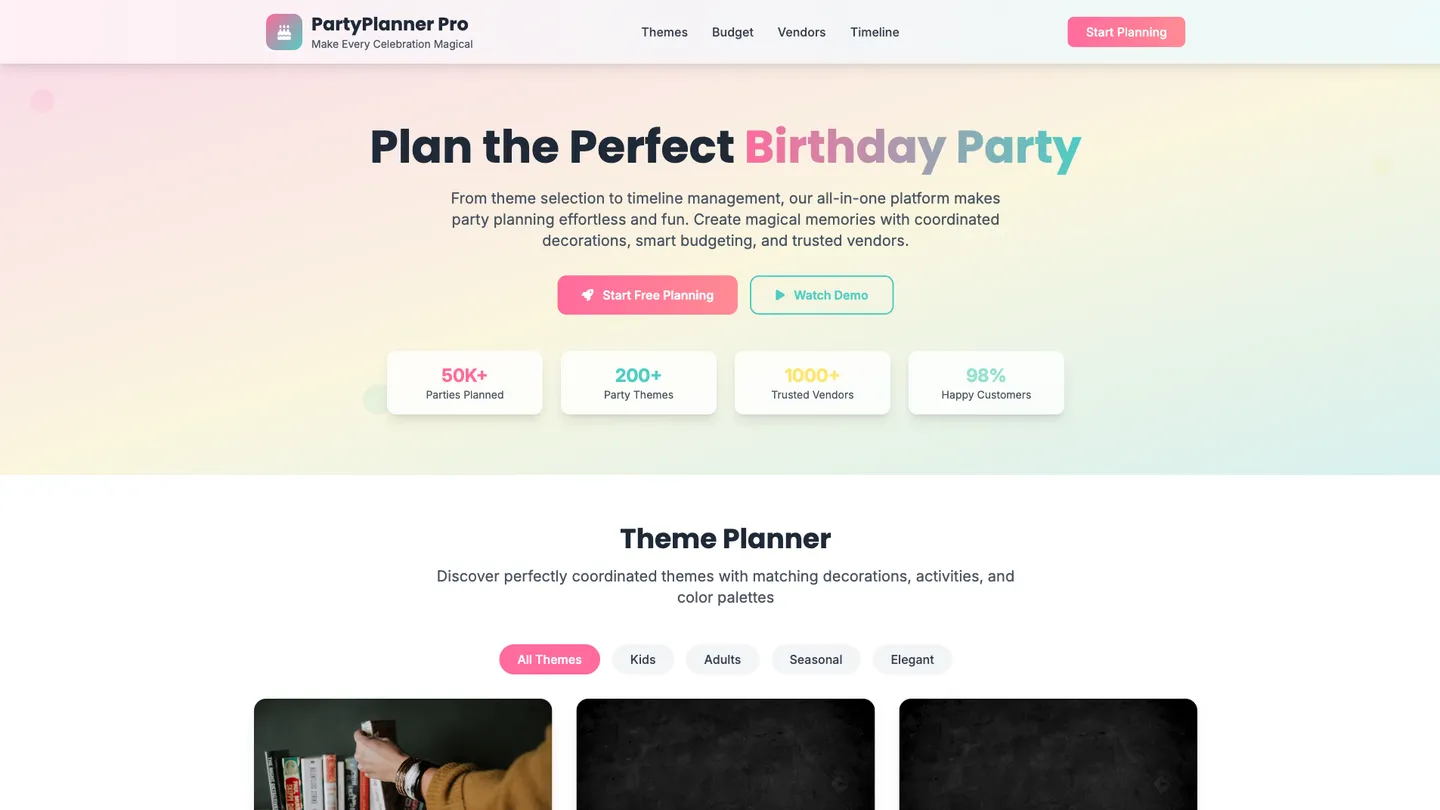
Example
Birthday Website Builder
Prompting the Birthday Website Builder
Party Planning Birthday Website Builder Prompt
Build a birthday party planning website with a Theme Planner to curate coordinated decor, activities, and color palettes; a Budget Tracker to set budgets, categorize projected vs. actual costs, and surface real-time savings; a Vendor Marketplace to browse vetted local venues, catering, entertainment, and rentals with reviews and instant quotes; and a Timeline Checklist that auto-generates milestones with reminders from planning through cleanup.
Use promptInvitation Creation Birthday Website Builder Prompt
Build a birthday invitation website that uses a professional Template Gallery, offers drag-and-drop Personalization Tools for fonts, colors, photos, and event details, includes real-time RSVP Tracking for guest counts, meal choices, and plus-ones, and supports Send & Schedule to deliver and remind via email, SMS, or printable PDFs.
Use promptGift Registry Birthday Website Builder Prompt
Build a birthday gift registry website featuring a universal registry that aggregates items and linked wishlists from any store into one destination to reduce duplicates, price tracking with stock and drop alerts so guests buy at the best value, secure group gifting for higher-priced items, and an automatic thank-you manager that logs gifts and generates personalized acknowledgments.
Use promptEvent Management Birthday Website Builder Prompt
Build a birthday event management website with attendee management (import contacts, segment lists, QR code check-ins), task assignments to team/volunteers with due dates and status, real-time updates for staff and guests, and an analytics dashboard showing KPIs like RSVP conversion, no-show rate, and budget variance.
Use promptTop Birthday Website Features by Type
Theme Planner
Curate themed party packages with coordinated decor, activities, and color palettes. This streamlines decision-making and ensures a cohesive, Instagram-worthy experience.
Budget Tracker
Set a budget and automatically categorize projected and actual costs. It keeps spending under control and surfaces savings opportunities in real time.
Vendor Marketplace
Browse vetted local vendors for venues, catering, entertainment, and rentals with reviews and instant quotes. Centralizing vendors speeds booking and reduces planning friction.
Timeline Checklist
Auto-generate a milestone timeline with reminders from planning to cleanup. Clear next steps reduce stress and prevent last-minute surprises.
Template Gallery
Choose from professionally designed birthday invitation templates for all ages and styles. Starting strong accelerates creation and produces polished invites.
RSVP Tracking
Collect RSVPs with guest counts, meal choices, and plus-ones in one place. Real-time headcounts inform ordering and seating decisions.
Personalization Tools
Customize fonts, colors, photos, and event details with drag-and-drop editing. Personal touches make invitations memorable and on-brand for the celebration.
Send & Schedule
Dispatch invites via email, SMS, or printable PDFs and schedule reminders. Timely delivery and nudges boost response rates.
Universal Registry
Add gifts from any store or link wishlists into one consolidated registry. Guests get a single, easy-to-use destination, reducing duplicates.
Price Tracking
Monitor price drops and stock status across retailers with alerts. This helps guests buy at the best value and avoids out-of-stock disappointments.
Group Gifting
Enable multiple contributors to chip in on higher-priced items securely. It unlocks bigger gifts without burdening any single guest.
Thank-You Manager
Automatically log who gave what and generate personalized thank-you prompts. Hosts save time and never miss acknowledging a gift.
Attendee Management
Import contacts, segment lists, and track check-ins with QR codes. Accurate attendance data simplifies seating, catering, and safety planning.
Task Assignments
Assign tasks to team members or volunteers with due dates and status. Clear ownership keeps the event running smoothly and on schedule.
Real-Time Updates
Broadcast live announcements and schedule changes to staff and guests. Instant communication reduces confusion and improves the experience.
Analytics Dashboard
View KPIs like RSVP conversion, no-show rate, and budget variance. Data-driven insights help optimize future birthday events.
The Birthday Website of Your Dreams
Get started freeFAQ about the Birthday Website Builder
How to build a birthday website?
To build a birthday website, you can start with a template and then customize its content and design.
A birthday website typically uses HTML for structure, CSS for styling, and sometimes JavaScript for interactive features. The main task involves editing these files to add personal text, images, and other details for the celebration.
You can begin by forking a personal website template. In the Workspace, edit the HTML and CSS files to replace placeholder content with your own. For automated help, you can ask Agent3 to perform tasks like "add a section for birthday wishes" or "fix any errors in my code." When your site is ready, use the Deploy button to make it live.
How can we create a web page?
To create a web page, you write code in files using HTML, CSS, and JavaScript.
Web pages are built with these three core technologies. HTML provides the basic structure and content. CSS controls the visual presentation, like colors and fonts. JavaScript adds interactive features, such as animations or form validation.
You can start with an HTML, CSS, and JS template to get the necessary files. As you edit the code, your web page updates live in the workspace. If you need help, you can ask Agent3 to write code, modify existing elements, or debug errors. For example, you could ask it to "add a navigation bar to the top of the page." Your project is automatically hosted and live as you build.
What features should a birthday website include?
A birthday website should include event details, an RSVP form, and a photo gallery. These core features ensure guests have all necessary information and provide a space for shared memories.
You can build this on Replit by starting with a website template. Edit the HTML files to add the party's date, time, and location. For RSVPs, you can add an HTML form; to collect the data, you'll need a simple backend, which you can also build in your project. If you need help creating the form or a photo gallery, you can ask Agent3 to generate the code. For instance, prompt it to "create a responsive photo gallery using HTML and CSS." Once your site is ready, you can deploy it directly from the workspace.
How do I design a professional-looking birthday website?
To design a professional-looking birthday website, start with a clean template and customize it with high-quality images and a consistent color scheme.
A professional design uses a clear layout, simple navigation, and a cohesive visual theme. Key elements include choosing complementary fonts and colors and ensuring the site looks good on all devices, which is known as responsive design.
In Replit, you can begin with a portfolio or personal site template. While it is not a visual editor, you can modify the design by editing the HTML and CSS files. For help, describe the changes you want to Agent3. For example, ask it to “change the main font to Arial” or “create a three-column layout for the photo gallery.” Agent3 can also help debug any visual or functional errors in your code.
What is the best way to optimize a birthday website for search engines?
The best way to optimize your birthday website is by adding relevant keywords and meta tags to your HTML and ensuring the site is mobile-friendly.
Search engine optimization (SEO) helps search engines understand and rank your site. Keywords in your text, a descriptive meta title, and a meta description tell search engines what your page is about. A mobile-friendly design is also essential for ranking, as many guests will view the site on their phones.
You can edit your HTML files directly in the workspace to add these elements. For example, place keywords like "Jane's 10th Birthday Party" in your text. Add a <meta name="description" content="..."> tag inside the <head> section of your HTML. Most templates are mobile-responsive, but you can ask Agent3 to help by prompting it to "add SEO meta tags for a birthday invitation website" or "make this page mobile-friendly."
What are you waiting for?
Build an app without knowing how to code. Tell Replit what you have in mind, then make it your own.