AR App Builder
Build a AR app in minutes for free with AI. Write in plain English or tap buttons to create your app.
How to Use the AR App Builder
Step 1: Share your AR app's features and requirements.
Step 2: Replit generates your app instantly.
Step 3: Customize features and user experience.
Step 4: Launch your new AR app.
AR App Builder Example
Built with Replit.
Build your vision in minutes for free without writing a single line of code.
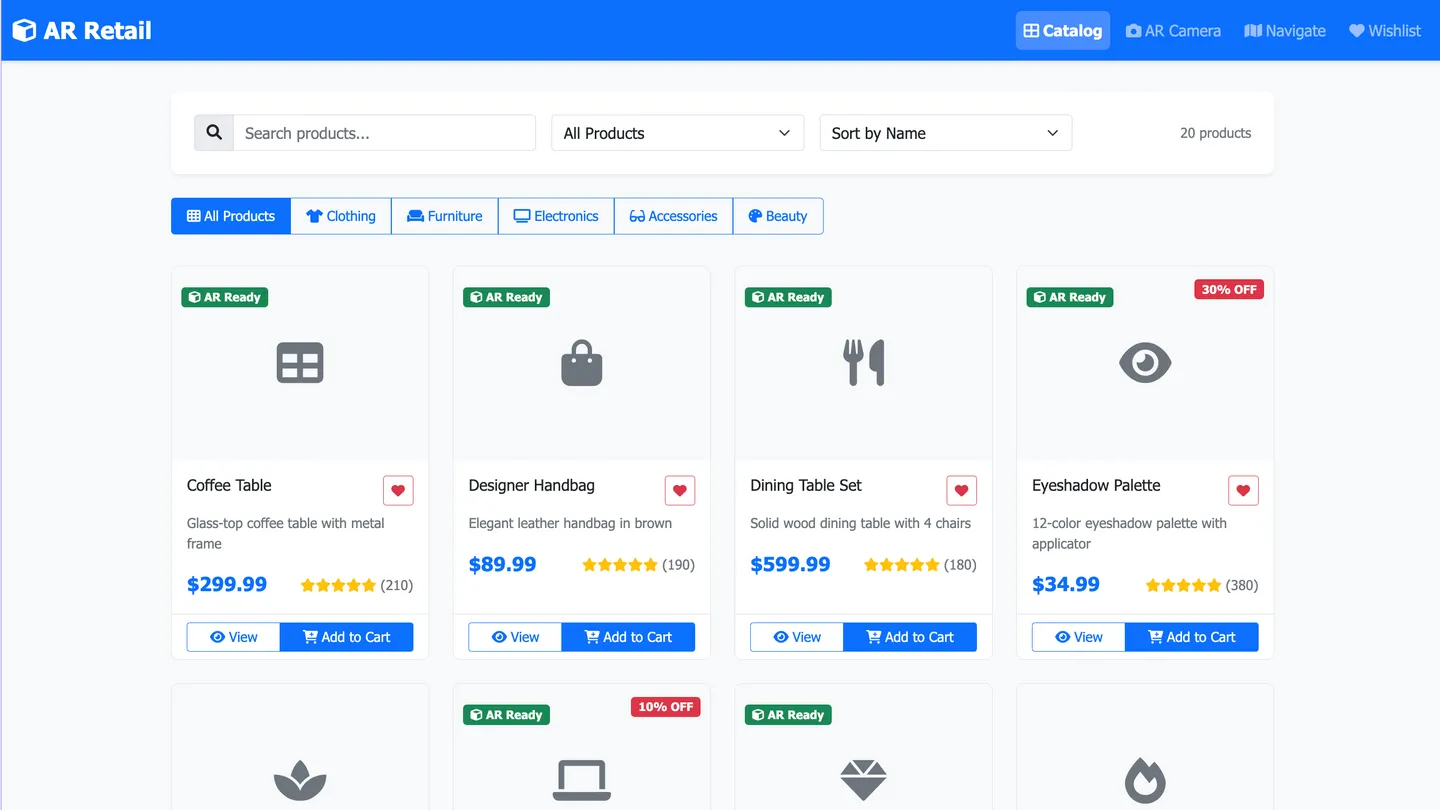
Example
AR App Builder
Prompting the AR App Builder
Gaming AR App Builder Prompt
Create an AR game featuring spatial multiplayer with cooperative and competitive play around shared anchored objects in real environments, environment quests that procedurally adapt via surface detection and occlusion, gesture combat for casting and blocking, and haptic boss fights using context-aware device and wearable vibration cues to heighten tension and reaction timing.
Use promptEducation AR App Builder Prompt
Build an education AR app that lets students explore interactive 3D models of molecules, engines, and artifacts, conduct curriculum-aligned step-by-step virtual labs, add real-time anchored annotations for collaborative feedback, and overlay progress heatmaps to visualize mastery and guide interventions.
Use promptRetail AR App Builder Prompt
Build a retail AR app that delivers real-time virtual try-on for clothing, eyewear, and makeup; true-to-scale in-home furniture and decor previews with accurate lighting and occlusion; AR overlays showing live prices, promos, and reviews for in-store and at-home comparison; and turn-by-turn indoor AR guidance to items on shoppers’ lists.
Use promptNavigation AR App Builder Prompt
Build an AR navigation app with anchored turn-by-turn arrows and lane-level cues, landmark callouts showing names/hours/ratings, real-time crowdsourced and sensor-based hazard alerts for potholes/closures/slick surfaces, and precise indoor positioning using visual markers and Bluetooth beacons for malls, airports, and campuses.
Use promptTop AR App Features by Type
Spatial Multiplayer
Players see and interact with the same anchored virtual objects in shared physical spaces. It boosts engagement and replayability by enabling cooperative and competitive gameplay in real-world environments.
Environment Quests
Procedurally generated quests adapt to the player’s surroundings using surface detection and occlusion. This keeps content fresh and encourages exploration of the player’s actual environment.
Gesture Combat
Hand and body gestures trigger in-game actions like casting spells or blocking attacks. It makes gameplay more immersive and accessible without relying on on-screen buttons.
Haptic Boss Fights
Device vibration patterns and wearables deliver context-aware feedback during critical encounters. The tactile cues heighten tension and improve player reaction timing.
3D Concept Models
Students inspect interactive AR models of molecules, engines, and historical artifacts. This improves comprehension by turning abstract concepts into manipulable objects.
Interactive Labs
Step-by-step AR overlays guide safe virtual experiments aligned to curriculum standards. It enables hands-on learning without expensive equipment or safety risks.
Real-Time Annotations
Teachers and students place anchored notes, highlights, and arrows on real-world objects. Collaborative annotations reinforce learning and support immediate feedback.
Progress Heatmaps
AR overlays display mastery levels and focus areas as color-coded heatmaps in the learning space. Instructors can quickly identify who needs help and where to intervene.
Virtual Try-On
Shoppers see clothing, eyewear, or makeup applied to their body or face in real time. This reduces returns and boosts confidence before purchase.
In-Home Preview
True-to-scale furniture and decor are placed in the shopper’s room with accurate lighting and occlusion. Customers make faster decisions by seeing fit and style in context.
Price & Promo Tags
AR overlays reveal live prices, promos, and reviews when looking at products in-store or at home. It streamlines comparison shopping and increases basket size.
Guided Store Path
Turn-by-turn AR guidance leads shoppers to items on their list using indoor positioning. It improves store flow and reduces frustration finding products.
The AR App of Your Dreams
Get started freeFAQ about the AR App Builder
How do I start building an AR app in my browser with AI assistance and no setup?
Open Replit in your browser, choose Create with Replit Agent, and describe the Augmented Reality or Mixed Reality app you want—the App creator workflow sets everything up with no installation. You can work with Declarative & Programmatic Options (e.g., a declarative UI plus programmatic AR logic), and AI will scaffold, explain, and refine code based on your coding experience. You don’t need professional coding skills to start, yet experts can fully customize the stack. Iterate live, apply app customization quickly, and preview on mobile devices with the Replit Mobile app or a shared URL.
What types of AR experiences can I create (marker-based, image targets, surface tracking, or location-based)?
You can build web apps on Replit that implement Location/Geo-Based Augmented Reality using the browser’s geolocation feature for a location-based feature. For marker, marker tracking, and image recognition, add AR libraries in your code—Replit itself does not provide in-built image recognition. Bind a trigger image to launch experiences on images or any real-world image by wiring the library’s events. Surface tracking on flat surfaces is also possible through compatible web APIs/libraries, and the AI Agent can help scaffold the integrations you choose.
Can I build custom, white-labeled AR apps with my own models and branding?
Yes—ship Custom AR experiences and custom white-labeled AR Apps on your own domain so your brand is front and center. Use declarative customization capabilities and Declarative & Programmatic Options to drive deep app customization without sacrificing speed. Import custom models and 3D models, or connect to a 3D library and third‑party 3D asset libraries (including an extensive library of external assets) to populate scenes. Deliver a personalized user experience across the app, from UI to content.
How can I add real-time interactions and maximize engagement in my AR app?
Implement Real-Time Interaction with standard web patterns (e.g., events, streaming, or sockets) and let Replit Assistant generate or modify the necessary code. Attach digital interaction handlers to AR elements to increase user engagement and tailor a personalized user experience. Keep digital content lightweight for fast renders on mobile devices and desktop. Iterate quickly with AI to test, measure, and refine interactions.
Do I need professional coding skills, or can I create an AR app with minimal code?
You can get started without professional coding skills—describe features in natural language and let Replit Agent generate the foundation, then refine with Replit Assistant. The platform supports Declarative & Programmatic Options so you can mix low-effort prompts with direct code edits. Use declarative customization capabilities for common patterns and rely on AI to explain or adjust code as needed. As your coding experience grows, you can take full control of app customization.
How do I integrate location, authentication, payments, or databases securely for my AR features?
For Location/Geo-Based Augmented Reality, add a geolocation feature via browser APIs, and ask the Agent to wire it into your flow. Use integration keywords to add authentication (e.g., Replit Auth or Google OAuth), payments (e.g., Stripe), and databases; store API keys in Secrets for security for custom applications. The App creator can persist digital content with Replit Database or managed Postgres, all from the same workspace. Deploy with HTTPS and connection encryption by default.
How do I deploy and share my AR app across devices and platforms?
Deploy in minutes on Replit and share a secure URL that runs on mobile devices and desktop. Attach a custom domain for a personalized user experience and optimize user engagement with fast global hosting. For app stores like Google Play Store, package your web app using external tooling outside Replit, then publish there. Replit’s hosting delivers your digital content with built‑in encryption and security for custom applications.
How do I trigger AR experiences on images and flat surfaces using my own assets?
Add image recognition or marker logic in your code, upload a trigger image, and map experiences on images tied to any real-world image. For Surface tracking on flat surfaces, include a compatible 3D library and anchor 3D models or other custom models where needed. Keep assets (images, models, scripts) in your repo, and let the Agent scaffold handlers and state. Iterate quickly until tracking and rendering meet your requirements.
What are you waiting for?
Build an app without knowing how to code. Tell Replit what you have in mind, then make it your own.