AI Html Website Builder
Build a AI html website in minutes for free with AI. Write in plain English or tap buttons to create your website.
How to Use the Html Website Builder
Step 1: Share your AI html website's features and requirements.
Step 2: Replit generates your website instantly.
Step 3: Customize features and user experience.
Step 4: Launch your new AI html website.
Html Website Builder Example
Built with Replit.
Build your vision in minutes for free without writing a single line of code.
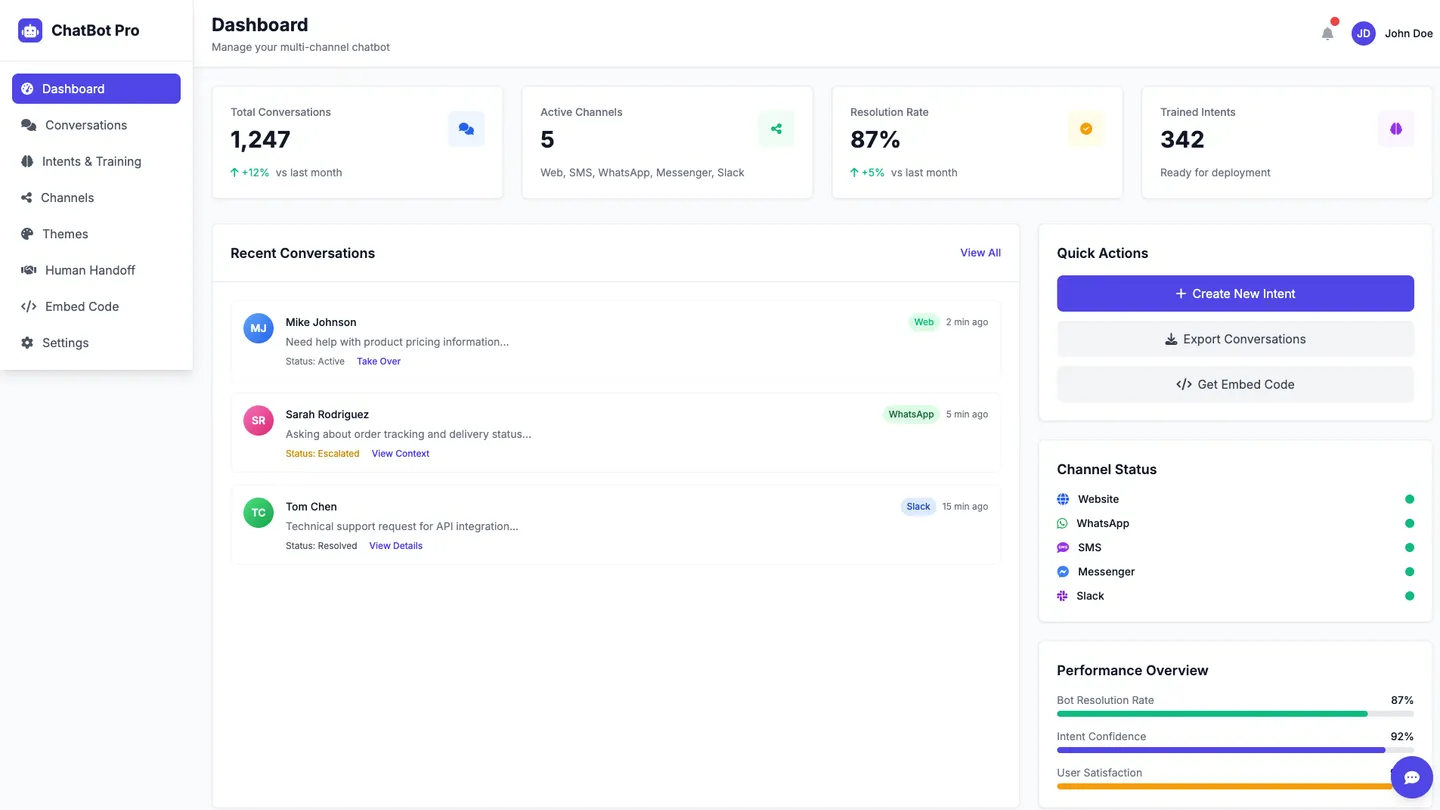
Example
AI Html Website Builder
Prompting the Html Website Builder
Chatbot Integration AI Html Website Builder Prompt
Build a chatbot for my site with a copy-paste no-code HTML embed and instant theming, connect it across web, SMS, WhatsApp, Messenger, and Slack from one dashboard, train intents with labeling, suggested utterances, and test playbooks, and enable seamless human handoff with full conversation context.
Use promptAI-Powered Analytics AI Html Website Builder Prompt
Build an AI-powered analytics HTML website that securely syncs data from databases, warehouses, and SaaS via unified connectors, auto-surfaces key drivers, trends, and summaries from raw data, answers natural language questions like “Why did churn rise last week?” with charts and explanations, and delivers real-time anomaly alerts on unusual metric spikes or drops.
Use promptPersonalized Content AI Html Website Builder Prompt
Build a responsive HTML website that dynamically personalizes headlines, images, and CTAs per visitor using behavior/context, segments audiences by clicks/time-on-page/purchase signals, serves real-time affinity-based product/article/video recommendations, and runs A/B autopilot bandit tests that auto-shift traffic to winners to maximize engagement, session depth, conversions, and revenue.
Use promptAutomated Customer Support AI Html Website Builder Prompt
Build an automated customer support HTML website featuring an AI-guided self-service portal with step-by-step troubleshooting and FAQs, automated ticket triage to classify, prioritize, and route requests, an AI knowledge builder that generates and updates articles from chat logs and agent notes, and real-time sentiment monitoring across conversations and channels.
Use promptTop AI Html Website Features by Type
No-code Embed
Add the chatbot to any page with a copy-paste HTML snippet and instant theming. This removes engineering bottlenecks and speeds deployment across sites.
Omnichannel Connectors
Connect the bot to web, SMS, WhatsApp, Messenger, and Slack from one dashboard. Meeting users where they are boosts engagement and support coverage.
Intent Trainer
Train and refine intents with built-in labeling, suggested utterances, and test playbooks. Better intent accuracy improves resolution rates and user satisfaction.
Human Handoff
Seamlessly escalate complex chats to live agents with full conversation context. This ensures high-quality outcomes while keeping the bot efficient on routine tasks.
Auto-Insights
Surface key drivers, trends, and summaries from raw data automatically. This saves analysts time and helps non-experts find actionable patterns fast.
Natural Language Queries
Ask questions like “Why did churn rise last week?” and get charts with explanations. Lowering the query barrier democratizes analytics across teams.
Anomaly Alerts
Detect and notify unusual spikes or drops in real time across metrics. Early warnings enable rapid response before issues escalate.
Unified Connectors
Securely sync data from databases, warehouses, and SaaS tools with one setup. Centralizing sources ensures consistent, up-to-date analysis.
Dynamic Personalization
Adapt headlines, images, and CTAs per visitor using behavior and context. Tailored experiences lift engagement and conversion rates.
Recommendation Engine
Serve product, article, or video suggestions based on real-time affinity. Relevant recommendations increase session depth and revenue.
A/B Autopilot
Continuously test variants and auto-shift traffic to winners with bandits. Automated optimization compounds gains without manual oversight.
Behavioral Segmentation
Build segments from clicks, time on page, and purchase signals instantly. Precise targeting enables more effective content and offers.
Self-Service Portal
Offer AI-guided troubleshooting and FAQs with step-by-step flows. Empowering customers to resolve issues reduces ticket volume.
Ticket Triage
Classify, prioritize, and route incoming requests automatically. Faster, smarter routing shortens response times and improves SLAs.
Knowledge Builder
Generate and update articles from chat logs and agent notes using AI. A living knowledge base keeps answers accurate and consistent.
Sentiment Monitoring
Track customer sentiment across conversations and channels in real time. Visibility into emotions helps teams defuse issues and improve CX.
The AI Html Website of Your Dreams
Get started freeFAQ about the AI Html Website Builder
How can I create my own website using html?
Yes, you can create a website by writing HTML code.
HTML (HyperText Markup Language) is the standard language for creating web pages. You write content inside HTML files, using tags to structure elements like headings, paragraphs, and images. A web browser then reads this file and renders it as a visual page.
To start on Replit, create a new Repl using the HTML/CSS/JS template. This provides a basic `index.html` file to edit in the workspace. You can write the code yourself or ask Agent3 to generate or modify it for you. For example, you can prompt it to "add a navigation bar" or "fix errors in my HTML." Once your site is ready, you can deploy it directly from the workspace.
Do people still make websites using html?
Yes. HTML (HyperText Markup Language) is the standard for creating web pages and forms the basic structure of virtually all websites. It is almost always used with CSS for visual styling and JavaScript for interactive features.
You can build a website on Replit by creating a new project from the HTML, CSS, JS template. This action prepares a workspace with the standard files. As you write or edit code, a live preview pane shows your changes in real time.
For assistance, you can ask Agent3 to write code, suggest modifications, or debug errors. When the website is complete, you can deploy it with a single click from the workspace.
Is google create html website free?
Yes, Google provides free tools to build a website, but they are not designed for directly creating or editing HTML files.
Services like Google Sites use a drag-and-drop interface to build pages. While this is simple, it offers limited control over the site's underlying code.
To build a website with full HTML control, you can use an HTML/CSS/JS template in the workspace. You can edit the files directly. For assistance, ask Agent3 to generate code, explain errors, or automate modifications. When finished, you can deploy your website with a single click.
Can I make a html website for free?
Yes, you can make an HTML website for free.
Creating a basic HTML website requires only a text editor to write the code and a service to host the files online. Many tools and platforms offer these services at no cost.
On Replit, you can start by creating a new Repl from the HTML/CSS/JS template. This sets up the necessary files, including index.html. You can write your code directly in the editor and see a live preview. If you need to add features, fix errors, or generate boilerplate code, you can ask Agent3 to modify your files. Once your site is ready, you can deploy it with a single click from the workspace.
Do websites make money?
Yes, websites can make money. Common methods include displaying ads, selling products or services, offering paid subscriptions, or collecting donations.
To monetize a site on Replit, you add code that integrates with third-party services. You can ask Agent3 to generate the code for an ad unit from a network like Google AdSense. For e-commerce or subscriptions, you can ask it to add a payment button using a provider like Stripe. Agent3 can also help modify your code or fix errors during the setup process. Once your monetization code is implemented, you can deploy the project as a live website.
What are you waiting for?
Build a AI html website in minutes for free with AI. Write in plain English or tap buttons to create your website.