
Veterinary Website Builder
Build a veterinary website in minutes for free with AI. Write in plain English or tap buttons to create your website.







How to Use the Veterinary Website Builder
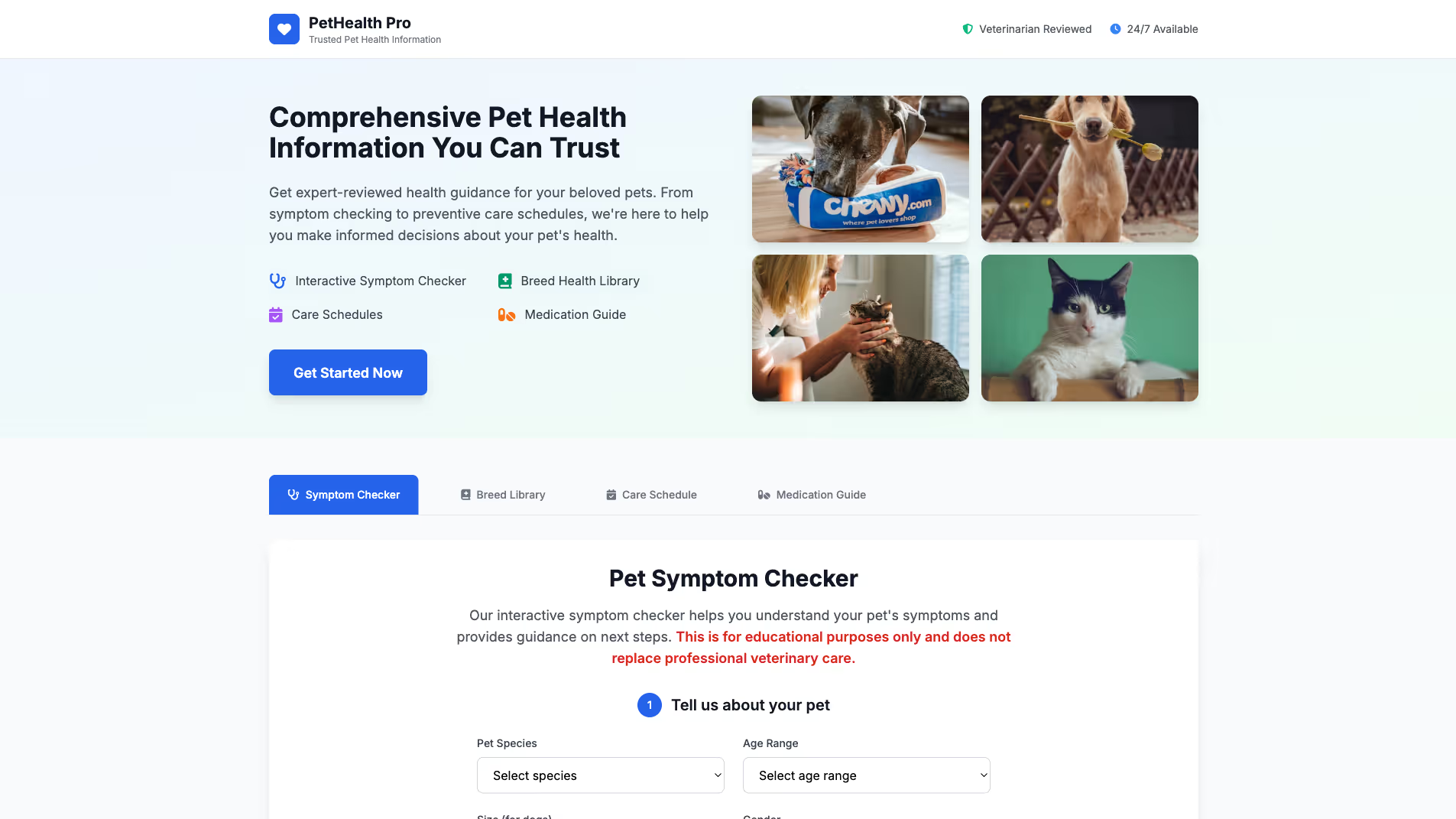
Veterinary Website Builder Example
Built with Replit.
Build your vision in minutes for free without writing a single line of code.
Prompting the Veterinary Website Builder
Build a user-friendly pet health information website featuring an interactive Symptom Checker for educational guidance and next steps, a searchable Breed Health Library of health predispositions, customizable Preventive Care Schedules by species and age (vaccines, parasite control, dental care, wellness exams), and a vet-reviewed Medication Guide with uses, precautions, and FAQs.
Build an animal hospital website with online booking (service selection and doctor preference), real-time wait times for walk-ins and urgent care, a transparent service menu with pricing, and a secure post-visit portal for visit summaries, lab results, discharge instructions, and bill pay.
Build a veterinary telemedicine website with HD, mobile-friendly video consults with scheduling and reminders; encrypted chat and file sharing with photo/video uploads for triage and follow-up compliant with privacy regulations; remote monitoring integrations for wearables and smart devices to track activity, vitals, and pain scoring for data-driven care and earlier intervention; and an e-prescription request workflow to review, approve, and route prescriptions to pharmacies where permitted to shorten turnaround and reduce administrative friction.
Build a veterinary pet nutrition advice website featuring a Diet Planner that personalizes meal plans by species, breed, weight, age, and health goals for safe, sustainable changes; a searchable Food Database with nutrient profiles and AAFCO statements for evidence-based comparisons; Allergen Alerts that filter and tag ingredients to avoid common sensitivities; and a Weight Tracker with body condition scoring, caloric targets, reminders, and progress tracking.
Top Veterinary Website Features by Type
Symptom Checker
An interactive tool that helps pet owners input signs and receive educational guidance on potential issues and next steps. It reduces uncertainty and encourages timely veterinary care without replacing professional diagnosis.
Breed Health Library
A searchable library outlining common health predispositions for different breeds. It empowers owners to spot risks early and discuss tailored prevention with their vet.
Preventive Care Schedules
Custom calendars for vaccines, parasite control, dental care, and wellness exams by age and species. It boosts adherence to preventive care and improves long-term pet health outcomes.
Medication Guide
Vet-reviewed information on common pet medications, uses, precautions, and FAQs. It helps owners use prescriptions safely and ask informed questions of their veterinarian.
Online Booking
A streamlined appointment scheduling system with service selection and doctor preference. It reduces phone traffic and improves client convenience and hospital efficiency.
Real-Time Wait Times
Live updates for walk-in and urgent care queues. It sets expectations, reduces lobby congestion, and improves client satisfaction.
Service Menu & Pricing
Transparent listings of services, packages, and estimated costs. It builds trust and helps clients choose appropriate care before arrival.
Post-Visit Portal
Secure access to visit summaries, lab results, discharge instructions, and bill pay. It improves compliance and reduces follow-up calls.
Video Consults
HD, mobile-friendly video appointments with scheduling and reminders. It delivers convenient care access while maintaining a personal vet-client-patient relationship.
Secure Chat & Files
Encrypted messaging with photo and video upload for triage and follow-up. It speeds decision-making and documents cases within privacy regulations.
Remote Monitoring
Integration with wearables and smart devices for activity, vitals, and pain scoring. It enables data-driven telemedicine and earlier intervention.
E-Prescription Requests
Workflow to review, approve, and route prescriptions to pharmacies where permitted. It shortens turnaround times and reduces administrative friction.
Diet Planner
Personalized meal plans based on species, breed, weight, age, and health goals. It removes guesswork and supports safe, sustainable nutrition changes.
Food Database
A searchable catalog of commercial diets with nutrient profiles and AAFCO statements. It helps owners compare options and select evidence-based foods.
Allergen Alerts
Ingredient filtering and tagging for common allergens and sensitivities. It prevents accidental exposure and simplifies shopping for restricted diets.
Weight Tracker
Progress tracking with body condition scoring, caloric targets, and reminders. It improves adherence and shows measurable results over time.
The Veterinary Website of Your Dreams
Build your vision in minutes for free without writing a single line of code.
FAQ about the Veterinary Website Builder
What is the best veterinary website builder for healthcare?
The best veterinary website builder depends on your technical needs. While no-code builders are simple, a code-based approach offers the most control for creating a professional healthcare site.
General website builders provide templates but can limit custom features essential for a veterinary practice, such as secure patient forms or appointment scheduling integrations. Building with code gives you full control over functionality and design.
You can build and host a custom veterinary website using Replit. Start with a web framework template, then ask Agent3 to generate code for specific features, modify the design, or fix errors. When the site is complete, you can deploy it directly from your workspace.
How to create a pet veterinary website?
You can create a pet veterinary website by starting with a template and modifying its code. This approach gives you a functional foundation that you can customize for your clinic.
A standard veterinary website requires code for its structure (HTML), styling (CSS), and any interactive elements like contact forms (JavaScript). Key pages usually include services, staff bios, contact information, and an appointment booking system. While Replit does not offer a visual drag-and-drop builder, it provides all the tools to code and host a complete site.
To begin, fork a business or portfolio website template. From the workspace, you can edit the HTML and CSS files to add your clinic’s text, branding, and images. If you need to add a new section or fix a layout issue, you can ask Agent3 to write or modify the code for you. Once the site is complete, you can deploy it with a single click.
What features should a veterinary website include?
A veterinary website should include pages for services, contact information, location, hours, and an "About Us" section. Features like online appointment booking, a blog, and client testimonials are also valuable.
These elements provide essential information to pet owners, build trust, and make it easier for clients to connect with your clinic. A good website acts as a reliable resource for both new and existing customers.
You can build your site by starting with a website template in the workspace. Edit the HTML and CSS files to create the necessary pages. For features like appointment booking, you can integrate a third-party tool by embedding its code into your HTML. If you need help structuring the pages or adding new sections, you can ask Agent3 to write or modify the code for you. Agent3 can also help fix errors. Once ready, you can deploy your site directly from the workspace.
How do I design a professional-looking veterinary website?
To design a professional veterinary website, start with a clean template and customize it with your clinic’s branding, services, and contact information.
A professional site builds trust with pet owners. It should be easy to navigate, look good on mobile devices, and clearly display essential details like business hours, services offered, and emergency procedures. High-quality photos of the staff and facility also add a personal touch.
You can build your site by starting with a website template in the workspace. Edit the HTML and CSS files to add your content and change the visual style. For assistance, you can ask Agent3 to perform tasks like "add a contact form" or "fix any layout errors in my CSS." It can also help modify the code to ensure the site is responsive. When you are finished, you can deploy your website with a single click.
What is the best way to optimize a veterinary website for search engines?
The best way to optimize a veterinary website is by targeting local keywords, creating content that answers pet owners' questions, and ensuring your site is technically correct. This includes using terms like "animal clinic in [City]" and listing your specific services.
Search Engine Optimization (SEO) makes your website more visible on search engines. It signals to Google that your clinic is a relevant result for people searching for local veterinary care.
You can edit your website’s code directly in the workspace to add these keywords to page titles, headings, and text. For technical improvements, ask Agent3 to generate meta tags or structured data for local businesses by providing your clinic’s details. Agent3 can also help you find relevant keywords or fix errors in your site’s code to improve its performance.