

Membership Website Builder
Build a membership website in minutes for free with AI. Write in plain English or tap buttons to create your website.







How to Use the Membership Website Builder
Membership Website Builder Example
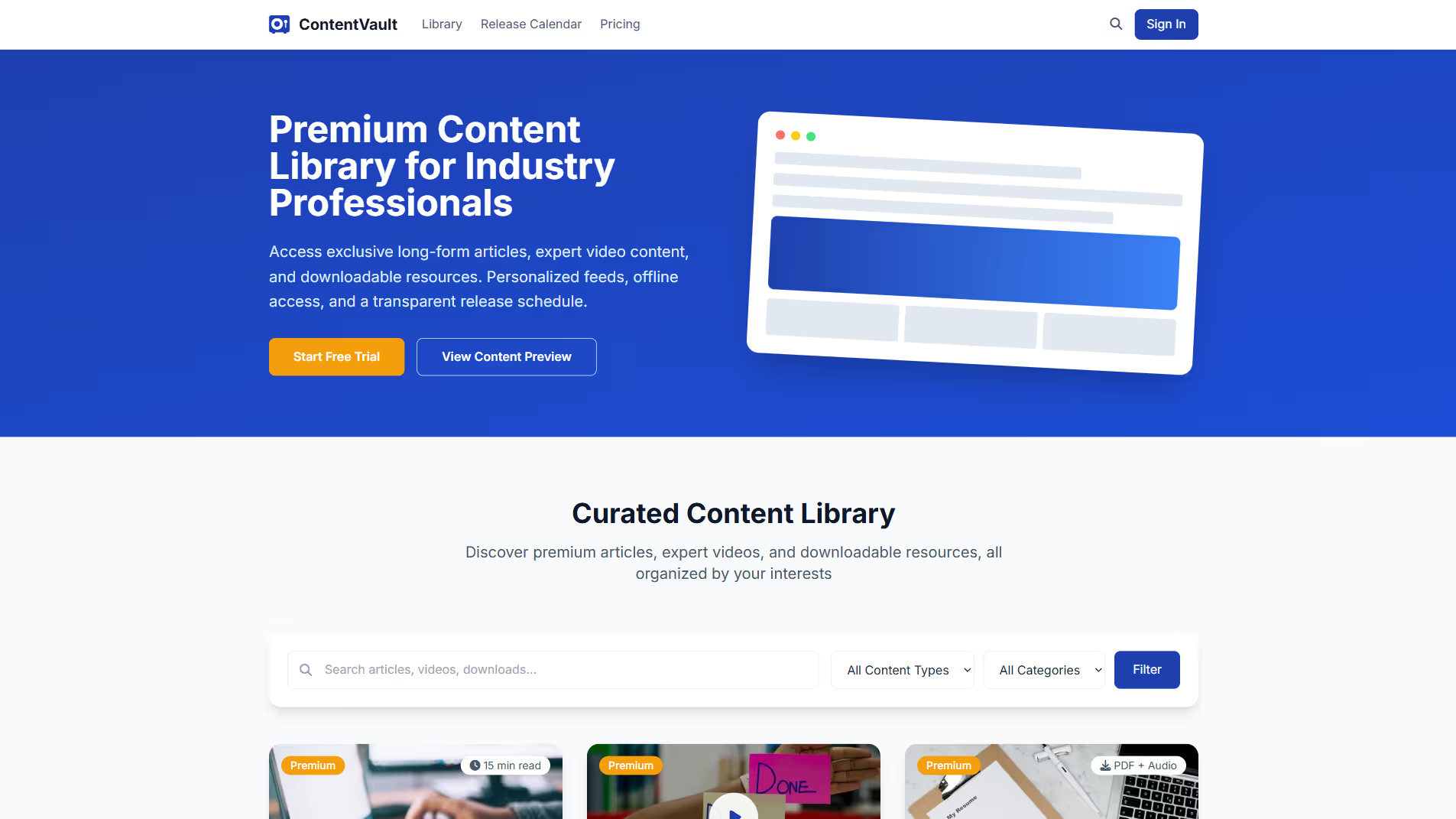
Built with Replit.
Build your vision in minutes for free without writing a single line of code.
Prompting the Membership Website Builder
Build a content membership site with a searchable paywalled premium library of long-form articles, videos, and downloads; member-defined interests for personalized content feeds and alerts; a transparent release schedule calendar of upcoming drops; and offline access via downloadable PDFs and audio.
Build a community membership website with topic-based discussion forums (threading, tagging, moderation), rich member profiles (bios, interests, badges), events and meetups (virtual/local with RSVPs and reminders), and gamified rewards (points, levels, leaderboards) to foster engagement and retention.
Build a training membership website featuring sequenced learning paths from beginner to advanced, interactive quizzes with instant feedback and explanations, shareable completion certificates with verification links, and scheduled live workshops with Q&A and practice for real-time accountability.
Build a health membership website that includes a habit tracker with daily check-ins for sleep, hydration, workouts, and meds; personalized goal-based meal, workout, and recovery plans tailored to preferences and constraints; wearable sync with Apple Health, Google Fit, and popular trackers for automatic data capture and timely nudges; and asynchronous coach messaging for expert feedback and adjustments.
Top Membership Website Features by Type
Premium Library
A searchable library of long-form articles, videos, and downloads behind a paywall. It delivers ongoing value and justifies subscriptions with depth and exclusivity.
Content Personalization
Members set interests and receive tailored content feeds and alerts. Personal relevance increases engagement and reduces churn.
Release Schedule
A transparent editorial calendar showing upcoming content drops. Predictability builds anticipation and keeps members returning.
Offline Access
Downloadable PDFs and audio for on-the-go consumption. Convenience expands usage occasions and perceived value.
Discussion Forums
Topic-based forums with threading, tagging, and moderation. Structured conversation fosters peer support and sustained activity.
Member Profiles
Rich profiles with bios, interests, and badges. Identity and recognition encourage participation and trust.
Events & Meetups
Virtual and local events with RSVPs and reminders. Synchronous touchpoints deepen relationships and retention.
Gamified Rewards
Points, levels, and leaderboards for helpful contributions. Incentives nudge positive behavior and keep the community lively.
Learning Paths
Sequenced curricula that guide members through beginner to advanced modules. Clear pathways reduce overwhelm and accelerate outcomes.
Interactive Quizzes
Module-end assessments with instant feedback and explanations. Active recall boosts mastery and shows progress.
Certificates
Shareable completion certificates with verification links. Tangible credentials increase motivation and career value.
Live Workshops
Scheduled cohort sessions with Q&A and practice. Real-time interaction clarifies concepts and builds accountability.
Habit Tracker
Daily check-ins for sleep, hydration, workouts, and meds. Consistency tools drive behavioral change and measurable results.
Personalized Plans
Goal-based meal, workout, and recovery plans tailored to preferences and constraints. Customization improves adherence and safety.
Wearable Sync
Integration with Apple Health, Google Fit, and popular trackers. Automatic data capture enables insights and timely nudges.
Coach Messaging
Asynchronous chat with certified coaches for feedback and adjustments. Expert support increases confidence and outcomes.
The Membership Website of Your Dreams
FAQ about the Membership Website Builder
How to build a membership website?
To build a membership website, you need a web application that manages user accounts, restricts access to content, and processes payments.
A membership site requires a frontend for user interaction, a backend for business logic, and a database for storing user data. Core features include user registration, login pages, and a system to show content only to paying members.
You can start with a web framework template in the workspace and then integrate third-party services for authentication and payments. Ask Agent3 to generate code for a login page, add a Stripe integration, or fix errors. When your site is complete, you can deploy it directly from Replit.
What features should a membership website include?
A membership site must have user registration and login, content that is restricted to members, and a system for managing member accounts and payments.
These features work together to control access. User accounts track who your members are, content protection ensures only they can see exclusive material, and payment systems handle subscriptions if the site is monetized.
You can build a membership site on Replit using a backend template. You will need to add a database for user information and integrate an authentication service. For paid memberships, you can connect a payment processor like Stripe. If you need help writing the code for these features or fixing bugs, you can ask Agent3 for assistance. Replit provides the tools to build these systems but does not have a built-in membership feature.
How do I design a professional-looking membership website?
To design a professional-looking membership website, start with a clean template and customize it with consistent branding and simple navigation. This can be done by modifying a pre-built template.
A professional design helps build user trust. It should clearly communicate your site's value, offer a simple user journey for sign-ups and logins, and adapt well to different screen sizes. The goal is a seamless user experience.
On Replit, you can begin with a membership site template. Edit the HTML and CSS files in the workspace to apply your brand's colors, fonts, and logo. If you need to make specific design changes, fix layout issues, or automate coding tasks, you can ask Agent3 for assistance. For example, prompt it to "make the design responsive for mobile devices." While Replit does not have a visual editor, its code-based environment gives you full control over the final design.
What is the best way to optimize a membership website for search engines?
The best way to optimize a membership site is to make some content public while keeping premium content behind a login. This allows search engines to discover and rank your site, attracting new users.
This strategy involves creating a mix of free, accessible content (like blog posts or landing pages) and exclusive, members-only material. The public content acts as a gateway, drawing in organic traffic, while the gated content provides the value that encourages visitors to subscribe.
In your Replit project, you can manage this by structuring your files to separate public and private routes. You can directly edit HTML files to add SEO-friendly meta titles and descriptions. For assistance, ask Agent3 to generate meta tags, add structured data, or write the code needed to restrict access to certain pages based on user membership status.
How can I customize the layout of my membership website?
You can customize your layout by directly editing the project's HTML and CSS files.
A website's visual appearance is defined by its code. HTML provides the structure, and CSS controls styling elements like colors, fonts, and positioning.
In your Replit workspace, open the HTML and CSS files to make changes. For assistance, you can ask Agent3 to perform specific tasks. For example, you can prompt it to "change the navigation bar color to dark gray" or "increase the font size of all paragraph text." Agent3 can then modify the code to apply your requested changes.