

LMS Website Builder
Build a LMS website in minutes for free with AI. Write in plain English or tap buttons to create your website.






How to Use the LMS Website Builder
LMS Website Builder Example
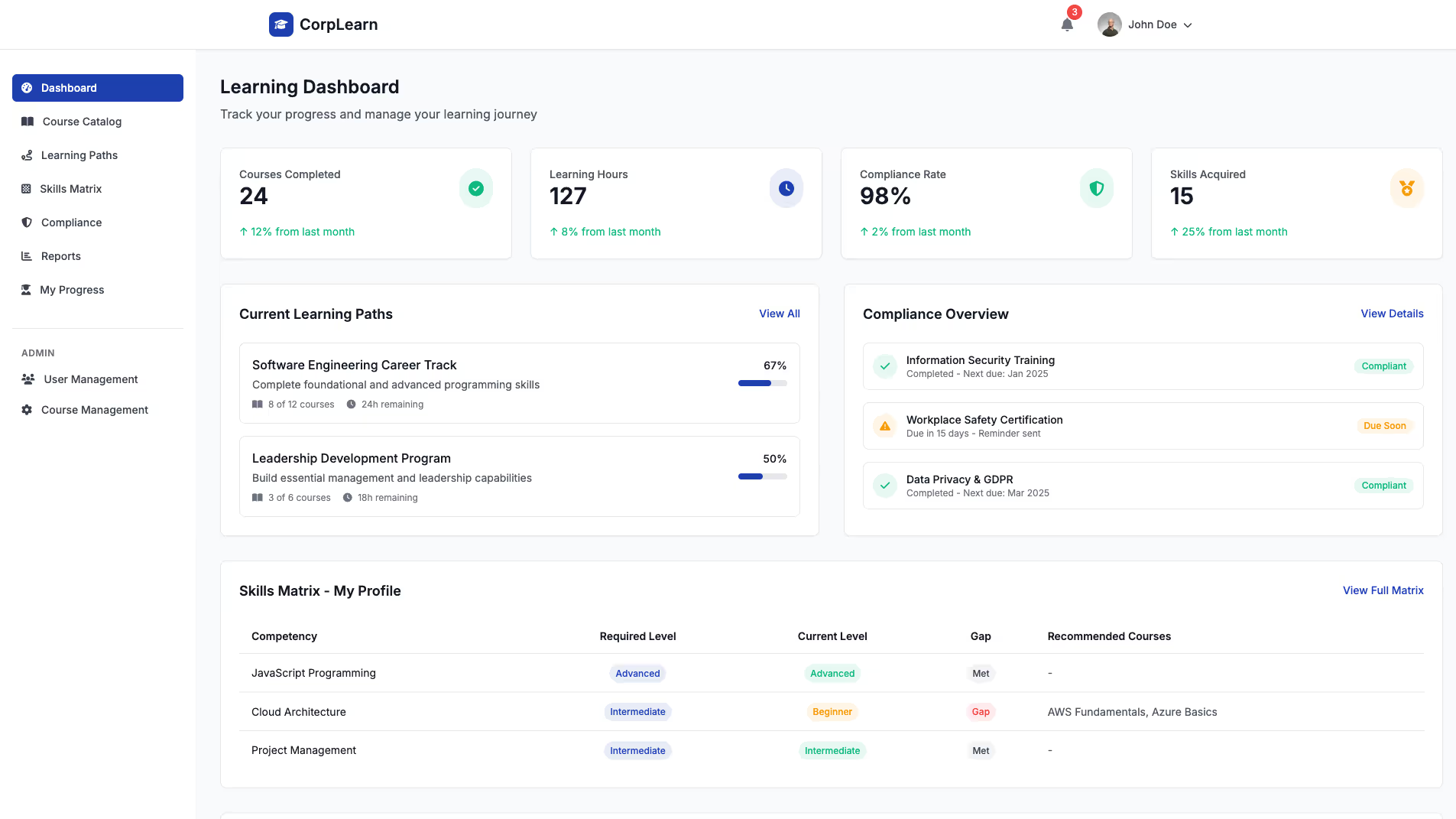
Built with Replit.
Build your vision in minutes for free without writing a single line of code.
Prompting the LMS Website Builder
Build a corporate training LMS website with a skills matrix mapping competencies to roles and projects, automated compliance for assigning/reminding/re-certifying mandatory courses, role-based learning paths tied to job titles and career ladders, and HRIS/SSO integration for seamless provisioning and frictionless access.
Build a higher education LMS website that integrates SIS Sync to automate rosters, enrollments, and drops; includes an Advanced Gradebook with weighted categories, rubrics, and outcome alignment for transparent progress; offers Lecture Capture to record, index, and stream sessions with slide synchronization for accessibility; and provides Academic Integrity tools with plagiarism detection and proctored assessments.
Build a K-12 LMS website with a secure Parent Portal (assignments, grades, messages), Standards Mapping to state/national standards, Attendance & Behavior tracking (participation, incidents, positive reinforcement), and Adaptive Assignments that adjust difficulty based on student performance.
Build a professional development LMS with micro-credentials (stackable badges/certificates), mentor matching with industry experts, live webinars with attendance tracking and CE credits, and a portfolio showcase for projects, reflections, and credentials.
Top LMS Website Features by Type
Skills Matrix
A skills matrix maps employee competencies to specific roles and projects. It helps organizations identify gaps and target training that directly improves job performance.
Compliance Automation
Compliance automation assigns, reminds, and re-certifies mandatory courses on schedule. It reduces risk and administrative overhead by ensuring regulators’ requirements are met on time.
Role Paths
Role-based learning paths deliver curated courses tied to job titles and career ladders. This personalizes development and accelerates time-to-productivity for new and advancing employees.
HRIS/SSO Integration
Integration connects the LMS with HR systems and single sign-on for seamless user provisioning and access. It ensures data accuracy and drives adoption with frictionless login.
SIS Sync
Student Information System sync automates course rosters, enrollments, and drops. It ensures accurate records and saves faculty time at term start and throughout add/drop periods.
Advanced Gradebook
An advanced gradebook supports weighted categories, rubrics, and outcome alignment. It gives instructors flexible assessment options and students transparent progress tracking.
Lecture Capture
Lecture capture records, indexes, and streams class sessions with slide synchronization. It supports diverse learning needs and improves accessibility for on-campus and online students.
Academic Integrity
Academic integrity tools provide plagiarism detection and proctored assessments. They uphold standards and protect institutional reputation while deterring cheating.
Parent Portal
A parent portal gives guardians visibility into assignments, grades, and messages. It fosters home-school communication and supports student accountability.
Standards Mapping
Standards mapping aligns lessons and assessments to state or national standards. It helps teachers plan effectively and demonstrate mastery growth for each student.
Attendance & Behavior
Attendance and behavior tracking lets teachers record participation, incidents, and positive reinforcement. It informs interventions and keeps administrators and families informed.
Adaptive Assignments
Adaptive assignments adjust difficulty based on student performance. They personalize learning paths and help close gaps for diverse learners.
Micro-Credentials
Micro-credentials award stackable badges and certificates for targeted skills. They motivate learners and provide portable proof of competency for employers.
Mentor Matching
Mentor matching pairs learners with industry experts for guidance and feedback. It accelerates skill application and expands professional networks.
Webinars & CE
Built-in webinars deliver live sessions with attendance tracking and CE credits. Professionals maintain licensure while engaging in interactive learning.
Portfolio Showcase
A portfolio tool lets learners publish projects, reflections, and credentials. It demonstrates real-world capability and enhances career opportunities.
The LMS Website of Your Dreams
FAQ about the LMS Website Builder
How to create a lms website?
You can create a learning management system (LMS) website by customizing a template or building one from scratch. An LMS is a platform for managing and delivering online educational content, which involves a user interface, a database for courses and users, and content delivery features.
To build on Replit, you can find an LMS template and fork it into your workspace. From there, you can edit the files to customize the content and design. If you need to add features, modify the code, or fix errors, you can ask Agent3 for assistance. Once your site is ready, you can deploy it directly from the workspace.
What features should a lms website include?
A Learning Management System (LMS) website should include features for course creation, user enrollment and management, progress tracking, and assessments like quizzes or assignments.
These core components allow educators to organize and deliver educational content, while learners can access materials and monitor their own progress in a structured environment.
You can build an LMS on Replit by starting with a web framework template. Use the workspace to manage course files and a Replit Database to handle user data and track progress. For specific functionality, you can ask Agent3 to write or modify code. For example, you could prompt it to "create a Python function for a multiple-choice quiz" or "design a database schema to store course completion status."
How do I design a professional-looking lms website?
To design a professional-looking LMS website, start with a clean template and customize its layout, navigation, and branding.
A professional design helps users easily find content and track progress. This involves a logical structure, readable fonts, a consistent color scheme, and a responsive layout that works on all devices.
On Replit, you can begin with an existing website template. From the workspace, you can directly edit the HTML and CSS files to change the design. For specific modifications, you can ask Agent3 to write code, suggest a color palette, or fix layout errors. Since Replit does not have a visual drag-and-drop editor, you can also describe the visual changes you want, and it will generate the necessary code for you to implement.
What is the best way to optimize a lms website for search engines?
The best way to optimize your LMS website is by implementing on-page SEO best practices. This includes using relevant keywords, creating high-quality content, and ensuring your site is mobile-friendly.
SEO helps search engines understand and rank your website. It involves technical adjustments to your site’s code, such as adding meta titles and descriptions, and structuring content with clear headings.
In Replit, you can directly edit your project’s HTML files to add these elements. You can modify the <title> tag and add <meta name="description"> tags in your HTML head. For assistance, ask Agent3 to perform tasks like "add SEO meta tags to my HTML files" or "make my CSS responsive for mobile devices." Agent3 can write the code, explain the changes, and help you apply them to your project.
How can I customize the layout of my lms website?
You can customize your LMS website layout by directly editing its HTML and CSS files.
A website's layout is defined by its code. HTML files structure the content, while CSS files control visual elements like colors, fonts, and spacing.
In your Replit workspace, you can find and modify these files. For assistance, you can ask Agent3 to write or change the code. For instance, provide a prompt like, "change the navigation bar color to dark gray." If you run into issues, you can also ask it to find and fix errors in your code.