

Lead Generation Website Builder
Build a lead generation website in minutes for free with AI. Write in plain English or tap buttons to create your website.







How to Use the Lead Generation Website Builder
Lead Generation Website Builder Example
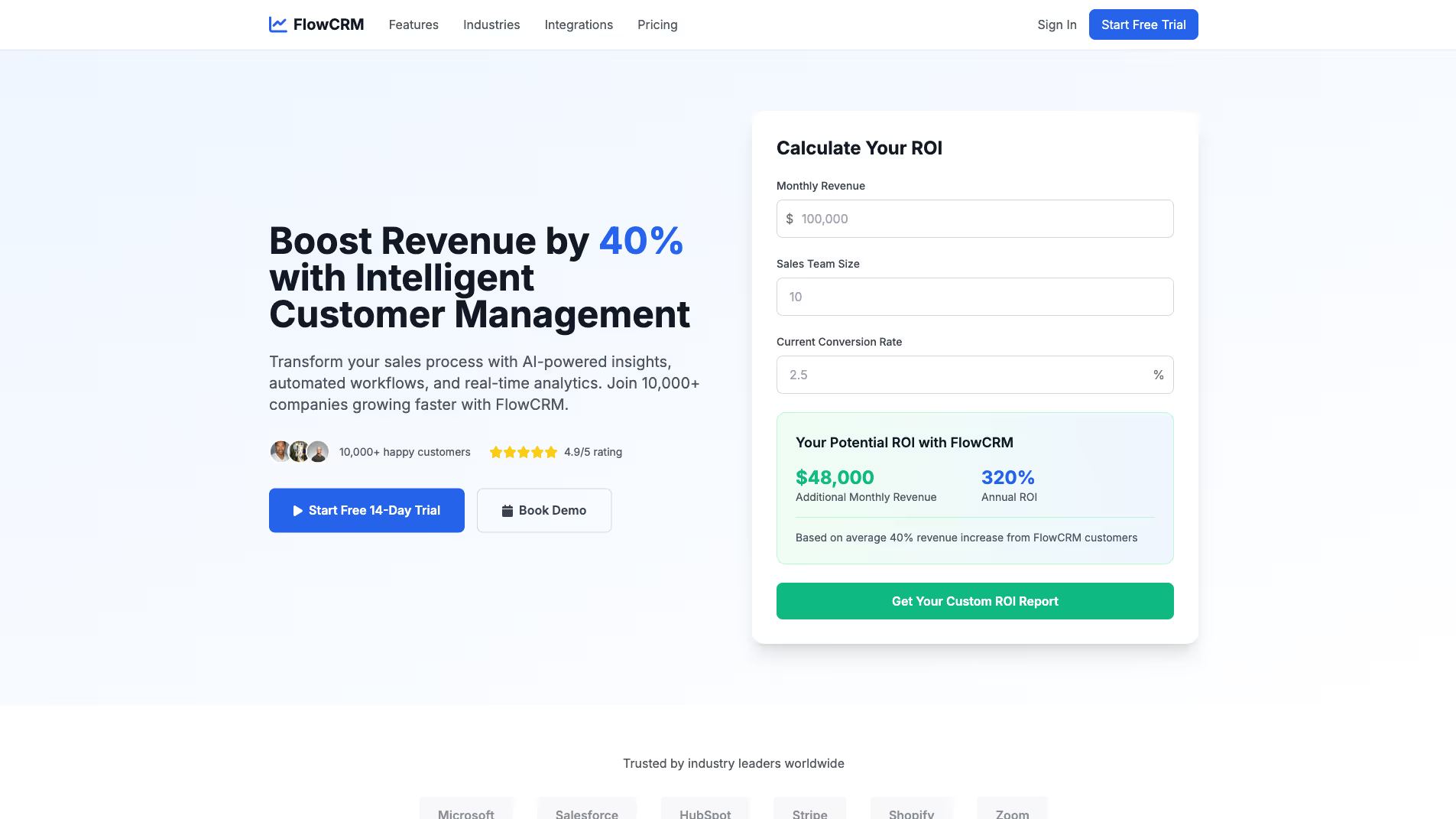
Built with Replit.
Build your vision in minutes for free without writing a single line of code.
Prompting the Lead Generation Website Builder
Build a high-converting SaaS lead-gen site with an interactive ROI calculator, a guided free-trial scheduler with onboarding and templates, dedicated use-case hubs by industry/role showing workflows, integrations, and outcomes, and smart exit-intent popups offering mini-demos, checklists, or discounts.
Build a HIPAA-compliant medical lead generation website featuring a real-time Appointment Finder (by provider, specialty, and location), encrypted HIPAA-secure intake/contact forms, an Insurance Checker for eligibility and cost estimates, and a non-diagnostic Symptom Triage Guide that routes users to the right services to maximize qualified conversions.
Build a commercial cleaning lead-generation website featuring an Instant Quote Builder that estimates pricing from square footage, surface types, and visit frequency; an interactive Service Area Map showing coverage zones, response times, and local testimonials; a Before/After Gallery with industry/size/method metadata; and a Maintenance Plan Selector recommending weekly, biweekly, or custom plans based on traffic and facility type.
Build a construction lead-generation site that includes a parametric Project Cost Estimator to align budget expectations, a Bid Request Portal with RFP templates for standardized comparable bids, an interactive Portfolio Map filtering by type/size/region with testimonials to build trust, and a Permit Checklist Wizard outlining permits and documents by project type to educate owners and increase qualified inquiries.
Top Lead Generation Website Features by Type
ROI Calculator
An interactive ROI calculator lets prospects input their metrics to see potential savings and gains from the SaaS. It creates an immediate value narrative that boosts conversions by making benefits tangible.
Free Trial Scheduler
A guided scheduler connects visitors to a self-serve trial with onboarding steps and recommended templates. Reducing friction to first value increases activation and qualified lead volume.
Use-Case Hubs
Dedicated landing hubs highlight workflows, integrations, and outcomes by industry or role. This alignment matches visitor intent and improves lead quality and demo requests.
Exit-Intent Offers
Appointment Finder
A real-time appointment finder shows next available slots by provider, specialty, and location. It shortens time-to-book and converts high-intent patients efficiently.
HIPAA-Secure Forms
Encrypted intake and contact forms collect necessary details while meeting HIPAA best practices. Trust and compliance increase completion rates and reduce drop-offs.
Insurance Checker
An eligibility checker verifies accepted plans and estimated costs before booking. This transparency reduces friction and phone calls, improving lead-to-visit conversion.
Symptom Triage Guide
An educational triage guide routes users to appropriate care types and resources without providing medical advice. It helps users choose the right service line, boosting qualified leads.
Instant Quote Builder
A guided estimator collects square footage, surface types, and frequency to generate ballpark pricing. It sets expectations and drives contact form completions with pre-qualified details.
Service Area Map
An interactive map showcases coverage zones, response times, and local testimonials. Visitors quickly confirm eligibility and feel confident in regional expertise.
Before/After Gallery
Visual transformations with metadata (industry, size, method) demonstrate outcomes and credibility. This social proof reduces perceived risk and encourages quote requests.
Maintenance Plan Selector
A configurator recommends weekly, biweekly, or custom plans based on traffic and facility type. It simplifies decision-making and increases recurring contract leads.
Project Cost Estimator
A parametric estimator gathers scope, materials, and timelines to produce budget ranges. It qualifies prospects and accelerates discovery by aligning expectations early.
Bid Request Portal
A structured RFP uploader with templates standardizes scope, drawings, and timelines. It reduces back-and-forth and yields higher-quality, comparable bids.
Portfolio Map
An interactive map of completed projects filters by type, size, and region with client testimonials. Location-based proof builds trust and drives contact from similar prospects.
Permit Checklist Wizard
A step-by-step wizard outlines typical permits, documents, and dependencies by project type. Educating owners early shortens preconstruction cycles and increases qualified inquiries.
The Lead Generation Website of Your Dreams
FAQ about the Lead Generation Website Builder
How to build a lead generation website that generates leads?
To build a lead generation website, you need a clear call to action and a form to capture visitor information. The site must offer something valuable to persuade visitors to share their contact details.
A lead generation site works by exchanging content, a service, or a product for a user's information, which is collected via a web form. This information, or "lead," can then be used for marketing or sales follow-up.
You can start with a website template and edit the files to add your content. To create the lead capture form, you can ask Agent3 to generate the necessary HTML and connect it to a backend service that processes form submissions. Agent3 can also help modify the code or fix errors. Once finished, you can deploy the project to make it live.
What is an example of a lead generation website?
An example of a lead generation website is a landing page with a form that collects visitor information, like an email address, in exchange for something of value.
These sites are designed to capture potential customer interest. They typically offer a resource, such as an ebook or a free trial, to entice visitors to share their contact details. The goal is to convert anonymous traffic into qualified leads for a business.
You can build a lead generation site on Replit by starting with a website template. Customize the HTML and CSS files in the Workspace to match your offer. To make the form functional, you will need to add backend code to process submissions. If you need to modify the form or fix errors, you can ask Agent3 to help write or debug the code. Once ready, deploy the site directly from your project.
Is a landing page builder worth the investment?
Yes, a landing page builder can be a worthwhile investment, especially for users who need to create and launch pages quickly without extensive coding. These tools streamline development with pre-made templates and visual editors, reducing the time and technical skill required to go live.
Replit provides a code-first alternative. You can begin with a landing page template and then directly edit the HTML and CSS files in the workspace. This approach offers more control than typical builders. If you need help, you can ask Agent3 to write code, modify your design, or fix errors. Once complete, you can deploy your site directly from the workspace.
What features should a lead generation website include?
A lead generation website needs a compelling offer, a clear call-to-action (CTA), and a simple contact or signup form.
These features work together to attract visitors and capture their contact information. The offer provides value, the CTA directs users to act, and the form collects their details, turning anonymous visitors into potential customers.
You can build a lead generation site by starting with a template and customizing it in the workspace. For the form, you will need backend code to process submissions. If you need help, ask Agent3 to write the necessary code, such as a script to email form data. Agent3 can also help you modify the design or fix errors. When your site is ready, you can deploy it directly from the workspace.
How do I design a professional-looking lead generation website?
To design a professional lead generation website, create a clean layout with a clear call-to-action and a simple form. You can build this on Replit by customizing a template.
An effective lead generation site focuses user attention on a single goal: submitting their information. This is achieved with a distraction-free design, persuasive copy, and a trustworthy appearance that encourages visitors to share their contact details.
Start with a website template in the Replit workspace. You can then edit the HTML and CSS files to customize the design. While Replit doesn't have a built-in form processor, you can add an HTML form and integrate a third-party service to handle submissions. For assistance, ask Agent3 to modify your code, fix errors, or add elements like a contact form. When finished, deploy your site directly from the workspace.