
Handyman Website Builder
Build a handyman website in minutes for free with AI. Write in plain English or tap buttons to create your website.







How to Use the Handyman Website Builder
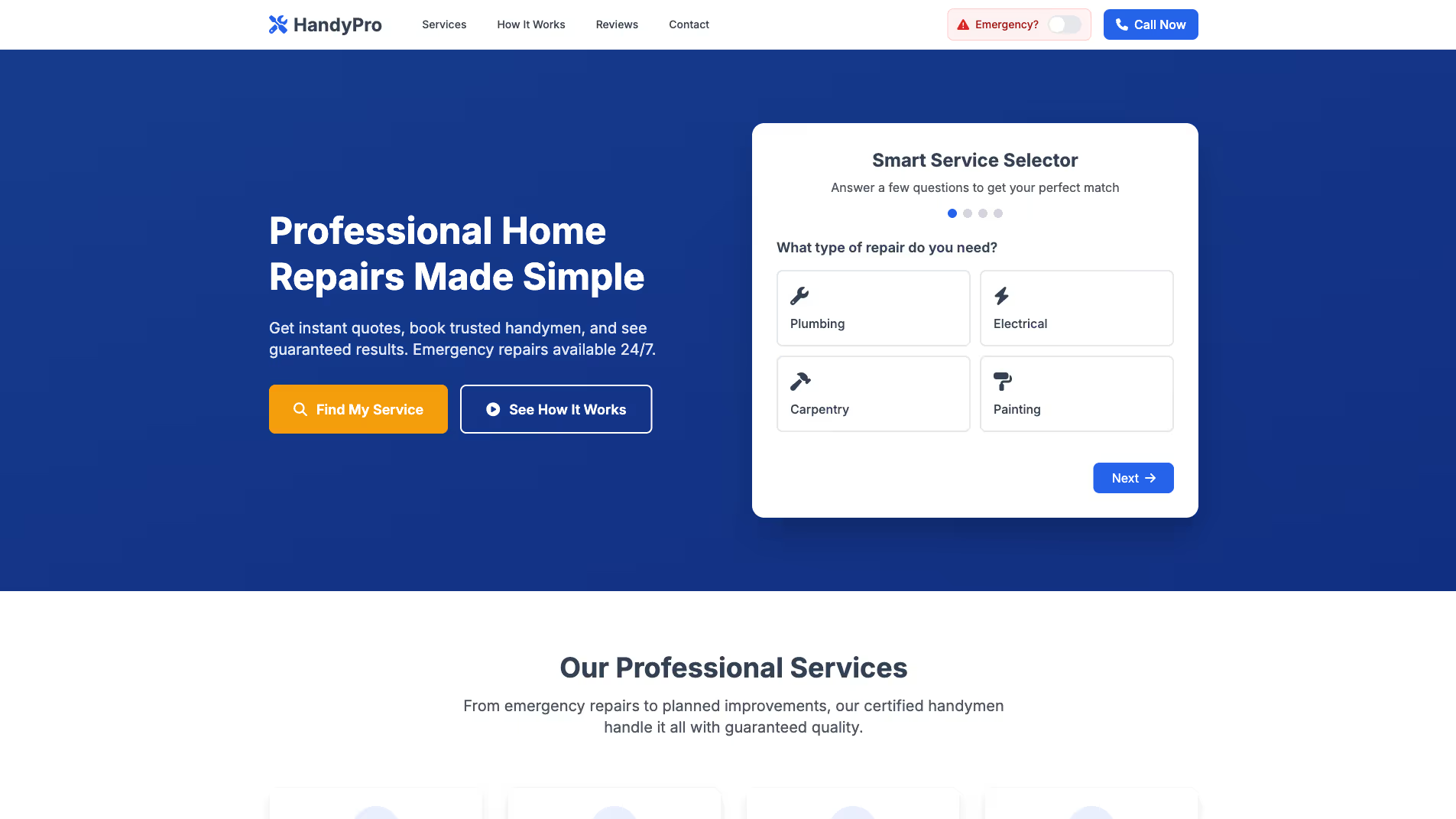
Handyman Website Builder Example
Built with Replit.
Build your vision in minutes for free without writing a single line of code.
Prompting the Handyman Website Builder
Create a home repair handyman website featuring a Smart Service Selector (question flow to pinpoint repairs and prep tools/parts), Instant Quote Booking (real-time pricing and available time slots), an Emergency Priority Toggle (urgent scheduling and alerts), and Before-After Reviews (paired photo gallery with verified reviews).
Build a plumbing and electrical handyman website featuring an interactive Leak & Fault Diagnostic to streamline service requests and accurate dispatch, a live Same-Day Dispatch Map showing technician availability and response times, a Compliance & Permits Hub with digital paperwork for codes/GFCI/backflow/permits, and a Maintenance Plan Signup for seasonal inspections, drain cleaning, and panel checks.
Build a carpentry and woodworking handyman website featuring a Custom Build Configurator for cabinets/shelves/furniture with sizes, styles, and hardware captured upfront, a Wood Species Library comparing grain, hardness, cost, and sustainability, a Precision Measurement Uploader for AR room photos or measurement sheets, and a Project Timeline Tracker showing design, milling, assembly, finishing, and install milestones.
Build a painting and decorating handyman website featuring a Color Visualizer to upload a room photo and preview paint colors/patterns, a Surface Prep Checklist with step-by-step guidance for walls, trim, brick, and cabinets, a Finish & Sheen Guide covering matte, eggshell, satin, semi-gloss, and specialty finishes with use cases, and Room-by-Room Pricing that delivers instant estimates with options for ceilings, trim, and accent walls to boost trust and bookings.
Top Handyman Website Features by Type
Smart Service Selector
Users answer a few questions to narrow down the exact repair they need. This reduces back-and-forth and ensures the handyman arrives prepared with the right tools and parts.
Instant Quote Booking
A dynamic form provides real-time pricing and available time slots. It increases conversions by giving homeowners clarity and an easy path to schedule.
Emergency Priority Toggle
Customers can mark urgent issues to trigger priority scheduling and alerts. This helps address safety-critical repairs quickly and builds trust.
Before-After Reviews
A gallery pairs photos of completed jobs with verified reviews. Visual proof boosts credibility and helps customers choose services confidently.
Leak & Fault Diagnostic
Interactive troubleshooting guides help users identify plumbing leaks or electrical faults. It streamlines service requests and ensures accurate dispatch information.
Same-Day Dispatch Map
A live map shows technician availability for same-day calls. Transparency on response times increases bookings for urgent issues.
Compliance & Permits Hub
Clear guidance and digital paperwork for codes, GFCI, backflow, and permits. It reassures customers that work is safe and compliant.
Maintenance Plan Signup
Subscriptions for seasonal inspections, drain cleaning, and panel checks. Recurring revenue smooths demand while preventing costly emergencies for clients.
Custom Build Configurator
Clients design cabinets, shelves, or furniture with sizes, styles, and hardware. It captures exact specs upfront and reduces revisions.
Wood Species Library
An interactive catalog compares species by grain, hardness, cost, and sustainability. Educated choices lead to better outcomes and fewer change orders.
Precision Measurement Uploader
Users upload room photos with AR measurements or a measurement sheet. Accurate inputs speed quoting and ensure a perfect fit.
Project Timeline Tracker
Milestones show design, milling, assembly, finishing, and install stages. Visibility builds confidence and reduces status inquiries.
Color Visualizer
Upload a room photo and preview paint colors and patterns virtually. It accelerates decisions and reduces color regret.
Surface Prep Checklist
Step-by-step prep guidance tailored to walls, trim, brick, or cabinets. Proper prep improves finish quality and durability.
Finish & Sheen Guide
Explains matte, eggshell, satin, semi-gloss, and specialty finishes with use cases. Matching sheen to traffic and lighting ensures better results.
Room-by-Room Pricing
Instant estimates per room with options for ceilings, trim, and accent walls. Clear pricing increases trust and speeds booking.
The Handyman Website of Your Dreams
Build your vision in minutes for free without writing a single line of code.
FAQ about the Handyman Website Builder
What is the best handyman website builder?
The best handyman website builder depends on your goals and technical comfort. No-code platforms offer simplicity, while code-based environments like Replit provide full customization.
General website builders often use drag-and-drop interfaces, which are fast for creating basic sites but can limit custom features. Building with code gives you complete control over the design, functionality, and user experience, allowing you to create a site that precisely fits your business needs.
You can build a handyman website on Replit by starting with a web template. From there, you can edit the HTML and CSS files directly. If you need help with the code, you can ask Agent3 to add new sections, create a contact form, or fix errors. Once finished, you can deploy your site directly from the workspace.
How much does it usually cost to pay someone to build a handyman website?
Hiring someone to build a handyman website typically costs between $500 and $5,000. The final price depends on the project's complexity.
Costs are influenced by factors like custom design requirements, the inclusion of features such as online booking or a photo gallery, and the developer's experience. A simple site built from a template is generally less expensive than one built from scratch.
You can reduce this cost by building the website yourself on Replit. Start with a website template and customize the content by editing the files in the workspace. For custom features or design changes, you can instruct Agent3 to write or modify the code. Agent3 can also help fix errors. When your site is ready, you can deploy it directly from the platform.
Does a handyman need a website?
Yes, a website is a valuable tool for a handyman. It provides a professional online presence where you can showcase your services, display your work, and make it easy for potential clients to contact you.
A simple website acts as a digital business card that works around the clock. It helps build trust with customers who search for local services online and gives you a platform to control your business's narrative beyond word-of-mouth referrals.
You can create one on Replit by starting with a portfolio or business website template. From there, you can edit the files directly to add your own text and images. If you need to make changes, like adding a contact form or fixing a layout issue, you can ask Agent3 to write or debug the code for you. When you're finished, you can deploy the website directly from your workspace.
What features should a handyman website include?
A handyman website should include a list of services, a portfolio of past work, customer testimonials, and a contact form. These features help potential clients understand your skills, see your quality of work, and easily get in touch to hire you.
You can start with a portfolio template and customize the files with your own content. For a contact form, you can adapt one from a template or ask Agent3 to generate the required code. If you run into errors or want to change the layout, Agent3 can also help debug or modify the code. Once your website is ready, you can deploy it directly from your project.
How do I design a professional-looking handyman website?
To design a professional-looking handyman website, focus on a clean layout, consistent branding, and easy-to-find contact information. A professional site should be simple for visitors to navigate, clearly present your services, and showcase your work with high-quality images.
You can start with a website template in the workspace and edit the HTML and CSS files directly. For specific design changes, you can instruct Agent3 with prompts like, “change the color scheme to blue and gray” or “add a section for customer testimonials.” If you run into a layout problem, you can also ask Agent3 to find and fix the error in your code.