Map App Builder
Build a map app in minutes for free with AI. Write in plain English or tap buttons to create your app.
How to Use the Map App Builder
Step 1: Share your map app's features and requirements.
Step 2: Replit generates your app instantly.
Step 3: Customize features and user experience.
Step 4: Launch your new map app.
Map App Builder Example
Built with Replit.
Build your vision in minutes for free without writing a single line of code.
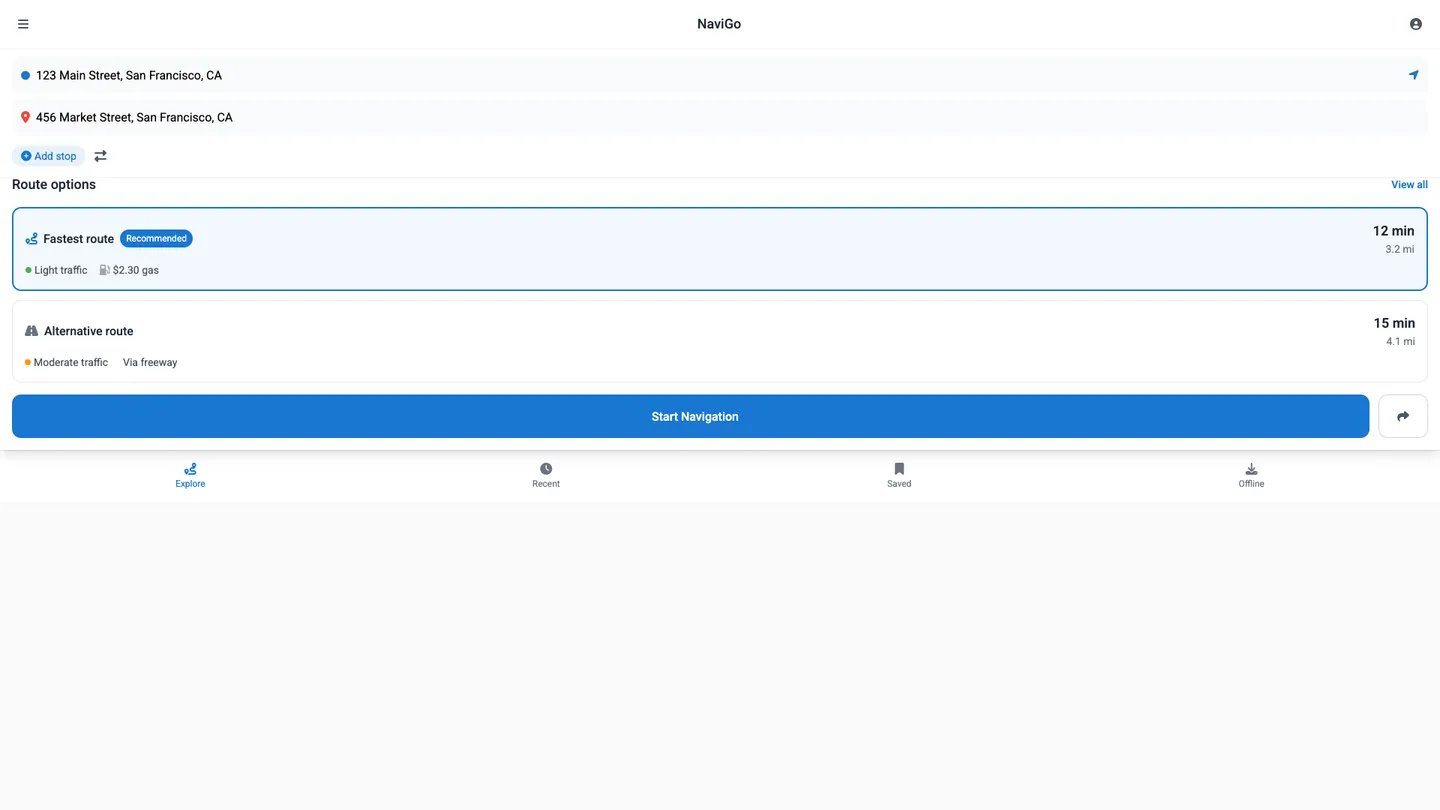
Example
Map App Builder
Prompting the Map App Builder
Navigation Map App Builder Prompt
Build a navigation app with real-time traffic rerouting, turn-by-turn voice guidance with lane guidance, downloadable offline maps, and optimized multi-stop routing with smart stop reordering.
Use promptHiking Trails Map App Builder Prompt
Build a hiking trails map app with topographic maps (contour lines, elevation shading, terrain features) to assess difficulty and plan safer routes, offline downloads of trail maps and waypoints for backcountry use, aggregated trail condition reports (closures, mud, snow, hazards) to guide trail selection, and GPX recording of tracks, distance, pace, and waypoints for retracing and sharing.
Use promptPublic Transit Map App Builder Prompt
Build a public transit map app that shows live arrivals for buses, trains, and trams, includes a door-to-door trip planner with transfers and walking, provides a fare calculator across agencies/zones/passes to find the cheapest option, and delivers service alerts via push notifications for delays, reroutes, and accessibility changes.
Use promptCycling Routes Map App Builder Prompt
Build a cycling routes map app that highlights protected lanes, shared roads, and bike-friendly streets, displays elevation profiles with gradients and total ascent, provides cyclist-tailored audio and haptic turn-by-turn navigation, and overlays community heatmaps of popular corridors from anonymized rides.
Use promptTop Map App Features by Type
Topographic Maps
Shows contour lines, elevation shading, and terrain features. Hikers can assess difficulty and plan safer routes.
Offline Trails
Enables downloading trail maps and waypoints for offline use. This is critical in backcountry areas without service.
Trail Conditions
Aggregates reports on closures, mud, snow, and hazards. This helps hikers choose suitable trails and avoid risks.
GPX Recording
Records tracks, distance, pace, and marks waypoints. Hikers can retrace steps and share routes with others.
Live Arrivals
Displays real-time bus, train, and tram arrival times. Riders can reduce waiting and catch optimal connections.
Trip Planner
Builds door-to-door itineraries with transfers and walking segments. This simplifies navigating complex networks."
Fare Calculator
Estimates costs across agencies, zones, and passes. Users can pick the cheapest option and budget trips."
Service Alerts
Pushes notifications for delays, reroutes, and accessibility changes. Commuters can adjust plans before disruptions hit.
Bike Lanes Map
Highlights protected lanes, shared roads, and bike-friendly streets. Cyclists can choose safer, more comfortable routes.
Elevation Profile
Shows climb gradients and total ascent for any route. Riders can pace efforts and avoid unexpected hills.
Turn-by-Turn
Provides audio and haptic turn cues tailored for cyclists. This keeps hands on bars and eyes on the road.
Community Heatmaps
Visualizes popular cycling corridors from aggregated, anonymized rides. It helps find well-traveled and efficient paths.
The Map App of Your Dreams
Get started freeFAQ about the Map App Builder
How do I go from a map app idea to a deployed app?
Start on Replit with a quickstart: describe your idea to the AI Agent, then use the Assistant to refine, remix templates, or build from scratch in the browser. You get a real-time preview as you iterate, can Figma import your UI, adjust it in the Visual Editor, and let Web Search keep libraries and APIs up to date. When ready, one-click deploy to the cloud, attach a custom domain with HTTPS, and share instantly. You can even keep building from the mobile app and ship a PWA so users can install it.
Which map libraries and basemaps can I use?
Because Replit runs standard web stacks, you can use Mapbox GL JS, Leaflet, Google Maps JS API, OpenLayers, deck.gl, or Cesium via npm or CDN. Bring basemaps from OpenStreetMap and any vector tiles or raster tiles sources, including WMS, WMTS, and TMS endpoints, and switch basemap styles as needed. Store provider API keys in Secrets and preview everything live before deploying.
How do I add search, geocoding, routing, and directions?
Add geocoding, reverse geocoding, and autocomplete by calling Mapbox Geocoding, the Google Places API (Places API), or open-source Nominatim. For directions, routing, ETA, turn-by-turn, and isochrones, integrate OSRM, OpenRouteService, or Mapbox Directions. Keep API keys in environment variables via the Secrets Manager, and let Agent/Assistant scaffold UI and server routes for search and directions.
Can I import my own geodata and show layers, markers, and popups?
Upload GeoJSON, TopoJSON, CSV, KML, or GPX directly to your repl, or reference remote tilesets; convert Shapefile to GeoJSON before import. Render layers, markers, clusters, heatmaps, popups, and tooltips with your chosen library, and add drawing tools plus a file upload flow. Test in the live preview and deploy when satisfied.
How do I store, query, and serve geospatial data?
Use Replit Database for simple needs or PostgreSQL for robust storage, and connect to an external PostGIS instance if you require advanced spatial functions. Implement a spatial index strategy—bbox filters and R-tree or KD-tree techniques—to speed queries in your API and database. Serve data over a REST API or GraphQL, stream updates via WebSocket, and add caching, pagination, and rate limits before deploying.
How do I style maps, use custom tiles, and optimize performance?
Style maps with Style JSON and Mapbox Studio, swap basemap styles, and load custom tiles or MBTiles (served by your Node service or an external tiles CDN). Include sprites and glyphs assets, and leverage WebGL and worker threads where supported for smooth rendering. Improve performance with clustering, geometry simplification, lazy loading, debounce on inputs, and a CDN for static assets.
How do I connect auth, external APIs, and manage secrets securely?
Implement OAuth 2.0 with Google OAuth or Replit Auth, issue JWTs, and configure CORS on your backend. Keep API keys and environment variables in the Secrets Manager, and connect external APIs (Stripe, Twilio) or webhooks securely. Add audit logs in your application code to track critical actions.
How do I collaborate, version changes, and safely roll back?
Work with teammates via real-time collaboration, share preview URLs, and let the community remix your project. Use Git for branches, diffs, and code review, while Replit’s automatic checkpoints and one-click rollback protect you from bad changes. Browse history, inspect logs, and deploy when ready.
What are you waiting for?
Build an app without knowing how to code. Tell Replit what you have in mind, then make it your own.