Kids Website Builder
Build a kids website in minutes for free with AI. Write in plain English or tap buttons to create your website.
How to Use the Kids Website Builder
Step 1: Share your kids website's features and requirements.
Step 2: Replit generates your website instantly.
Step 3: Customize features and user experience.
Step 4: Launch your new kids website.
Kids Website Builder Example
Built with Replit.
Build your vision in minutes for free without writing a single line of code.
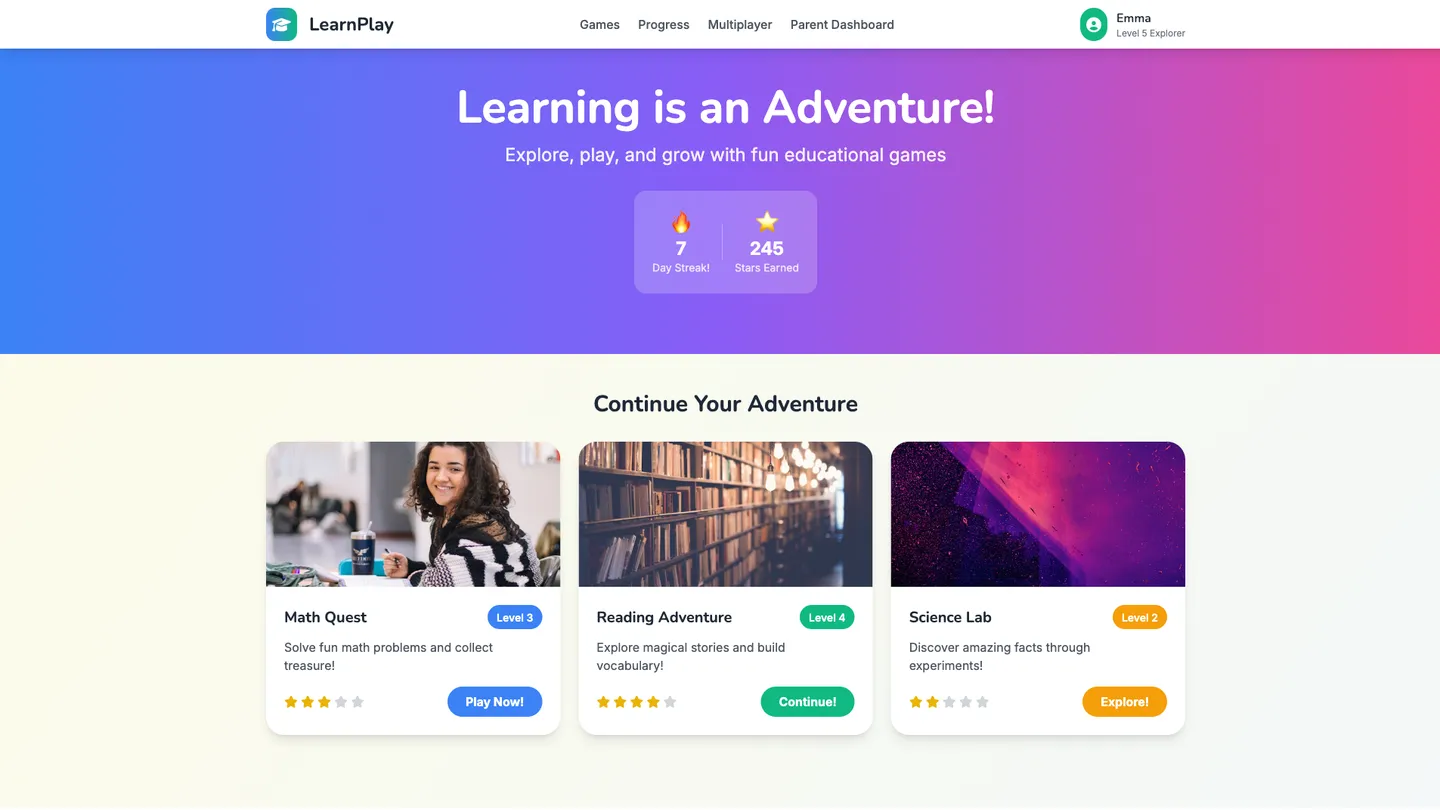
Example
Kids Website Builder
Prompting the Kids Website Builder
Educational Games Kids Website Builder Prompt
Build a kid-friendly educational games website featuring adaptive skill quizzes that adjust difficulty per child, colorful progress badges for skills, streaks, and milestones, a simple parent dashboard showing time on task, strengths, and practice needs, and safe cooperative multiplayer mini-games with pre-set, moderated emoji-only chat.
Use promptInteractive Learning Kids Website Builder Prompt
Build an interactive kids learning site with step-by-step clickable lessons featuring tappable hotspots, pop-ups, and mini checks for understanding; hands-on simulations where kids manipulate virtual objects to explore cause-and-effect in science, math, and coding; friendly voice-guided help that explains instructions and reads text aloud; and instant feedback with hints, corrections, or celebrations.
Use promptCreative Activities Kids Website Builder Prompt
Build a kid-friendly creative activities site featuring a drag-and-drop art studio (stickers, brushes, textures with simple controls to reduce frustration), a grid-based Music Maker for layering beats, melodies, and sound effects, short step-by-step craft tutorial videos using household items with clear safety tips and offline projects, and a moderated, private Safe Sharing Gallery with curated prompts, positive feedback, and protective filters.
Use promptStorytelling Platforms Kids Website Builder Prompt
Create a kids storytelling platform with a Build-A-Story drag-and-drop beginning/middle/end flow, a Character Creator for customizable avatars with traits, emotions, and voices, Audiobook Narration with one-tap text-to-speech and kid voice recording, and Collaborative Tales turn-based rooms where friends add chapters using safe preset prompts.
Use promptTop Kids Website Features by Type
Adaptive Skill Quizzes
Dynamic quizzes adjust difficulty based on each child's performance to keep them challenged without frustration. This personalization boosts engagement and ensures steady learning progress.
Progress Badges
Kids earn colorful badges for mastering skills, streaks, and milestones. Visible rewards motivate consistent practice and celebrate achievement.
Parent Dashboard
A simple dashboard shows time on task, strengths, and areas needing practice. Parents get actionable insights to support learning at home.
Safe Multiplayer
Cooperative mini-games let kids solve puzzles together with pre-set, emoji-only chat. This builds teamwork while maintaining a safe, moderated environment.
Clickable Lessons
Step-by-step lessons include tappable hotspots, pop-ups, and mini checks for understanding. Interactivity keeps attention and improves knowledge retention.
Interactive Simulations
Kids manipulate virtual objects to see cause-and-effect in science, math, and coding. Hands-on exploration makes abstract concepts concrete and fun.
Voice-Guided Help
Friendly audio prompts explain instructions and read text aloud. This supports early readers and multilingual learners.
Instant Feedback
Answers trigger immediate hints, corrections, or celebrations. Fast feedback helps kids learn from mistakes without losing momentum.
Drag-and-Drop Art
Kids create scenes with stickers, brushes, and textures using simple drag-and-drop tools. Easy controls lower frustration and encourage creative flow.
Music Maker
A grid-based sequencer lets kids layer beats, melodies, and sound effects. Playful composition builds pattern recognition and musical confidence.
Craft Tutorials
Short, step-by-step craft videos use household items with clear safety tips. Offline projects extend creativity beyond the screen.
Safe Sharing Gallery
Kids can post creations to a moderated, private gallery with curated prompts. Positive feedback and filters keep sharing safe and inspiring.
Build-A-Story
Kids assemble plots with drag-and-drop story blocks for beginning, middle, and end. Structured choices spark imagination while teaching narrative flow.
Character Creator
Custom avatars with traits, emotions, and voices bring stories to life. Personalization deepens engagement and empathy for characters.
Audiobook Narration
One-tap text-to-speech and kid voice recording turn stories into audio. Listening and recording improve fluency and confidence.
Collaborative Tales
Turn-based story rooms let friends add chapters with safe, preset prompts. Co-creation builds social skills and keeps storytelling fresh.
The Kids Website of Your Dreams
Get started freeFAQ about the Kids Website Builder
How can a 10 year old make a kids website?
Yes, a 10-year-old can create a website. Using a template and simple tools makes it possible without needing to be a coding expert.
Websites are typically made with code—HTML for the page structure, and CSS for colors and fonts. Starting from a template gives you a pre-built site that you can change by editing the code files.
In Replit, you can begin by choosing an HTML/CSS/JS template. This sets up the necessary files in your workspace. To add your own words and pictures, edit the index.html file. To change the design, modify the style.css file. If you need help, want to add something new, or have an error, you can ask Agent3. For instance, you could prompt it to “change the background color to blue,” “fix my code,” or “help me add a gallery of my drawings.” When your site is ready, you can deploy it to make it live on the internet.
Can a 12 year old make a kids website?
Yes, a 12-year-old can make a website. Building a site typically involves writing code like HTML and CSS, but many tools are available to make the process easier.
On Replit, you can begin with a website template, which gives you a pre-built site to edit. You can change the text and images by modifying the files in the workspace. If you get stuck or want to add a feature, you can ask Agent3 to write or fix code for you. For example, you could ask it to "add a new page about my favorite games." Once your site is finished, you can deploy it to make it live online.
What features should a kids website include?
A kids' website should have interactive content, simple navigation, and colorful visuals. Common features include games, learning activities, and protected areas for user interaction.
Effective kids' sites prioritize safety and engagement. They use large fonts, clear icons, and age-appropriate material. Any feature that allows user input, like a comment section, must be designed with safety and moderation in mind.
You can build a kids' site on Replit using an HTML/CSS/JS template. To add interactive games or quizzes, you can write the necessary JavaScript code. For design and coding assistance, ask Agent3 to generate CSS for bright visuals, create JavaScript for a simple game, or help fix errors in your project. While Replit does not offer native content moderation, you can integrate external services for features requiring it.
How do I design a professional-looking kids website?
To design a professional-looking kids' website, start with a suitable template and customize it with a bright color scheme, large fonts, and simple navigation.
A good kids' website is visually engaging but also easy for children to use. It should feature clear, simple layouts and interactive elements without being cluttered. The design must also be responsive to work well on tablets and phones, where many kids access the internet.
You can begin by forking a website template in the Replit workspace. From there, you can directly edit the HTML and CSS files to change colors, text, and images. For specific tasks, you can ask Agent3 to generate code for a new layout, suggest a playful color palette, or fix errors in your design. When your site is ready, you can deploy it directly from the workspace.
What is the best way to optimize a kids website for search engines?
The best way to optimize a kids' website is by creating high-quality, age-appropriate content and ensuring your site is technically well-structured for search engines.
This process, known as search engine optimization (SEO), makes your site more visible in search results. It involves using relevant keywords, ensuring fast page loads, and having a clear site structure. For a kids' site, content should be safe and engaging.
You can implement SEO best practices directly in the workspace. Edit your HTML files to add keywords to page titles, headings, and meta tags. To improve technical SEO, you can ask Agent3 to generate a sitemap.xml file, check your code for issues that slow down your site, or write meta descriptions for your pages.
What are you waiting for?
Build an app without knowing how to code. Tell Replit what you have in mind, then make it your own.