Database Website Builder
Build a database website in minutes for free with AI. Write in plain English or tap buttons to create your website.
How to Use the Database Website Builder
Step 1: Share your database website's features and requirements.
Step 2: Replit generates your website instantly.
Step 3: Customize features and user experience.
Step 4: Launch your new database website.
Database Website Builder Example
Built with Replit.
Build your vision in minutes for free without writing a single line of code.
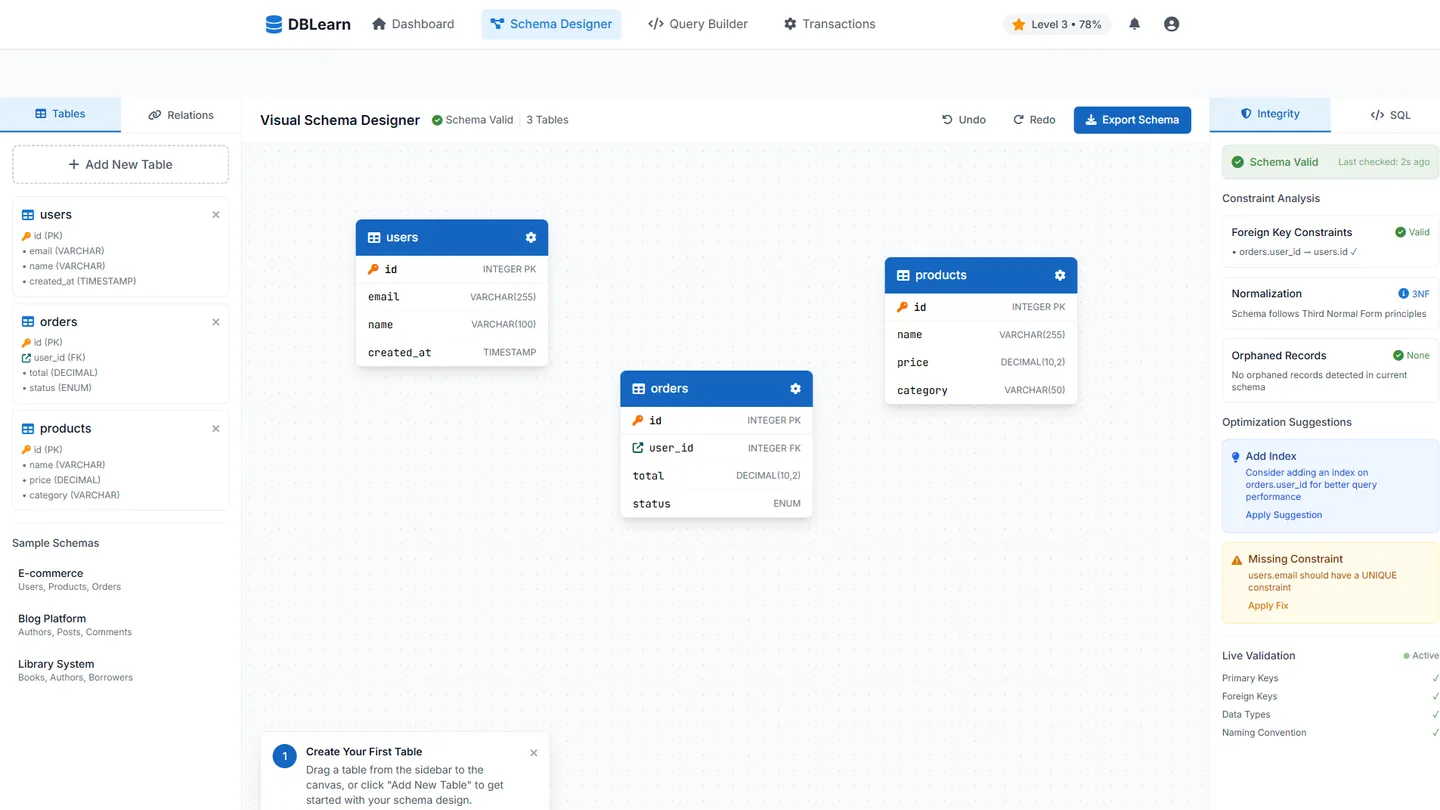
Example
Database Website Builder
Prompting the Database Website Builder
Relational Database Website Builder Prompt
Build a relational database learning site that lets users design normalized schemas with a drag-and-drop Visual Schema Designer, practice reliable concurrent operations in an ACID Transactions Sandbox, compose SELECTs with joins, filters, and window functions in a guided SQL Query Builder, and preserve data quality via a real-time Referential Integrity Monitor that flags foreign key violations and orphaned records with suggested fixes.
Use promptNosql Database Website Builder Prompt
Create a NoSQL database builder site featuring a Flexible Schema Modeler to evolve documents without migrations, a Sharding Simulator to partition by keys with hotspot/rebalancing previews, an Aggregation Pipeline Builder with live map/reduce or document-aggregation previews, and a TTL and Caching Manager to set expirations and in-memory caches per collection or bucket.
Use promptCloud Database Website Builder Prompt
Build a cloud database site with a Multi-Region Wizard (active-active/active-passive), Auto-Scaling Policies (CPU/IOPS/queue rules), a Cost Estimator (storage/compute/I/O/egress), and Managed Backups & PITR (encrypted snapshots, retention, scheduled recovery).
Use promptGraph Database Website Builder Prompt
Build a graph database website featuring a Graph Visual Explorer (interactive canvas with dynamic filters to browse nodes, edges, and properties to reveal hidden relationships), a Query Playground to run Cypher or Gremlin with path highlights and performance hints, Pathfinding & Recommendations (shortest-path, similarity, community detection) for real-time insights, and a Graph Algorithms Library for one-click PageRank, centrality, and motif detection with explainers.
Use promptTop Database Website Features by Type
Visual Schema Designer
Drag-and-drop tables, columns, and keys to design normalized schemas. This helps relational users enforce structure and plan efficient queries before deployment.
ACID Transactions Sandbox
Interactive environment to run multi-statement transactions and observe atomicity, consistency, isolation, and durability. It demonstrates why relational databases excel at reliable, concurrent operations.
SQL Query Builder
A guided interface to compose SELECTs with joins, filters, and window functions. It accelerates learning and reduces syntax errors while leveraging relational power.
Referential Integrity Monitor
Real-time checks for foreign key violations and orphaned records with suggested fixes. This preserves data quality and showcases a core relational strength.
Flexible Schema Modeler
Design and evolve document or key structures without migrations. This highlights NoSQL’s agility for rapidly changing data shapes.
Sharding Simulator
Visual tool to partition data by keys and preview hotspot distribution and rebalancing. It teaches horizontal scalability patterns common in NoSQL systems.
Aggregation Pipeline Builder
Compose map/reduce or document-aggregation stages with live previews. It enables complex analytics close to the data in schemaless stores.
TTL and Caching Manager
Configure time-to-live expirations and in-memory caches per collection or bucket. It optimizes cost and performance for ephemeral or high-read workloads.
Multi-Region Wizard
Set up active-active or active-passive deployments across regions. This improves latency and resilience, a core cloud database advantage.
Auto-Scaling Policies
Define CPU, IOPS, or queue-based rules to scale up and down automatically. It ensures performance while controlling spend under variable traffic.
Cost Estimator
Forecast monthly charges from storage, compute, I/O, and egress patterns. It prevents bill shock and guides architecture trade-offs.
Managed Backups & PITR
Schedule encrypted snapshots and point-in-time recovery with retention policies. It simplifies compliance and disaster recovery in the cloud.
Graph Visual Explorer
Interactive canvas to browse nodes, edges, and properties with dynamic filters. It reveals hidden relationships that tabular views miss.
Query Playground
Run Cypher or Gremlin queries with path highlights and performance hints. It accelerates mastery of graph querying and optimization.
Pathfinding & Recommendations
Built-in shortest-path, similarity, and community detection tools. These power real-time recommendations and insights unique to graphs.
Graph Algorithms Library
One-click execution of PageRank, centrality, and motif detection with explainers. It showcases graph-first analytics without heavy custom code.
The Database Website of Your Dreams
Get started freeFAQ about the Database Website Builder
How do I create a database for my website?
You can create a database for your website using Replit's integrated PostgreSQL database feature. This gives you a managed database directly within your project.
A database is essential for storing and managing website data like user profiles, content, or inventory. It allows your application to save information and retrieve it later, which is necessary for most dynamic websites.
To get started, open the Tools tab in your workspace and add a PostgreSQL database. Your project will automatically be configured with the required connection credentials stored as secrets. You can then write code to interact with your database. If you need help writing queries, connecting to the database, or debugging issues, you can ask Agent3 to generate or fix the code for you.
How much does it cost to build a website with a database?
Building a website with a database can cost anywhere from nothing to thousands of dollars. The final price depends on factors like hosting, development time, and the complexity of the database itself.
You can build and deploy a database-backed website on Replit at no initial cost using a template and a built-in PostgreSQL database. For custom development, you can describe your needs to Agent3, which can generate the necessary code to connect your site to the database, modify tables, or troubleshoot errors.
Do I need a database for my website?
Yes, if your website needs to store and manage data that changes, such as user accounts, blog posts, or product inventory. A database allows your site to save information and retrieve it later. Websites that only display fixed content, like a simple online resume, do not need one.
Replit provides a simple, built-in key-value database that works for many projects. For more complex applications, you can connect to external database services like PostgreSQL or MongoDB from your workspace. If you need assistance, you can ask Agent3 to write the necessary code to connect to a database, help debug errors, or modify your project to integrate database functions.
What features should a database website include?
A database website needs a user interface to view and add data, a secure backend to store it, and functions to search or filter that information.
Together, these components allow users to interact with the data. A good interface makes the site usable, while a well-designed backend ensures data is managed securely and efficiently.
You can build this on Replit by starting with a template and connecting to a database like PostgreSQL or using the built-in Replit Database. The workspace is where you will edit the files for your site's front-end and back-end logic. If you need help writing code or fixing bugs, you can ask Agent3. For instance, you could ask it to "generate a form to add new entries to my database."
How do I design a professional-looking database website?
To design a professional-looking database website, combine a clean user interface (UI) with a well-organized backend. This approach ensures users can interact with your data easily and securely.
A professional design generally features a simple, intuitive layout that is responsive on all devices. The backend must handle data requests efficiently and keep information secure. This separation of front-end presentation from back-end logic is a standard best practice.
You can start with a web framework template that includes database support. Customize the front-end files (HTML, CSS, JavaScript) in the Workspace to create your visual design. For help with specific tasks, you can ask Agent3 to generate CSS for styling, write database queries, or debug your code.
What are you waiting for?
Build an app without knowing how to code. Tell Replit what you have in mind, then make it your own.