For marketing teams
Replit for Marketing
Get more customers with faster campaigns, stronger creative, and better spending decisions.

Live workspace
Connect your stack. Build what's missing.
Bring campaign data, brand assets, and review material into one working app.

 Google Sheets
 BigQuery
 Salesforce
 HubSpot
 ReplitYour team's
working tools
 Google Drive
 Notion
'%3e%3cpath%20fill='%23f4b400'%20d='M44.823%200h-38.1C3.026%200%200%203.026%200%206.723v85.165c0%203.697%203.026%206.723%206.723%206.723h58.27c3.699%200%206.724-3.026%206.724-6.723V26.894L56.03%2015.688z'/%3e%3c/g%3e%3cg%20mask='url(%23SVGOJaYrdyS)'%3e%3cpath%20fill='%23f1f1f1'%20d='M50.426%2044.823H21.291a3.37%203.37%200%200%200-3.362%203.362V77.32a3.37%203.37%200%200%200%203.362%203.362h29.135a3.37%203.37%200%200%200%203.362-3.362V48.185a3.37%203.37%200%200%200-3.362-3.362m-1.12%2025.774H22.412V54.909h26.894z'/%3e%3c/g%3e%3cg%20mask='url(%23SVGOJaYrdyS)'%3e%3cpath%20fill='url(%23SVGHjkXJesw)'%20d='M46.79%2024.927L71.717%2049.85V26.894z'/%3e%3c/g%3e%3cg%20mask='url(%23SVGOJaYrdyS)'%3e%3cpath%20fill='%23fada80'%20d='M44.823%200v20.17a6.72%206.72%200%200%200%206.724%206.724h20.17z'/%3e%3c/g%3e%3cg%20mask='url(%23SVGOJaYrdyS)'%3e%3cpath%20fill='%23fff'%20fill-opacity='.1'%20d='M44.823%200v.56l26.334%2026.334h.56z'/%3e%3c/g%3e%3cg%20mask='url(%23SVGOJaYrdyS)'%3e%3cpath%20fill='%23fff'%20fill-opacity='.2'%20d='M6.723%200C3.026%200%200%203.026%200%206.723v.56C0%203.587%203.026.56%206.723.56h38.1V0z'/%3e%3c/g%3e%3cg%20mask='url(%23SVGOJaYrdyS)'%3e%3cpath%20fill='%23bf360c'%20fill-opacity='.2'%20d='M64.994%2098.05H6.724C3.025%2098.05%200%2095.026%200%2091.328v.56c0%203.698%203.026%206.724%206.723%206.724h58.27c3.699%200%206.724-3.026%206.724-6.723v-.56c0%203.697-3.025%206.723-6.723%206.723'/%3e%3c/g%3e%3cg%20mask='url(%23SVGOJaYrdyS)'%3e%3cpath%20fill='%23bf360c'%20fill-opacity='.1'%20d='M51.547%2026.894a6.72%206.72%200%200%201-6.724-6.723v.56a6.72%206.72%200%200%200%206.724%206.723h20.17v-.56z'/%3e%3c/g%3e%3cpath%20fill='url(%23SVG6dpJadoi)'%20d='M44.823%200h-38.1C3.026%200%200%203.026%200%206.723v85.165c0%203.697%203.026%206.723%206.723%206.723h58.27c3.699%200%206.724-3.026%206.724-6.723V26.894z'/%3e%3cdefs%3e%3cradialGradient%20id='SVG6dpJadoi'%20cx='0'%20cy='0'%20r='1'%20gradientTransform='translate(2.272%201.96)scale(115.643)'%20gradientUnits='userSpaceOnUse'%3e%3cstop%20stop-color='%23fff'%20stop-opacity='.1'/%3e%3cstop%20offset='1'%20stop-color='%23fff'%20stop-opacity='0'/%3e%3c/radialGradient%3e%3clinearGradient%20id='SVGHjkXJesw'%20x1='59.255'%20x2='59.255'%20y1='27.067'%20y2='49.852'%20gradientUnits='userSpaceOnUse'%3e%3cstop%20stop-color='%23bf360c'%20stop-opacity='.2'/%3e%3cstop%20offset='1'%20stop-color='%23bf360c'%20stop-opacity='.02'/%3e%3c/linearGradient%3e%3c/defs%3e%3c/g%3e%3c/svg%3e) Google Slides
Google Slides Slack
SlackInteractive lead-generation tools
Build calculators, assessments, and product finders that give customers something useful while collecting consented information.

1 of 5 — Interactive lead-generation tools
Improve campaign returns. Launch pages and decks. Scale creative.

Workflow 01
Campaign performance and budget decisions
Reduce wasted campaign spend and invest in the channels that bring customers.
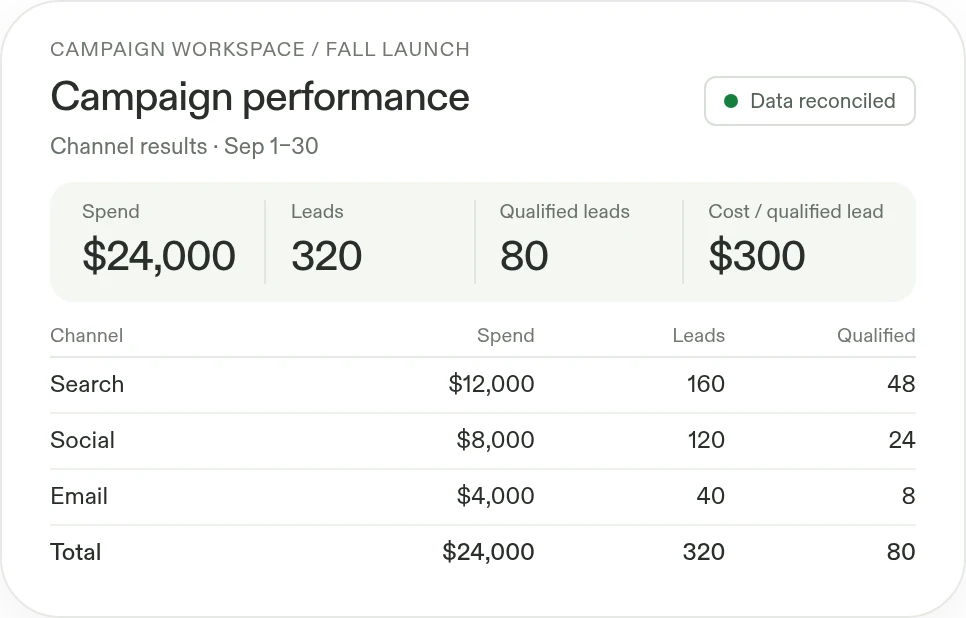
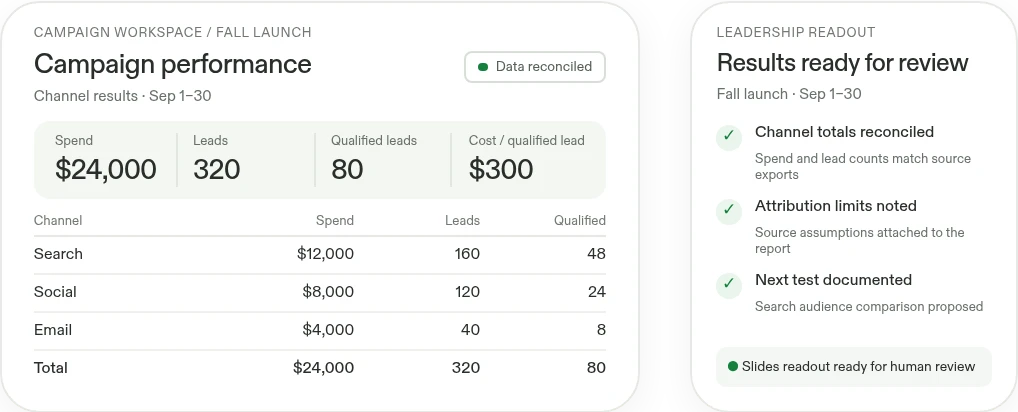
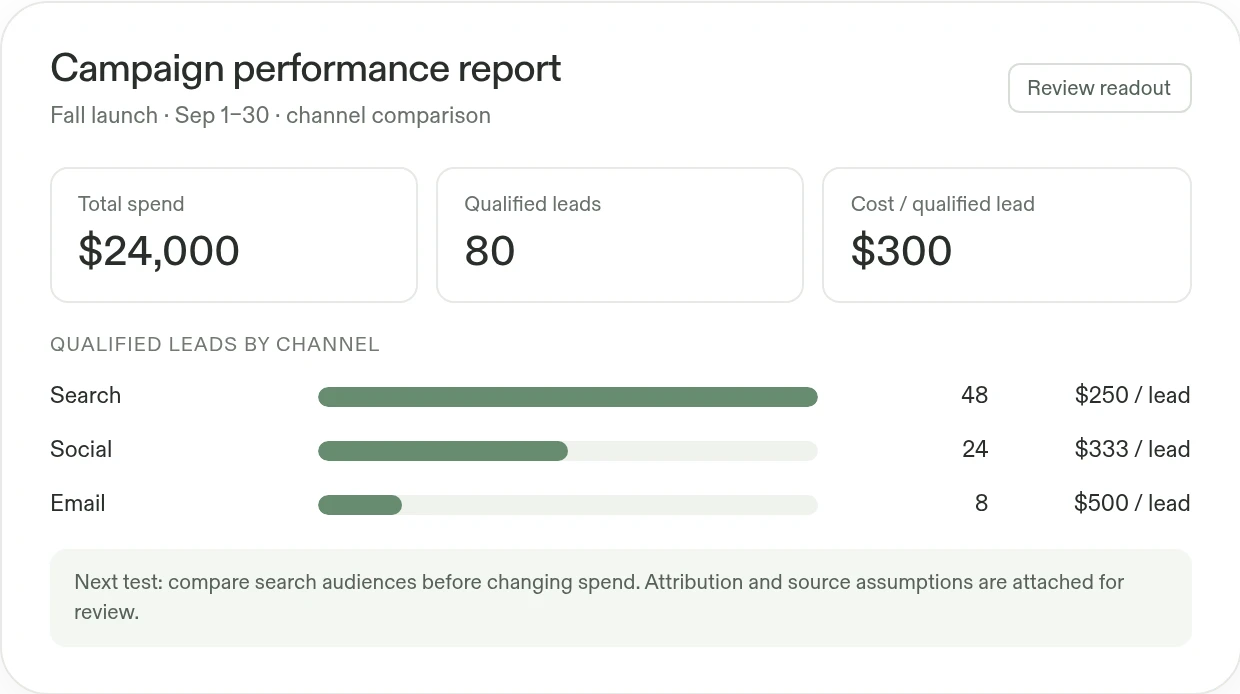
- Compare campaign performanceExplore channels, audiences, creative, and customer segments; call out attribution limits and missing data.
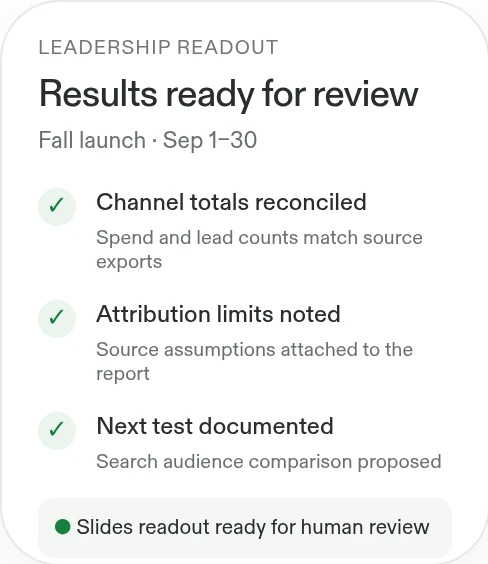
- Turn the results into a decisionCreate a leadership readout with Replit Slides, including performance charts, supporting data, and the next recommended test.
See what worked.
What you'll build
A reusable campaign dashboard plus an editable Replit Slides readout that ties each recommendation to its supporting data.
Review our campaign results and build an interactive performance report. Explain what changed, recommend the next test, and create a leadership deck with Replit Slides that links each recommendation to the supporting data.
Works withGoogle SheetsSalesforceHubSpotGoogle Slides
Google SheetsSalesforceHubSpotGoogle SlidesBuild with Replit.
Workflow 02
Campaign landing pages and presentation decks
Save launch time with a working campaign page and a shareable presentation.
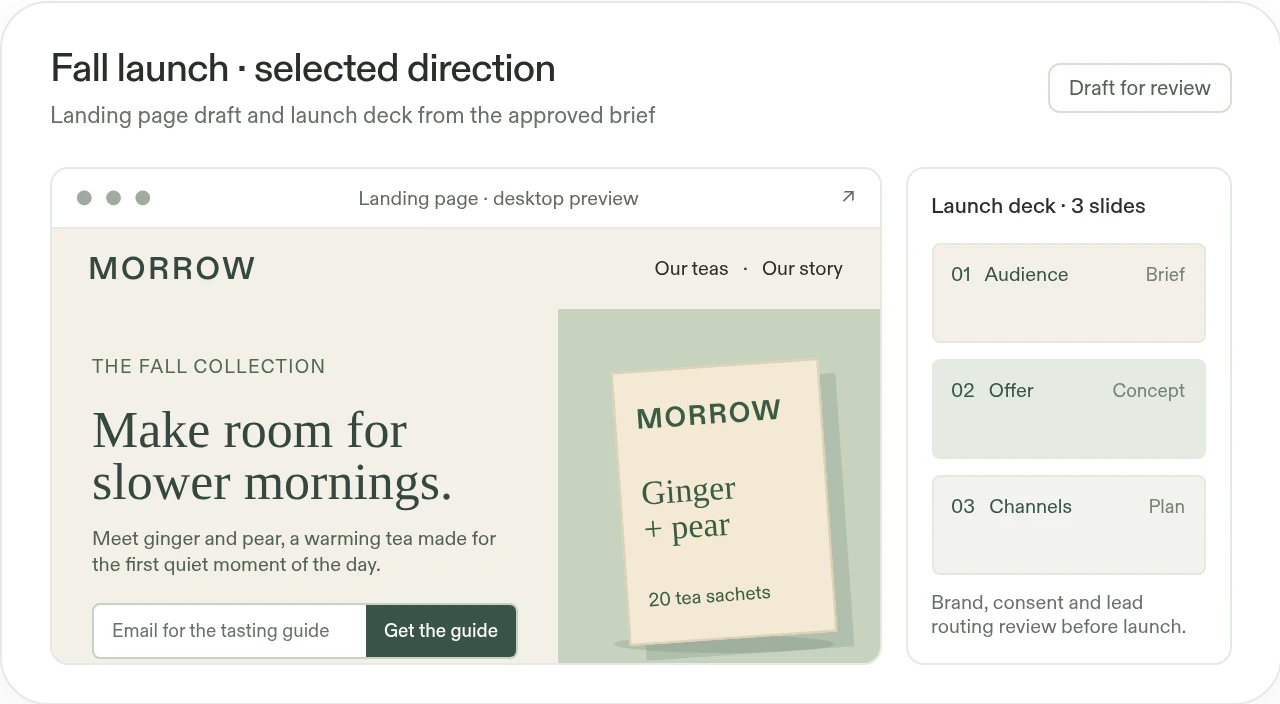
- Explore campaign directionsCreate concept boards that combine the audience, message, visual references, and proposed offer. Compare options against the brief rather than debating disconnected mockups.
- Build the landing page and launch deckBuild a responsive landing page with interactive content and a working lead-capture flow. Create the launch presentation with Replit Slides. Review consent, accessibility, analytics, brand accuracy, and lead routing before publishing.

One brief
to build
decks
to build
What you'll build
An editable concept board, a working campaign landing page, and a shareable launch deck for brand, data, and launch review.
Create three campaign concepts from our brief and approved assets. Develop the selected direction into a working landing page with a clear offer and a reviewable lead-capture flow. Use Replit Slides to build the campaign launch deck from the same brief.
Works withNotionGoogle DriveGoogle SlidesSalesforceHubSpot
NotionGoogle DriveGoogle SlidesSalesforceHubSpotWorks withNotionGoogle DriveGoogle SlidesSalesforceHubSpot
NotionGoogle DriveGoogle SlidesSalesforceHubSpotdecks

Live workspace
Workflow 03
Ad creative and product-image variations
Save production time and run more creative tests without starting each asset from scratch.
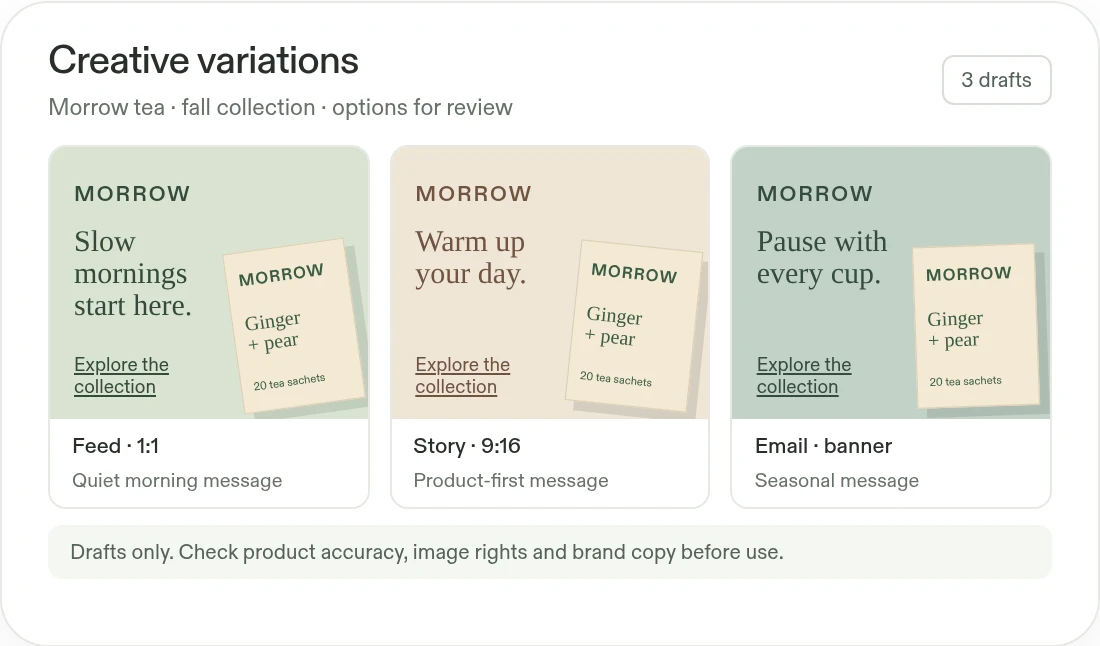
- Create variations for channels and audiencesProduce alternative layouts, messages, and channel sizes. Keep a reviewable record of the brief and the chosen direction.
- Explore product-image treatmentsVary backgrounds, styling, and compositions using approved product references. Check product accuracy and usage rights before accepting an image.
What you'll build
A reviewable creative set with variants organized by audience, message, and channel, ready for the team's brand and performance checks.
Use these approved product assets and brand guidelines to create ad variations for our campaign. Compare messages, layouts, and product-image treatments, and organize the options for review.
Works withGoogle DriveNotionGoogle Slides
Google DriveNotionGoogle Slides ↔From
↔Fromone draft.
To options.
↔From
one draft.
one draft.
What you'll build
A reviewable creative set with variants organized by audience, message, and channel, ready for the team's brand and performance checks.
Start with this prompt
Use these approved product assets and brand guidelines to create ad variations for our campaign. Compare messages, layouts, and product-image treatments, and organize the options for review.
Works withGoogle DriveNotionGoogle Slides
Google DriveNotionGoogle SlidesTo options.
Spend less time producing reports.More time improving campaigns.

Before
Campaign results live in separate exports, every new concept needs another handoff, and creative versions are difficult to compare against the brief.
 With Replit
Build the analysis workspace, campaign page, presentation deck, and reviewable creative around one brief. Keep recommendations and tests connected to the evidence and assets behind them.
Prepare recurring campaign reviews
Highlight important competitor changes to help the team prioritize its next campaign.
Create a Routine named "Competitive intelligence brief" that runs every weekday at 6:40 AM in my confirmed timezone. Before scheduling, connect and authorize approved competitor websites, research sources, Drive folder, Notion briefs, and campaign context; confirm competitors, market, scopes, and timezone. Review launches, pricing, partnerships, leadership changes, and credible customer signals. Return no more than five deduplicated items, each with source link, what changed, why it matters, confidence, and one follow-up; label unknowns and exclude speculative or low-signal coverage. Return the dated summary in this Replit conversation for marketing review; do not create files. Do not change spend, publish, or make claims automatically.