Web Scraper Builder
Build your web scraper in minutes with Replit AI agent. Pull data from any site, schedule recurring runs, and export clean results straight to a database or CSV.
How to Use the Web Scraper Builder
Step 1: Describe the site and the data you want to scrape.
Step 2: Replit generates your scraper instantly.
Step 3: Customize selectors, sources, and schedule.
Step 4: Run and export, or schedule automated runs.
Web Scraper Builder Example
Built with Replit.
Build your vision in minutes for free without writing a single line of code.
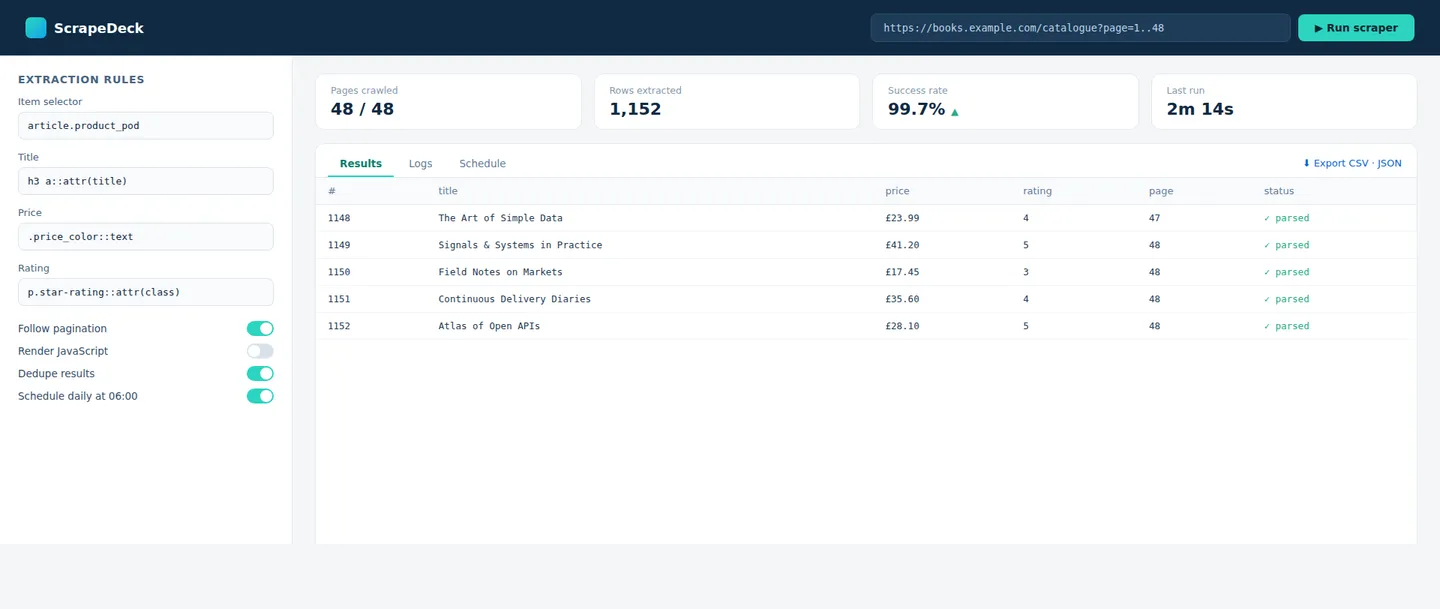
Example
Automated Catalog Scraper
Prompting the Web Scraper Builder
Static HTML Web Scraper Builder Prompt
Build a web scraper that parses static HTML with BeautifulSoup or similar, targets data using CSS and XPath selectors, follows pagination to crawl multiple pages, and exports clean results to CSV or JSON.
Use promptDynamic (JS-Rendered) Web Scraper Builder Prompt
Build a scraper for JavaScript-heavy sites using a headless browser (Playwright/Selenium), auto-waiting for elements to render, handling infinite scroll and dynamic content, and maintaining login sessions and cookies behind authentication.
Use promptAPI & Structured Web Scraper Builder Prompt
Build an API data extractor that pulls structured JSON from REST endpoints, respects rate limits with retries and backoff, authenticates with tokens or API keys stored in Secrets, and maps responses into a normalized schema.
Use promptScheduled Monitoring Web Scraper Builder Prompt
Build a scheduled scraper that runs on a cron schedule, detects changes since the last run, sends alerts via email or webhooks, and stores every snapshot in a database for history and analysis.
Use promptTop Web Scraper Features by Type
HTML Parsing
Parse and traverse the DOM with BeautifulSoup or lxml. This is the foundation of extracting data from any static page.
CSS/XPath Selectors
Target exactly the elements you need with precise selectors. Extraction stays accurate and easy to maintain.
Pagination Crawling
Follow next-page links to collect data across many pages. A one-page scrape scales to an entire catalog.
CSV/JSON Export
Save clean, structured results to CSV or JSON. The data lands ready for spreadsheets, databases, or APIs.
Headless Browser
Playwright or Selenium renders JavaScript like a real browser. This unlocks data on sites that build content client-side.
Auto-Wait for Elements
Wait for content to load before extracting to avoid empty results. Dynamic scrapes become reliable and repeatable.
Infinite Scroll
Programmatically scroll to trigger lazy-loaded content. Feeds and listings that load on demand won't slip past it.
Login & Sessions
Handle cookies and authenticated sessions to reach gated pages. Even data behind a login is within reach.
REST/JSON Extraction
Pull structured data directly from JSON endpoints. It's faster and far more stable than parsing HTML.
Rate Limiting
Throttling, retries, and backoff keep requests polite and unblocked. This protects both the source and your scraper.
Auth Tokens
API keys and tokens stored securely in the Secrets manager. Requests are authenticated without hardcoding credentials.
Schema Mapping
Normalize varied responses into a consistent structure. Downstream data stays clean and predictable.
Cron Scheduling
Run scrapes automatically on a set schedule via Scheduled Deployments. This keeps your data fresh without manual runs.
Change Detection
Compare runs to flag what's new or updated. Your scraper becomes a monitoring tool.
Alerts & Webhooks
Send email or webhook notifications when conditions are met. React instantly to price drops, stock changes, or new posts.
Database Storage
Persist every run to a built-in database for history. Over time that unlocks trends, dedup, and deeper analysis.
Build the Web Scraper of Your Dreams
Get started freeFAQ about the Web Scraper Builder
Can I build a web scraper in my browser with AI, with no setup?
Yes—Replit is a browser-based IDE with zero installation, so you get a full Python environment in one tab. Describe the site and the data you want, and Replit Agent scaffolds the scraper, picks libraries like Requests, BeautifulSoup, or Playwright, and wires up storage. Replit Assistant refines the code and debugs as you iterate. You can run it live, preview results, and deploy from the same workspace.
How do I scrape JavaScript-heavy or dynamic sites?
Ask Agent to use a headless browser such as Playwright or Selenium so pages render exactly like a real browser. It can auto-wait for elements, handle infinite scroll, and interact with the page to load dynamic content before extracting. For gated data, it can manage cookies and authenticated sessions. This unlocks sites that build their content client-side.
How do I avoid IP bans and get blocked less?
Be polite: add rate limiting, randomized delays, and retries with backoff so you don't overload the source. Agent can rotate user agents and route requests through proxies if you provide them, and respect robots.txt where appropriate. Storing results in a database lets you resume instead of re-scraping. Together these reduce the chance of being blocked.
Where is scraped data stored, and how do I export it?
Use the built-in Replit Database or PostgreSQL to persist results across runs, or write straight to CSV and JSON. Agent can design a schema, dedupe records, and keep a history of every run. From there you can export to a spreadsheet, feed an API, or push to another tool. Your data is never locked in.
How do I keep API keys and credentials secure?
Store tokens, logins, and API keys in Replit's Secrets manager rather than hardcoding them, and reference them as environment variables. This keeps credentials out of your source and safe to share or deploy. Agent reads from Secrets automatically when it generates requests. You stay secure while collaborating or publishing your project.
How do I schedule a scraper to run automatically?
Use Scheduled Deployments to run your scraper on a cron schedule—hourly, daily, or any cadence you set. Add change detection to flag what's new, and send alerts via email or webhooks when conditions are met. Every run can be saved to your database for history and trends. This turns a one-off script into an ongoing monitor.
What happens when a site changes its layout or selectors?
When markup changes, update your CSS or XPath selectors—pasting the new page's HTML into Agent helps it regenerate accurate selectors fast. The Assistant can debug empty results and make your extraction more resilient with fallbacks. Automatic checkpoints let you roll back if an edit goes wrong. Maintenance stays quick even as sites evolve.
What does it cost, and is web scraping allowed?
You can start for free, with advanced capabilities and more compute on higher plans; details are on Replit's official billing pages. Scraping publicly available data is common, but you're responsible for following each site's terms of service, robots.txt, and applicable laws. Prefer official APIs when they exist, and scrape responsibly. Check your workspace billing settings for current limits.
What are you waiting for?
Build an app without knowing how to code. Tell Replit what you have in mind, then make it your own.