SaaS App Builder
Build your SaaS app in minutes with Replit AI agent. Connect a database, add subscription billing, and ship a multi-tenant app without managing any infrastructure.
How to Use the SaaS App Builder
Step 1: Share your SaaS app's features and requirements.
Step 2: Replit generates your app instantly.
Step 3: Customize plans, features, and user experience.
Step 4: Launch your new SaaS app.
SaaS App Builder Example
Built with Replit.
Build your vision in minutes for free without writing a single line of code.
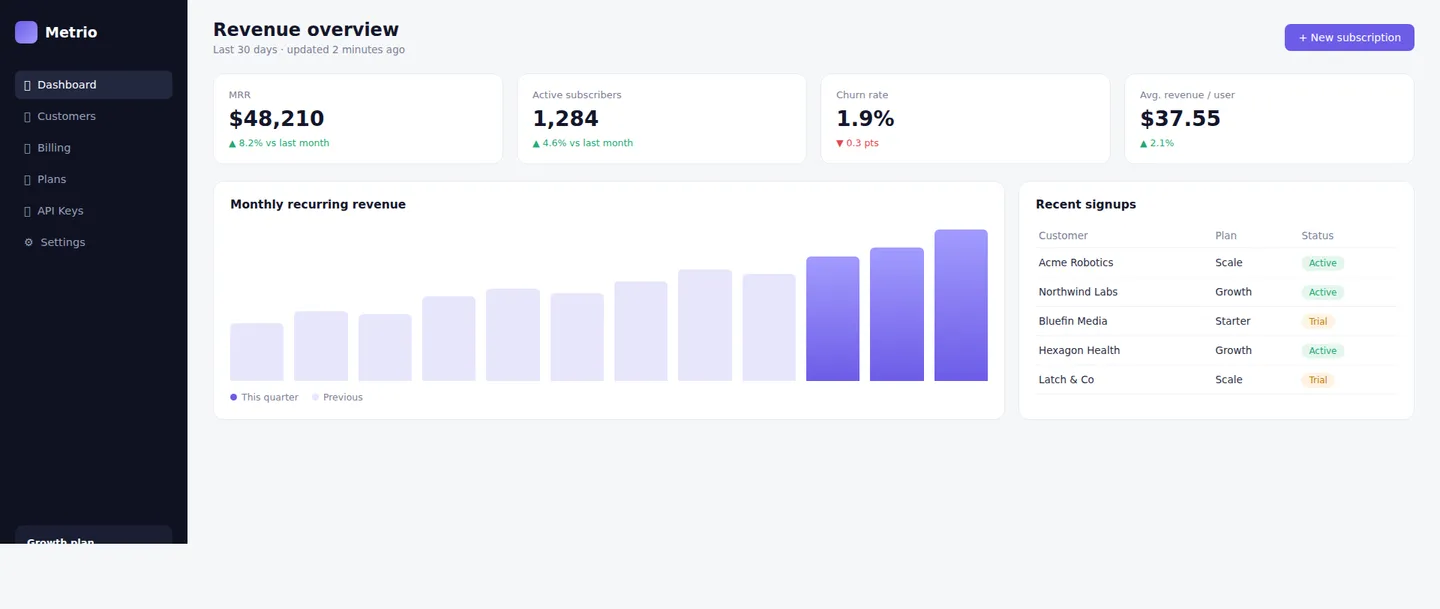
Example
Subscription Revenue Dashboard
Prompting the SaaS App Builder
Subscription SaaS App Builder Prompt
Build a subscription SaaS app with recurring billing via Stripe, tiered plans and feature paywalls that gate access by subscription level, a self-serve customer portal for upgrades/downgrades and invoices, and usage metering that tracks seats or events and enforces plan limits.
Use promptB2B Multi-Tenant SaaS App Builder Prompt
Build a B2B multi-tenant SaaS with isolated workspaces and organizations, role-based access control for team permissions, SSO/SAML for enterprise login, and audit logs that record every change for security and compliance.
Use promptAnalytics SaaS App Builder Prompt
Build a SaaS analytics dashboard with customizable widgets and layouts, interactive charts and reports over your data, CSV/API data export for stakeholders, and scheduled email digests that deliver key metrics automatically.
Use promptMarketplace SaaS App Builder Prompt
Build a SaaS marketplace with vendor onboarding and dashboards, split payments and payouts via Stripe Connect, searchable listings with filters and categories, and ratings and reviews that build trust between buyers and sellers.
Use promptTop SaaS App Features by Type
Recurring Billing
Subscriptions, trials, and proration handled through Stripe or similar. This is the revenue engine every subscription SaaS depends on.
Tiered Plans & Paywalls
Gate features and limits by plan so each tier unlocks the right value. The result: steady upgrades and protected premium functionality.
Customer Portal
A self-serve area to manage plans, payment methods, and invoices. Support load drops, and customers stay in control.
Usage Metering
Track seats, events, or API calls and enforce plan limits automatically. Usage-based pricing becomes possible — and overages never surprise anyone.
Workspaces & Orgs
Isolated tenants keep each customer's data private and separate. This multi-tenancy is the foundation of any B2B SaaS.
Team Roles (RBAC)
Role-based permissions control who can view, edit, or admin. Larger accounts stay secure and organized as teams grow.
SSO & SAML
Single sign-on with SAML or OAuth for enterprise identity providers. For bigger deals, it's often a hard requirement.
Audit Logs
Immutable records of key actions for security and compliance. Admins get visibility, and enterprise reviews go smoothly.
Custom Dashboards
Drag-and-arrange widgets let each user build the view they need. It's what makes the product feel sticky and personal.
Charts & Reports
Interactive visualizations turn raw data into decisions. This is the core value of an analytics SaaS.
Data Export
Export to CSV or via API for downstream tools and stakeholders. Your data is never locked in.
Scheduled Digests
Automated email summaries deliver key metrics on a cadence. Users stay engaged even when they don't log in.
Vendor Onboarding
Signup, verification, and dashboards for sellers to manage listings. Supply grows on both sides of the platform.
Split Payments
Commission splits and payouts via Stripe Connect or PayPal Payouts. This is how a marketplace monetizes each transaction.
Listings & Search
Searchable catalog with filters, categories, and pagination. Buyers find the right offer fast.
Ratings & Reviews
Buyer feedback and seller ratings build trust and quality. Conversion climbs across the marketplace.
Build the SaaS App of Your Dreams
Get started freeFAQ about the SaaS App Builder
Can I build a full SaaS application in my browser with AI?
Yes—Replit is a browser-based IDE with no installation, so you get a full-stack workspace in one tab. Replit Agent generates your SaaS from a natural-language prompt, scaffolding the frontend, backend, and database end to end. Replit Assistant then refines code, explains changes, and debugs as you iterate. You can preview live, collaborate in real time, and deploy from the same tab—no local setup needed.
How do I add subscriptions, billing, and paywalls?
Ask Agent to integrate Stripe or PayPal for recurring billing, trials, proration, and invoices. Define tiered plans and gate features so each subscription level unlocks the right value. Add a self-serve customer portal for upgrades, downgrades, and payment methods, and meter usage to enforce plan limits. Any API keys are stored securely in the Secrets manager.
How do I handle authentication, teams, and role-based access?
Add login with Replit Auth, Google OAuth, or Firebase Auth, and Agent will wire up signup and session handling. For B2B SaaS, create isolated workspaces or organizations and define role-based permissions to control who can view, edit, or administer. The Assistant can add middleware, guards, and audit logs for security and compliance. You keep full control of the logic while AI writes the boilerplate.
How do I set up a database for a multi-tenant SaaS?
Choose Replit Database for simple storage or managed PostgreSQL for relational data with schemas and relations. Agent can design tenant-aware schemas, migrations, and seed data so each customer's data stays isolated. It can add indexing for performance and ensure persistence across deploys. Automatic checkpoints capture code and connected database state so you can restore safely.
Can I import designs and build the SaaS UI quickly?
Yes—Import from Figma to generate responsive React components, or start from a template and Remix it in about a minute. Use the visual editor to tweak text, CSS, and layout live, or ask Agent to add themes, dashboards, and responsive design. Agent can even generate logos and illustrations on demand. You go from design to working UI in minutes while keeping full code control.
How do collaboration, versioning, and safe rollbacks work?
Replit supports real-time multiplayer editing so teams can build in the same workspace. Version control integration gives you branches, code diffs, and an audit trail for reviews. Every AI change creates a checkpoint, enabling one-click rollback to any prior state. This lets you ship fast and recover instantly if something breaks.
How do I deploy my SaaS with a custom domain and SSL?
Use one-click deploy to cloud hosting, then connect a custom domain with guided DNS setup. HTTPS/TLS/SSL is handled automatically, and environment variables are managed via the Secrets manager. You can add a managed database during deployment and redeploy updates in seconds. The same workspace provides preview, logs, and rollbacks for safe releases.
What does it cost to build and deploy, and what are the limits?
You can start building on a free tier, with advanced capabilities available on higher plans. Pricing, usage limits, AI credits, deployments, bandwidth, and storage vary by subscription and are listed on Replit's official billing pages. Begin for free, then upgrade as your SaaS grows. Check your workspace billing settings for the latest limits and options.
What are you waiting for?
Build an app without knowing how to code. Tell Replit what you have in mind, then make it your own.